
Quick answer
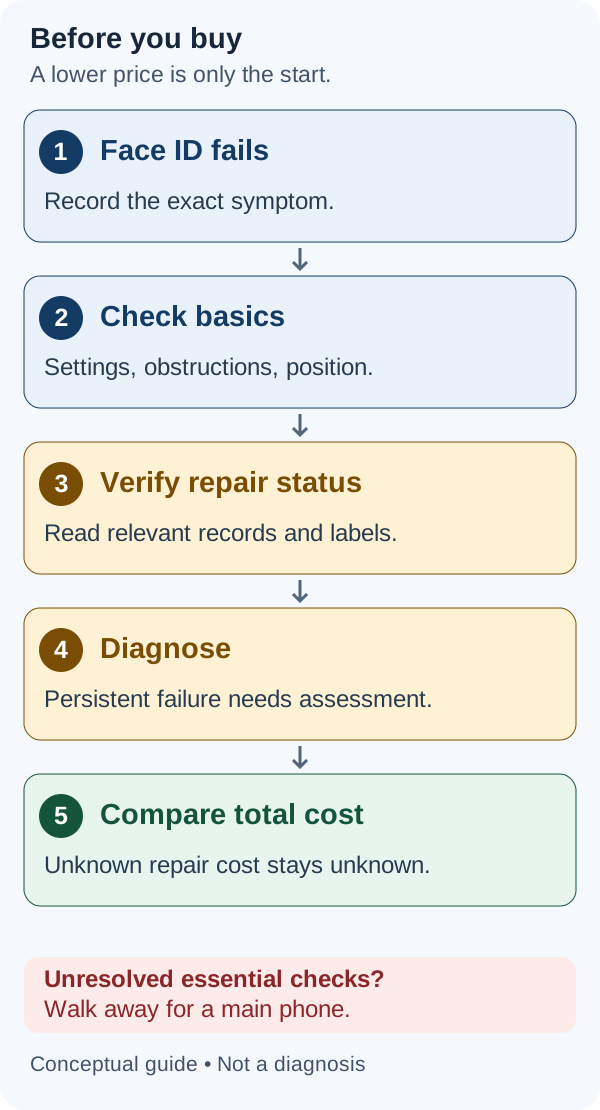
For most people buying a main phone, skip a used iPhone with an unresolved Face ID fault. A lower asking price is not enough when you do not know the cause, repair cost, or whether the seller can complete a clean handover.
There are exceptions: the seller fixes a basic setup issue and you verify operation before paying; a diagnosed repair leaves worthwhile savings after all costs; or you deliberately want a secondary device and accept that Face ID may never work.
Our buying rule: price an unresolved fault as an unresolved fault—not as a cheap fix someone has promised.
| What the seller can demonstrate | Our buying verdict |
|---|---|
| The issue is resolved, fresh enrollment succeeds, and unlocking works | Buy after verification: continue the full inspection |
| Face ID still fails and there is no diagnosis | Walk away for a main phone; diagnose first if evaluating repair |
| A technician has diagnosed the fault and provided a written repair scope and quote | Diagnose first, then compare total costs and terms |
| The relevant camera repair is unfinished | Ask the seller to finish it and demonstrate the result before purchase |
| You intentionally want a device without Face ID | Consider only for a clearly defined secondary use |
Scope: US buying guidance. Apple documentation checked October 16, 2026. This guide draws on documentation, not hands-on testing or diagnosis of a particular phone. Dollar examples below are hypothetical.
What “Face ID not working” actually means
A listing saying “no Face ID” describes a limitation, not a diagnosis. Ask what happens on the device.
Asking for a passcode is not automatically a fault
Apple requires a passcode in normal security situations, including after a restart, after more than 48 hours without unlocking, and after five failed face matches. A remote lock or initiating power-off/Emergency SOS can also trigger the requirement. Apple explains these security safeguards.
Have the owner enter their passcode privately, then check whether Face ID works afterward. Knowing a passcode does not replace the separate ownership and activation checks.
Intermittent recognition needs a fair test
Apple recommends checking settings, camera obstructions, face visibility and positioning, then restarting or resetting Face ID when appropriate. Landscape support requires iPhone 13 or later with iOS 16 or later; older Face ID iPhones should be checked in portrait. Apple’s troubleshooting guide explains these differences.
Do not mistake an unsupported test position for a broken sensor. Equally, do not accept “it works sometimes” as proof that the problem is resolved.
Enrollment failure and an explicit alert need different treatment
Record whether setup starts, stalls, or displays an error. Repeated failure to progress through enrollment after basic checks can warrant service, according to Apple’s troubleshooting guidance above.
If the phone displays “A problem was detected with the TrueDepth Camera. Face ID has been disabled,” Apple says the device has detected an issue; updating and, if the problem persists, service may be necessary. That warning does not identify the exact failed component or prove water damage. Apple’s alert explanation.
| What you see | What it establishes | Next step |
|---|---|---|
| Passcode requested once | A passcode is required now; no hardware diagnosis | Owner enters it privately; test Face ID afterward |
| Recognition fails intermittently | The observed attempts failed; cause unresolved | Check obstruction, settings and supported position |
| A new face cannot be enrolled | Enrollment has not completed | After basic checks, obtain a service assessment |
| A TrueDepth/Face ID alert appears | An issue is reported; exact cause unresolved | Record the alert and seek diagnosis if it persists |
| Failure follows a repair | Timing, not proof of a particular cause | Verify repair records, component status and completion |
A seller’s claim that an update caused it, or that replacing the screen explains it, is still a claim until supported by evidence.
What you lose without working Face ID
You lose biometric unlocking and Face ID authentication where you would otherwise use it. Entering a passcode may be acceptable for a spare device; it can be a substantial inconvenience on a phone you use throughout the day.
Do not assume every app offers the same fallback. Before buying, establish how you would access the services you need. This guide does not certify the behavior of any particular banking app.
There is also a security-setting limitation. With Stolen Device Protection enabled, certain actions require biometrics without a passcode alternative away from familiar locations. The Always setting extends those requirements to familiar locations too. Examples include accessing saved passwords/passkeys and opening locked apps; some security changes also require a delay. Apple advises turning the feature off before selling. Apple’s Stolen Device Protection guide.
That does not mean all payments stop working: the same Apple guide explicitly says a passcode can still be used for Apple Pay purchases. Avoid treating every Wallet action as equivalent.
Choose functions you can verify. If the purchase depends on disabling protections or an unconfirmed app fallback, choose a phone whose authentication functions meet your needs.
What to check before you pay
Agree on the inspection and handover procedure first. The owner should handle their account, passcode and personal data. Do not reset their phone or enroll your face without permission. For the full inspection sequence, use our used iPhone buying checklist.
1. Record the exact phone and symptom
Write down the model, model number, storage, iOS version and exact warning. Ask when the issue began and what was repaired. Request repair receipts or a diagnostic report if the seller has them.
“Tested” or “certified” should prompt a practical question: did that inspection include successful Face ID enrollment and unlocking?
2. Check Parts and Service History where supported
On iOS 15.2 or later, look under Settings → General → About. The available component information depends on the model.
| Model group | Front-camera history listed in Apple’s model table? |
|---|---|
| iPhone X | Not listed |
| iPhone XS, XS Max and XR | No; listed history covers the battery |
| iPhone 11 family | No; listed history covers battery and display |
| iPhone 12 and later | Yes |
Apple says Genuine describes genuine parts and repair processes. Unknown can have several explanations, including a nonworking, nongenuine, modified or unverified part. Only the latest service appears if a component was serviced repeatedly. Apple’s Parts and Service History guide.
Read the entry for the relevant component. A display or rear-camera label does not establish the state of the front-camera system. These records are useful evidence, not a complete physical inspection or a lifetime repair log. Our Unknown Part buying guide explains how to assess an unresolved label.
3. Resolve basic checks and test enrollment appropriately
Start with the external and settings checks described earlier. If the owner agrees and security settings allow it, have them reset Face ID and arrange a fresh enrollment test as part of the handover.
After enrollment, lock and unlock the phone repeatedly during the inspection. If setup fails again, preserve that result rather than continuing to assume another reset will fix it.
A few successful attempts establish observed operation at that time. They do not guarantee future reliability.
Taking a selfie is a separate test. Face ID uses depth and infrared information, so an ordinary photo cannot establish that its authentication system works. That is a practical inference from Apple’s explanation of Face ID technology.
4. Keep Activation Lock separate
A working Face ID demonstration does not establish that the seller has removed their account.
Apple advises against buying an Activation Locked iPhone. A Hello screen means the phone has been erased; setup and activation are still needed before testing. Follow the seller handover process and confirm that the device is no longer tied to the previous owner. Apple’s preowned-iPhone buying guidance.
Also check carrier compatibility, battery condition, display, charging, cameras and audio. Do not let the Face ID discussion consume the entire inspection. Use the used iPhone IMEI guide for lookup limits; a clean result does not test hardware.
5. Preserve the terms for an online purchase
Save the listing’s defect description, seller identity, configuration, battery claim, price, fees and return conditions. Establish whether returns are allowed for a disclosed Face ID fault, who pays shipping, and the inspection deadline.
Test promptly when it arrives. Do not assume a general protection badge means you can return a defect you knowingly accepted; check the applicable terms before purchase.
Can it be repaired? Get a diagnosis before pricing the deal
Repairability depends on the actual fault and the exact device. A general internet service price is not a diagnosis or a promise that a particular phone is eligible.
Ask a repair provider to identify:
- The diagnosed problem and exact model covered.
- Whether the quoted work restores Face ID, including required calibration.
- Parts, labor, tax and shipping included in the amount.
- Charges if repair is refused or unsuccessful.
- Exclusions for additional damage and the quote’s validity.
- Repair warranty and what it covers.
Apple says inspection determines the final service fee; taxes and shipping may apply, and authorized providers may issue their own estimates. Apple’s iPhone repair page.
What if the phone says Finish Repair?
For the relevant front-camera repair, Finish Repair means calibration is unfinished. Apple says Face ID authentication remains unavailable until calibration is complete. Its front-camera guidance specifically supports same-model reused front cameras on iPhone 16 and later. Do not generalize that rule to every older iPhone or every donor camera. Apple’s front-camera guidance.
Repair Assistant currently lists front-camera completion for iPhone 12 and later, subject to its requirements. This is separate from permission to reuse any particular part. Apple also warns that a locked replacement part may prevent completion without the necessary Apple Account information. Apple’s Repair Assistant guide.
Finish the work before buying. Have the seller or repair provider complete the repair and demonstrate the result. Buying first transfers the uncertainty to you.
Is the discount worth the total cost?
Compare equivalent phones: same model and storage, suitable US variant and carrier status, similar cosmetics and battery condition, and clearly stated return and warranty terms. Our used iPhone battery-health guide helps interpret capacity readings alongside condition.
Use total acquisition prices for the same delivery destination, including applicable taxes, buyer fees and shipping.
Remaining savings = working-phone total − defective-phone total − confirmed repair charge − additional known costs.
Count each cost once. If a diagnostic charge is credited toward repair, do not add it twice. If the repair cost is unknown, remaining savings are not established.
Hypothetical example: where the discount disappears
These are invented calculation examples, not current offers or repair quotes. Assume the working phone costs $300 all-in, the defective phone costs $180 all-in, and other known costs total $20.
| Repair charge | Buy-and-repair total | Savings against $300 working phone | What it tells you |
|---|---|---|---|
| Unknown | Not calculable | Not established | The lower asking price proves little |
| $100 | $300 | $0 | No known cash advantage |
| $60 | $260 | $40 | Positive savings; further judgment still needed |
| $140 | $340 | −$40 | The working alternative costs less |
In this example, $100 is the repair allowance at simple cash break-even:
$300 − $180 − $20 = $100.
It is not a recommended repair price. A quote below that amount leaves some savings, but you must decide whether they justify the repair process, exclusions and seller terms.
A failed repair can also leave you paying for the defective phone, diagnosis and shipping before buying another device. Do not assign a failure probability without evidence, and do not assume a resale will recover the loss.
What if you will never repair it?
Then assess it as a phone that may permanently lack Face ID. Verify that it can perform your intended tasks and that you can afford the purchase even if it has no useful resale value.
Do not combine the arguments “I do not need Face ID” and “I can cheaply fix it later” unless that later repair has actually been evaluated.
Who should avoid it?
We recommend avoiding an unresolved Face ID fault if:
- This will be your only phone for work, travel or important accounts.
- You cannot absorb an unexpected repair bill.
- Your daily use relies on biometric authentication.
- You cannot inspect the phone and have weak or unclear return rights.
- The seller cannot complete account removal and handover.
- The deal makes sense only if an unverified repair promise comes true.
For a tight budget, compare a working older or lower-priced model before accepting an unresolved defect. A repair professional may reach a different decision because they can assess parts, labor and failed-repair costs themselves. If you want a different purchase route, compare new, used and renewed iPhones by the actual seller commitments.
Our verdict: for a main phone, require fresh Face ID enrollment and successful unlocking, then complete the rest of the inspection. If the fault persists, require a diagnosis and acceptable repair costs or choose another phone. A secondary-use buyer must deliberately accept the limitation.
Final buying checklist
Before paying—or before the online inspection period ends—confirm:
- Exact model, storage, variant, iOS version and symptom recorded.
- Normal passcode requirements distinguished from persistent failure.
- Relevant repair history checked where supported.
- Fresh enrollment and repeated unlocking checked with owner permission, if buying as a working device.
- Unresolved faults supported by a diagnosis and written quote if planning repair.
- Seller’s account/security requirements resolved for handover.
- Activation Lock checked independently.
- Other essential hardware and carrier needs checked.
- Purchase and repair totals compared with a suitable working alternative.
- Disclosures, returns, shipping charges and warranties preserved.
If the cause or repair cost remains unknown, keep it marked unknown in your decision.
