
A used iPhone can look spotless and still leave you unable to activate it, use your carrier, or unlock it with Face ID. The inspection needs to answer three questions: can you make it yours, does it work for your needs, and does the price reflect its condition?
For an in-person purchase, complete the essential checks before paying. Online, check the listing and return terms before ordering, then inspect the delivered phone promptly within the actual return window.
This guide is a practical screening process. It cannot certify a phone’s history or predict every future fault.
If you plan to keep the phone for several years, use our used iPhone lifespan guide to assess current software support, repair options and suitability alongside the inspection.
Choosing a model before inspecting an offer? Our best used iPhones under $300 guide narrows the US shortlist while keeping condition and total cost in the decision.
What to Check Before Buying a Used iPhone
Ask the seller to prepare the phone for testing and back up their data before erasing it. Bring a compatible charger and access to Wi-Fi or a hotspot. Confirm the advertised model and storage in Settings → General → About once the phone is accessible.
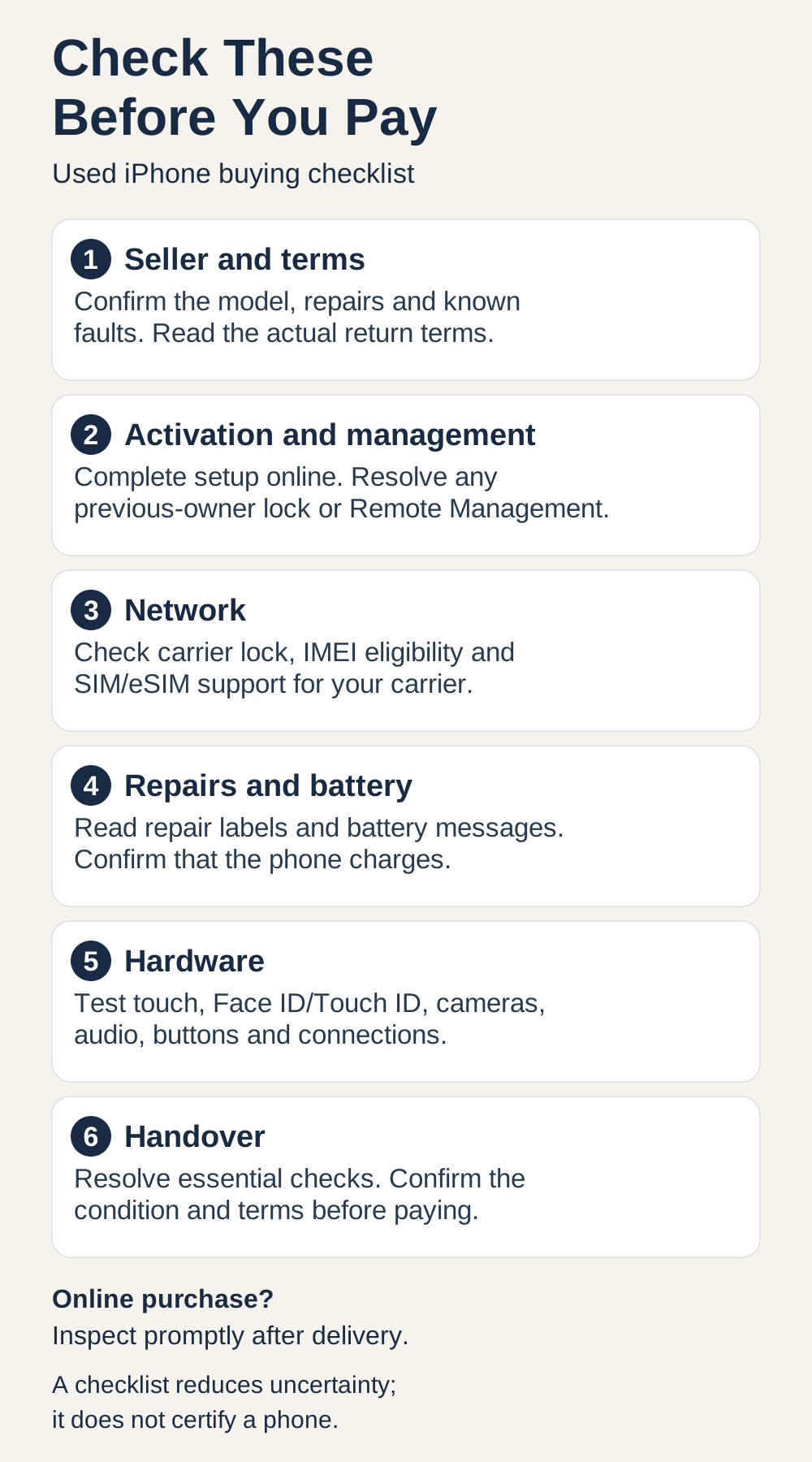
Start with the activation and management checks after confirming the seller and terms. Then work through the remaining steps; the sections below explain the results.
Before and after erasing: checks made in the seller’s existing session are preliminary. Let the seller back up and erase the phone with permission. Complete fresh setup online, check for Activation Lock and Remote Management, and reach the Home Screen. Then reopen About, Carrier Lock, Parts and Service History and Battery Health, test your intended network where possible, and repeat the essential hardware checks below, including your own biometric enrollment. If the phone is erased again for handover, repeat activation and management checks before paying; verify service and essential functions again on the final setup. Do not treat the seller’s previous session as proof that the erased phone is ready for you.
| Order / check | What to do | What you need to see | What to do next |
|---|---|---|---|
| 1. Seller and terms | Confirm model, storage, repairs and known faults. Read the actual return process and any warranty. | Clear disclosures and terms you understand. | Save the listing/terms. Pause if descriptions conflict or essential questions remain unanswered. |
| 2. Startup and activation | If needed, charge it. Have the seller prepare and erase it; continue setup over the internet. | It activates and reaches the Home Screen without needing the previous owner's credentials. | Do not pay for unresolved Activation Lock. A Hello screen alone is not enough. |
| 3. Organization management | Watch for Remote Management during setup. Check the top of Settings and General → VPN & Device Management. | No unresolved organization control; any profile is understood. | If management appears, ask the responsible organization to resolve it, then repeat setup. Do not accept a bypass promise. |
| 4. Carrier lock | Open Settings → General → About → Carrier Lock. | “No SIM restrictions” if you need an unlocked phone. | For a locked phone, verify it fits your intended use. If another carrier is required, confirm completed unlock before paying. |
| 5. Network eligibility | Use the phone's IMEI from About with your intended carrier's official checker or support. Ask about relevant financing restrictions. | Eligibility confirmed for that carrier, with no unresolved blocked/unknown result. | Pause for carrier clarification if blocked, unknown or incompatible. A clean report is not payoff proof. |
| 6. SIM or eSIM | Confirm the exact regional variant. Where practical, test an active compatible line with Wi-Fi off. | Calls and mobile data work on the intended network. | For eSIM, confirm the carrier's setup process. If service cannot be tested, keep that limitation explicit. |
| 7. Repair information | Read Parts and Service History in About, where supported. Open available part details and ask about repairs. | Labels and repair disclosures are understood, with no unresolved functional problem. | Investigate Unknown, Unverified or Finish Repair. A Genuine or Used label still needs function testing. |
| 8. Battery and charging | Read Battery Health and any service/performance messages. Connect a known-working compatible charger. | It accepts charging; displayed battery information matches what was disclosed. | Budget for battery service if appropriate. Pause for unexplained messages, restarts or a charging failure. |
| 9. Body and ports | Remove the case with permission. Inspect glass, frame, camera covers and charging port while dry. | Condition matches the listing, without unexplained damage or separation. | Ask about discrepancies. Stop for significant unresolved structural problems; do not immerse it. |
| 10. Screen and touch | View plain bright/dark backgrounds. Type across the keyboard and drag an item across the screen. | Consistent response with no obvious dead touch areas, unwanted touches or distracting display defects. | Repeat without obstructing accessories if appropriate. Persistent defects need disclosure and assessment. |
| 11. Face ID or Touch ID | On a prepared phone, enroll your own face/fingerprint with permission and test unlocking. Enter the passcode once after a restart. | Enrollment completes and supported biometric unlocking works. | Check obstruction/settings first. Persistent enrollment failure needs assessment before purchase. |
| 12. Cameras and audio | Take front/rear photos and video; try supported camera modes. Record Voice Memos and videos with both cameras; play them back. Test speaker/earpiece with a call if possible. | Photos focus normally; video and audio have no obvious persistent defects. | Repeat a failed test. Pause for unexplained focus, image or audio faults; one recording does not test every path. |
| 13. Buttons and connections | Test each available button/control, Wi-Fi, and Bluetooth with a known accessory if available. | Controls respond and tested connections work. | Investigate failures. Mark any unavailable test as unresolved rather than passed. |
| 14. Handover | Compare the final phone with the agreed model, storage, condition and terms. Record these in the receipt/order record. | Essential checks resolved and the agreement reflects the delivered phone. | Pay only when satisfied. If declining, remove your test data/biometrics and network connections with permission. |
Before you pay: quick checklist
Seller and terms
1. Seller and terms
- Do
- Confirm model, storage, repairs and known faults. Read the actual return process and any warranty.
- Look for
- Clear disclosures and terms you understand.
- Next
- Save the listing/terms. Pause if descriptions conflict or essential questions remain unanswered.
Activation and management
2. Startup and activation
- Do
- If needed, charge it. Have the seller prepare and erase it; continue setup over the internet.
- Look for
- It activates and reaches the Home Screen without needing the previous owner's credentials.
- Next
- Do not pay for unresolved Activation Lock. A Hello screen alone is not enough.
3. Organization management
- Do
- Watch for Remote Management during setup. Check the top of Settings and General → VPN & Device Management.
- Look for
- No unresolved organization control; any profile is understood.
- Next
- If management appears, ask the responsible organization to resolve it, then repeat setup. Do not accept a bypass promise.
Network
4. Carrier lock
- Do
- Open Settings → General → About → Carrier Lock.
- Look for
- “No SIM restrictions” if you need an unlocked phone.
- Next
- For a locked phone, verify it fits your intended use. If another carrier is required, confirm completed unlock before paying.
5. Network eligibility
- Do
- Use the phone's IMEI from About with your intended carrier's official checker or support. Ask about relevant financing restrictions.
- Look for
- Eligibility confirmed for that carrier, with no unresolved blocked/unknown result.
- Next
- Pause for carrier clarification if blocked, unknown or incompatible. A clean report is not payoff proof.
6. SIM or eSIM
- Do
- Confirm the exact regional variant. Where practical, test an active compatible line with Wi-Fi off.
- Look for
- Calls and mobile data work on the intended network.
- Next
- For eSIM, confirm the carrier's setup process. If service cannot be tested, keep that limitation explicit.
Repairs and battery
7. Repair information
- Do
- Read Parts and Service History in About, where supported. Open available part details and ask about repairs.
- Look for
- Labels and repair disclosures are understood, with no unresolved functional problem.
- Next
- Investigate Unknown, Unverified or Finish Repair. A Genuine or Used label still needs function testing.
8. Battery and charging
- Do
- Read Battery Health and any service/performance messages. Connect a known-working compatible charger.
- Look for
- It accepts charging; displayed battery information matches what was disclosed.
- Next
- Budget for battery service if appropriate. Pause for unexplained messages, restarts or a charging failure.
Hardware
9. Body and ports
- Do
- Remove the case with permission. Inspect glass, frame, camera covers and charging port while dry.
- Look for
- Condition matches the listing, without unexplained damage or separation.
- Next
- Ask about discrepancies. Stop for significant unresolved structural problems; do not immerse it.
10. Screen and touch
- Do
- View plain bright/dark backgrounds. Type across the keyboard and drag an item across the screen.
- Look for
- Consistent response with no obvious dead touch areas, unwanted touches or distracting display defects.
- Next
- Repeat without obstructing accessories if appropriate. Persistent defects need disclosure and assessment.
11. Face ID or Touch ID
- Do
- On a prepared phone, enroll your own face/fingerprint with permission and test unlocking. Enter the passcode once after a restart.
- Look for
- Enrollment completes and supported biometric unlocking works.
- Next
- Check obstruction/settings first. Persistent enrollment failure needs assessment before purchase.
12. Cameras and audio
- Do
- Take front/rear photos and video; try supported camera modes. Record Voice Memos and videos with both cameras; play them back. Test speaker/earpiece with a call if possible.
- Look for
- Photos focus normally; video and audio have no obvious persistent defects.
- Next
- Repeat a failed test. Pause for unexplained focus, image or audio faults; one recording does not test every path.
13. Buttons and connections
- Do
- Test each available button/control, Wi-Fi, and Bluetooth with a known accessory if available.
- Look for
- Controls respond and tested connections work.
- Next
- Investigate failures. Mark any unavailable test as unresolved rather than passed.
Handover
14. Handover
- Do
- Compare the final phone with the agreed model, storage, condition and terms. Record these in the receipt/order record.
- Look for
- Essential checks resolved and the agreement reflects the delivered phone.
- Next
- Pay only when satisfied. If declining, remove your test data/biometrics and network connections with permission.
A check you could not complete remains unanswered. Do not turn “the seller says it works” into a passed test.
Check Activation Lock Before You Pay
Being able to unlock the screen is different from being able to take ownership. Activation Lock links the device to an Apple Account through Find My and is checked during activation.
Have the seller remove their account correctly and prepare the phone for a new owner. After erasure, connect it to the internet and continue setup. If it requires the previous owner’s credentials, the seller needs to resolve that before you buy. Do not accept a promise to send the password or remove the lock later.
A Hello screen is only the beginning. Apple’s preowned-iPhone guidance says you need to set up and activate an erased phone before testing it. Continue until you reach a usable Home Screen. Avoid restoring your personal backup during an inspection.
If activation fails, it does not automatically prove the phone is stolen or permanently unusable. Resolve the specific problem before paying rather than guessing its cause.
What if you see Remote Management?
Remote Management is a separate issue from a previous owner’s Apple Account. A phone associated with a business or school may be enrolled in organization management during setup. Apple’s Setup Assistant documentation describes that enrollment screen.
Also look at the top of Settings for a supervision message and inspect General → VPN & Device Management. Apple’s supervision guide explains these checks. Read what a profile does: a VPN entry alone does not establish enterprise ownership.
For a personal-use purchase, ask the seller to arrange resolution with the responsible organization. Where applicable, this includes releasing the device, followed by erasure/restoration and another setup check. Removing a visible profile is not proof of release from organization enrollment. Walk away if control remains unresolved or the proposed solution is a bypass.
Is the iPhone Unlocked and Compatible With Your Carrier?
Open Settings → General → About → Carrier Lock. According to Apple, “No SIM restrictions” means the iPhone is carrier-unlocked. If you need another carrier, confirm the unlock has actually completed. Apple cannot perform a carrier unlock; the carrier must handle it.
A locked phone might suit someone staying with the permitted carrier, but confirm eligibility for your own line. The seller’s SIM working is not enough to establish that.
Check the IMEI with your intended carrier
Find the identifier in About and use the intended carrier’s official compatibility checker or support channel. Keep the results separate: a phone can be unlocked yet incompatible or blocked from network use.
For a US example, T-Mobile’s BYOD checker distinguishes compatibility from blocking and may return an unknown result. Unknown calls for clarification, not an assumption that everything is fine. These results concern that network; they are not worldwide certificates.
Financing is another question. AT&T’s US unlock rules include payment and account requirements; they differ by service type. Ask for relevant payoff evidence and carrier clarification when needed. A clean IMEI result is not proof of full payment, and unpaid financing should not be described as automatic global blacklisting.
Confirm the regional SIM configuration
Check the exact variant, not just the model name. Physical-SIM and eSIM availability vary with model, region and carrier. A missing SIM tray can be normal.
Where practical, test an active compatible line: turn Wi-Fi off, make a call and load a page using mobile data. For eSIM, confirm the activation process with your carrier. Avoid moving your main number simply to test a phone you may decline. If you cannot test service, record that limitation before deciding.
Check Parts and Service History
On supported iPhones running iOS 15.2 or later, look in Settings → General → About for Parts and Service History. Read the details alongside the seller’s repair disclosures.
Apple’s specialist documentation distinguishes these labels:
- Genuine: genuine Apple parts and repair processes.
- Used: a part previously installed in another iPhone.
- Unknown: several possible causes, including verification or functional issues; it is not a precise diagnosis of a counterfeit part.
- Unverified: a previously used logic board, with possible feature limitations.
- Finish Repair: calibration has not been completed. For biometric components awaiting calibration, Face ID or Touch ID is unavailable until that work is finished.
Available component records depend on model, iOS and the part replaced; not every label applies to every phone. Apple lists battery records for iPhone XR, XS, XS Max and SE (2nd and 3rd generation); battery and display records for iPhone 11 models; and battery, display, logic board, front-camera and rear-camera records for iPhone 12 models and later. Only the most recent service appears when a part has been serviced repeatedly. An absent section does not establish that the phone has never been repaired.
A repaired phone can still be worth buying. Ask what changed, why, and whether documentation is available. Test the affected functions. A Genuine label does not remove the need to check the phone, and a Used label does not by itself make the deal unacceptable.
For Unknown, Unverified or Finish Repair, understand the unresolved issue and any required service before committing. Do not let a vague “it is just a message” replace an explanation.
If a warning is blocking your decision, use our used iPhone Unknown Part buying guide to check the component and decide whether to proceed.
A repair label is one piece of evidence. Read its model and software limits, ask about the repair, and test the affected function before deciding.
Check Battery Health and Charging
Open the Battery section in Settings and look for Battery Health; wording varies with the model and iOS. Read capacity, performance and service messages together.
Maximum Capacity describes battery capacity relative to when it was new. It does not promise a particular runtime or number of months before replacement. An advertised 100% figure also does not settle repair history or overall condition.
For the detailed percentage decision, read Used iPhone Battery Health: Is 85% or 90% Good Enough?. Here, the practical questions are whether the information matches the listing, whether service is indicated, and whether the price leaves room for likely battery costs.
Connect a known-working, compatible cable and power supply. Confirm that charging starts. If it fails, try another known-working combination before blaming the phone. Persistent failure, unexplained restarts or battery messages require clarification. A short charging check cannot establish full endurance or sustained charging performance.
Test the Screen, Face ID, Cameras, and Audio
Test on a prepared phone with the seller’s permission. Use built-in apps and repeat suspicious results. A failed check tells you what to investigate; it does not necessarily identify the defective part.
Screen and touch
View plain bright and dark backgrounds at comfortable brightness. Look for distracting spots, lines, uneven color or persistent image marks. Then type across the keyboard and drag an item around the display, including the edges. A drawing app, if available, can help screen for dead areas.
This practical exercise is not a laboratory test of every touch point. Watch for unresponsive regions, jumps or unwanted input; recheck after addressing an obstructing accessory where appropriate.
True Tone availability does not authenticate the display. Apple documents potential touch, brightness and color problems with nongenuine displays, but observing a feature or symptom alone does not establish a specific repair history.
Face ID or Touch ID
Use the biometric method the model supports. On a prepared phone, enroll your face or fingerprint with permission, then test unlocking. Watching the seller unlock it does not show whether your enrollment will work.
For Face ID, check settings and ensure the camera and face are unobstructed. Use portrait orientation for a straightforward test. For Touch ID, use a clean, dry finger and an uncovered sensor.
Enter the passcode once after a restart before testing biometric unlock. If enrollment repeatedly fails after basic checks, obtain an assessment. Do not buy a phone advertised as fully working based on a promise of a cheap future fix.
Cameras, focus and video
Take front- and rear-camera photos of a nearby object and a more distant scene. Tap the intended subject to focus and inspect the saved images, rather than judging only the preview.
Try the Ultra Wide and Telephoto modes where available, in usable light. Take a short video and play it back, checking image and sound for persistent problems. A zoom button alone does not prove which physical camera module captured an image; automatic behavior varies.
If a result looks wrong, clean the exterior lens cover, try another subject or light level, and repeat. Persistent inability to focus, black previews or unexplained image defects need investigation before purchase.
An unavailable test stays unanswered. One camera mode, one audio recording or one successful unlock does not certify every module or rule out intermittent faults.
Microphones, speakers and calls
Record a Voice Memo and listen to it. Then record and play videos using the front and rear cameras. These are the separate recording checks Apple recommends; one clear memo does not establish that every audio path works.
Listen for clear speech, missing audio and persistent distortion. Where possible, make a call to test the earpiece and microphone, then try speakerphone. Disconnect headphones or Bluetooth audio when checking the phone’s own speakers.
Buttons, Wi-Fi and other connections
Test volume and side buttons, plus the Ring/Silent switch or Action button and other controls actually fitted. Observe their response. Connect to Wi-Fi and load a page. Pair a known Bluetooth accessory if available and relevant to your use.
Check charging as described above. A wireless-charging test can be useful if the model supports it and you have a compatible charger, but an unavailable test stays untested. Before declining or returning the device, remove your test biometrics, data and saved network connections with permission.
Look for Physical Damage and Signs of Repair
Remove the case with permission. Inspect the display glass, frame, back, camera covers and charging port. Check for chips, deep dents, separation or condition that contradicts the listing.
Minor disclosed scratches may be acceptable. Significant unexplained gaps or structural damage deserve assessment. Do not diagnose swelling, liquid damage or a particular repair solely from a cosmetic mark.
Ask about damage and repairs, then compare the explanation with available records and functional tests. You can screen for concerns, but you cannot establish internal condition from the exterior.
Do not test water resistance by immersion. Apple says resistance is not permanent and advises against deliberate submersion. An IP rating or clean-looking seal does not establish the current condition of a used phone.
What each check cannot prove
| Check | What it helps establish | What it cannot prove | What to do alongside it |
|---|---|---|---|
| Hello screen | The phone is at the setup stage. | Successful activation or removal of all ownership/control restrictions. | Continue setup over the internet and check management. |
| Fresh activation | The phone can complete the tested activation without the previous owner's credentials. | Legal ownership, network eligibility or overall hardware condition. | Review seller information and complete the remaining checks. |
| Carrier Lock | The displayed carrier restriction status. | Acceptance by every network or absence of an IMEI block. | Check the intended carrier and exact regional variant. |
| IMEI/carrier check | Reported eligibility or block status within that service's scope at the time checked. | A universal clean history, proof of payoff or guaranteed future usability. | Ask the carrier about restrictions; retain transaction records and seller terms. |
| Battery Health | Displayed capacity/performance information, when available. | Exact runtime, remaining lifespan or a guaranteed trouble-free battery. | Read messages, test charging and evaluate likely service needs. |
| Parts and Service History | Available records for supported components and software. | A complete lifetime repair record or proof that an absent section means untouched hardware. | Ask for repair details and test the relevant functions. |
| True Tone | Whether that feature is available and appears to operate. | That the display is original, genuine or free from defects. | Inspect touch, brightness/color and available repair information. |
| Settings/profile check | Visible supervision and installed profiles. | Release from every organization enrollment record. | Investigate management and recheck fresh setup after resolution. |
| Quick hardware tests | Whether tested functions work under those conditions. | Absence of intermittent faults, hidden damage or future failures. | Repeat suspicious results and understand the actual return/service terms. |
| Exterior inspection | Visible condition and discrepancies. | Internal condition or current water resistance. | Ask about repairs and damage; seek assessment for significant concerns. |
What each check cannot prove
Hello screen
- Helps establish
- The phone is at the setup stage.
- Cannot prove
- Successful activation or removal of all ownership/control restrictions.
- Also check
- Continue setup over the internet and check management.
Fresh activation
- Helps establish
- The phone can complete the tested activation without the previous owner's credentials.
- Cannot prove
- Legal ownership, network eligibility or overall hardware condition.
- Also check
- Review seller information and complete the remaining checks.
Carrier Lock
- Helps establish
- The displayed carrier restriction status.
- Cannot prove
- Acceptance by every network or absence of an IMEI block.
- Also check
- Check the intended carrier and exact regional variant.
IMEI/carrier check
- Helps establish
- Reported eligibility or block status within that service's scope at the time checked.
- Cannot prove
- A universal clean history, proof of payoff or guaranteed future usability.
- Also check
- Ask the carrier about restrictions; retain transaction records and seller terms.
Battery Health
- Helps establish
- Displayed capacity/performance information, when available.
- Cannot prove
- Exact runtime, remaining lifespan or a guaranteed trouble-free battery.
- Also check
- Read messages, test charging and evaluate likely service needs.
Parts and Service History
- Helps establish
- Available records for supported components and software.
- Cannot prove
- A complete lifetime repair record or proof that an absent section means untouched hardware.
- Also check
- Ask for repair details and test the relevant functions.
True Tone
- Helps establish
- Whether that feature is available and appears to operate.
- Cannot prove
- That the display is original, genuine or free from defects.
- Also check
- Inspect touch, brightness/color and available repair information.
Settings/profile check
- Helps establish
- Visible supervision and installed profiles.
- Cannot prove
- Release from every organization enrollment record.
- Also check
- Investigate management and recheck fresh setup after resolution.
Quick hardware tests
- Helps establish
- Whether tested functions work under those conditions.
- Cannot prove
- Absence of intermittent faults, hidden damage or future failures.
- Also check
- Repeat suspicious results and understand the actual return/service terms.
Exterior inspection
- Helps establish
- Visible condition and discrepancies.
- Cannot prove
- Internal condition or current water resistance.
- Also check
- Ask about repairs and damage; seek assessment for significant concerns.
Use these checks together. A convincing result in one row cannot answer the other questions.
For the rating and coverage distinction, read IP68 vs Water-Damage Warranty.
What to Check When Buying a Used iPhone Online
Before ordering, confirm the exact model, storage, regional variant, carrier restriction, cosmetic grade, disclosed repairs and battery information. Ask whether photographs show the actual device or represent stock.
Read the actual seller’s terms: when the return window starts, qualifying reasons, how to start a return, shipping costs and any warranty exclusions. “Refurbished,” “renewed” or “certified” needs a defined inspection process. The label alone does not tell you what was checked or what remedy is offered.
For the purchase-route differences, see New vs Used vs Renewed iPhone.
On delivery, compare the phone with the listing and document discrepancies. Run activation, management, network and hardware checks before transferring your personal data. Keep the listing, order record and relevant messages.
If the phone is locked or does not match what you ordered, contact the seller/platform promptly and follow the actual return process. Do not let troubleshooting or promises of later repair consume the return window.
When buying through Amazon, compare Renewed and Renewed Premium iPhone offers for their battery commitments and exact protection terms. The tier does not replace these delivery checks.
Before choosing the retailer, compare Amazon Renewed with Apple Certified Refurbished iPhone for program commitments and support arrangements. You still need to inspect the device delivered to you.
When Should You Walk Away?
Separate a known cost from an unresolved ability to use the device. Cosmetic wear and battery service may be negotiable. Account control, network eligibility and unexplained core faults need resolution first.
| What you find | Why it matters | What must happen before buying | Decision |
|---|---|---|---|
| Previous-owner Activation Lock remains | You cannot complete normal activation for yourself. | Seller removes it correctly; you repeat activation. | Do not buy while unresolved. |
| Unresolved Remote Management or supervision | Organization control may restrict personal use. | Responsible organization resolves control; repeat setup and relevant Settings checks. | Pause; walk away if unresolved. |
| Carrier-locked phone; you need another carrier | It may not work with your intended service. | Completed carrier unlock and eligibility confirmation. | Pause. If unlock is only promised, do not pay on that basis. |
| IMEI blocked, unknown or network-incompatible | Cellular use is blocked or unconfirmed. | Intended carrier clarifies and resolves the issue, or confirms an acceptable compatible option. | Pause; walk away if your required service remains unavailable. |
| Financing/payoff questions remain | Carrier rules may affect unlocking or activation. | Relevant evidence and carrier clarification. | Pause. A discount is not proof of eligibility. |
| Genuine or Used repair label; disclosed repair; functions work | Repair history changes the context, not automatically the buying decision. | Understand the repair, condition and seller terms; test affected functions. | Consider buying if the overall deal suits you. |
| Unknown, Unverified or Finish Repair | Verification, calibration or feature questions need investigation. | Read details; obtain repair explanation; confirm required functions and any necessary service. | Pause for assessment. Do not treat the label alone as a precise fault diagnosis. |
| Lower battery capacity or a disclosed service need | Battery service may add cost and inconvenience. | Understand messages and obtain a model/market-specific service estimate if needed. | Consider negotiating once charging and essential checks are resolved. |
| Cosmetic wear matches disclosure; functions work | Mainly affects appearance and resale appeal. | Confirm you accept the condition and price. | Buy or negotiate according to preference. |
| Persistent Face ID, screen, camera, audio or charging fault | A core function is impaired; cause/cost may be uncertain. | Seller fixes it and you retest, or obtain a credible assessment before considering a knowingly defective purchase. | Walk away from an unresolved working-phone purchase. |
| Significant unexplained structural damage | Repair scope and reliability are uncertain. | Professional assessment and clear disclosure. | Pause; walk away if uncertainty remains. |
| Seller refuses essential testing or fresh activation | Important questions remain unanswered. | Access to necessary checks. | Walk away from the in-person transaction. |
| Online delivery differs from the listing or fails essential checks | You did not receive the expected usable device. | Document the issue and start the seller/platform return process promptly. | Seek return under the actual terms. Avoid waiting beyond the deadline for promises. |
| Essential checks resolved; condition and terms suit you | You have enough information to make a practical decision. | Confirm final agreement and receipt/order record. | Consider buying. Passing checks does not guarantee future reliability. |
Buy, negotiate, or walk away?
Previous-owner Activation Lock remains
- Why it matters
- You cannot complete normal activation for yourself.
- Before buying
- Seller removes it correctly; you repeat activation.
- Decision
- Do not buy while unresolved.
Unresolved Remote Management or supervision
- Why it matters
- Organization control may restrict personal use.
- Before buying
- Responsible organization resolves control; repeat setup and relevant Settings checks.
- Decision
- Pause; walk away if unresolved.
Carrier-locked phone; you need another carrier
- Why it matters
- It may not work with your intended service.
- Before buying
- Completed carrier unlock and eligibility confirmation.
- Decision
- Pause. If unlock is only promised, do not pay on that basis.
IMEI blocked, unknown or network-incompatible
- Why it matters
- Cellular use is blocked or unconfirmed.
- Before buying
- Intended carrier clarifies and resolves the issue, or confirms an acceptable compatible option.
- Decision
- Pause; walk away if your required service remains unavailable.
Financing/payoff questions remain
- Why it matters
- Carrier rules may affect unlocking or activation.
- Before buying
- Relevant evidence and carrier clarification.
- Decision
- Pause. A discount is not proof of eligibility.
Genuine or Used repair label; disclosed repair; functions work
- Why it matters
- Repair history changes the context, not automatically the buying decision.
- Before buying
- Understand the repair, condition and seller terms; test affected functions.
- Decision
- Consider buying if the overall deal suits you.
Unknown, Unverified or Finish Repair
- Why it matters
- Verification, calibration or feature questions need investigation.
- Before buying
- Read details; obtain repair explanation; confirm required functions and any necessary service.
- Decision
- Pause for assessment. Do not treat the label alone as a precise fault diagnosis.
Lower battery capacity or a disclosed service need
- Why it matters
- Battery service may add cost and inconvenience.
- Before buying
- Understand messages and obtain a model/market-specific service estimate if needed.
- Decision
- Consider negotiating once charging and essential checks are resolved.
Cosmetic wear matches disclosure; functions work
- Why it matters
- Mainly affects appearance and resale appeal.
- Before buying
- Confirm you accept the condition and price.
- Decision
- Buy or negotiate according to preference.
Persistent Face ID, screen, camera, audio or charging fault
- Why it matters
- A core function is impaired; cause/cost may be uncertain.
- Before buying
- Seller fixes it and you retest, or obtain a credible assessment before considering a knowingly defective purchase.
- Decision
- Walk away from an unresolved working-phone purchase.
Significant unexplained structural damage
- Why it matters
- Repair scope and reliability are uncertain.
- Before buying
- Professional assessment and clear disclosure.
- Decision
- Pause; walk away if uncertainty remains.
Seller refuses essential testing or fresh activation
- Why it matters
- Important questions remain unanswered.
- Before buying
- Access to necessary checks.
- Decision
- Walk away from the in-person transaction.
Online delivery differs from the listing or fails essential checks
- Why it matters
- You did not receive the expected usable device.
- Before buying
- Document the issue and start the seller/platform return process promptly.
- Decision
- Seek return under the actual terms. Avoid waiting beyond the deadline for promises.
Essential checks resolved; condition and terms suit you
- Why it matters
- You have enough information to make a practical decision.
- Before buying
- Confirm final agreement and receipt/order record.
- Decision
- Consider buying. Passing checks does not guarantee future reliability.
If you are still deciding what to buy, compare Used iPhone vs New Android or Used iPhone Pro Max vs New Base iPhone. Those comparisons help with model choice; this checklist assesses the individual offer.
For example, a seller who has completed a carrier unlock and lets you verify it has resolved that question. A seller who says it will be unlocked next week has not. Apply the same distinction to calibration and hardware repairs.
Verdict: buy when the essential checks are resolved, the condition is understood and the price makes sense. Negotiate over disclosed wear or service needs you can evaluate. Walk away when necessary testing is refused or a critical problem remains unexplained. Even a phone that passes practical checks can develop faults later, so the seller’s terms still matter.
Sources and inspection limits
This research-based guide uses Apple documentation and explicitly labelled US carrier examples checked October 10, 2026. Check your own model, software, market, carrier and seller terms. The practical tests and buying decisions are editorial screening procedures; FlawCheck has not inspected a delivered phone for this guide. The hero is an AI-generated illustration, and the checklist graphic represents inspection order rather than successful test results.
