
An iPhone with 85% battery health can be worth buying if its condition checks out, the price leaves room for battery service, and you are comfortable with the charging routine it may need. A 90% reading is a useful advantage when comparing otherwise similar phones, but it cannot tell you whether the whole device is a good purchase.
Start with three questions: Is the battery information reliable? Will this particular model suit your use? Does the price still make sense if you choose to replace the battery?
Our buying recommendations below are editorial judgments, not Apple-approved minimum percentages. They are intended for people choosing a used phone or deciding whether to keep one during its return window. For the broader purchase-route decision, see new versus used versus renewed iPhone.
For a model shortlist, see which used iPhones to consider under $300. Compare battery condition and seller terms alongside the price; a newer model is not automatically the better unit.
Is 85% battery health good enough for a used iPhone?
Yes, it can be. For someone who mainly messages, makes calls and browses, with convenient access to charging, an inspected 85% phone may be a reasonable way to save money. You still need to assess the device and its purchase terms.
The calculation changes if you spend long days away from power. A commute, navigation and evening plans can leave little room for an extra charge. You may prefer a higher-health example, a documented replacement battery, or a seller with a practical return window so you can evaluate your routine.
If you play games or record video frequently, avoid deciding from a seller’s screenshot alone. Check representative tasks where possible and consider whether a replacement budget fits the purchase. A brief demonstration cannot establish how long the phone will run under your own use.
For a planned two- or three-year purchase, include battery service in your budget planning. That is a possible ownership expense, not a prediction that an 85% battery will need replacement on a particular date.
Use these ranges to organize the decision. A service recommendation, verification issue or unresolved symptom takes priority over the percentage.
| Reported Maximum Capacity | When the offer may make sense | Next step |
|---|---|---|
| 90–100% | Reliable information, suitable model, competitive price and satisfactory checks | Consider buying after checking history and purchase terms |
| 85–89% | The discount and your charging needs fit an inspected phone | Compare with the same model at 90%+; negotiate where appropriate |
| 80–84% | You accept reduced capacity and can budget for service | Get a replacement quote before comparing total costs |
| Below 80%, or a service recommendation at any percentage | The rest of the phone is suitable and the service-inclusive price remains attractive | Budget for service; investigate symptoms before committing |
| Missing or unverified information | The seller can resolve the uncertainty with credible evidence | Request further checks before paying |
On a small screen, swipe sideways or focus the table and use the arrow keys.
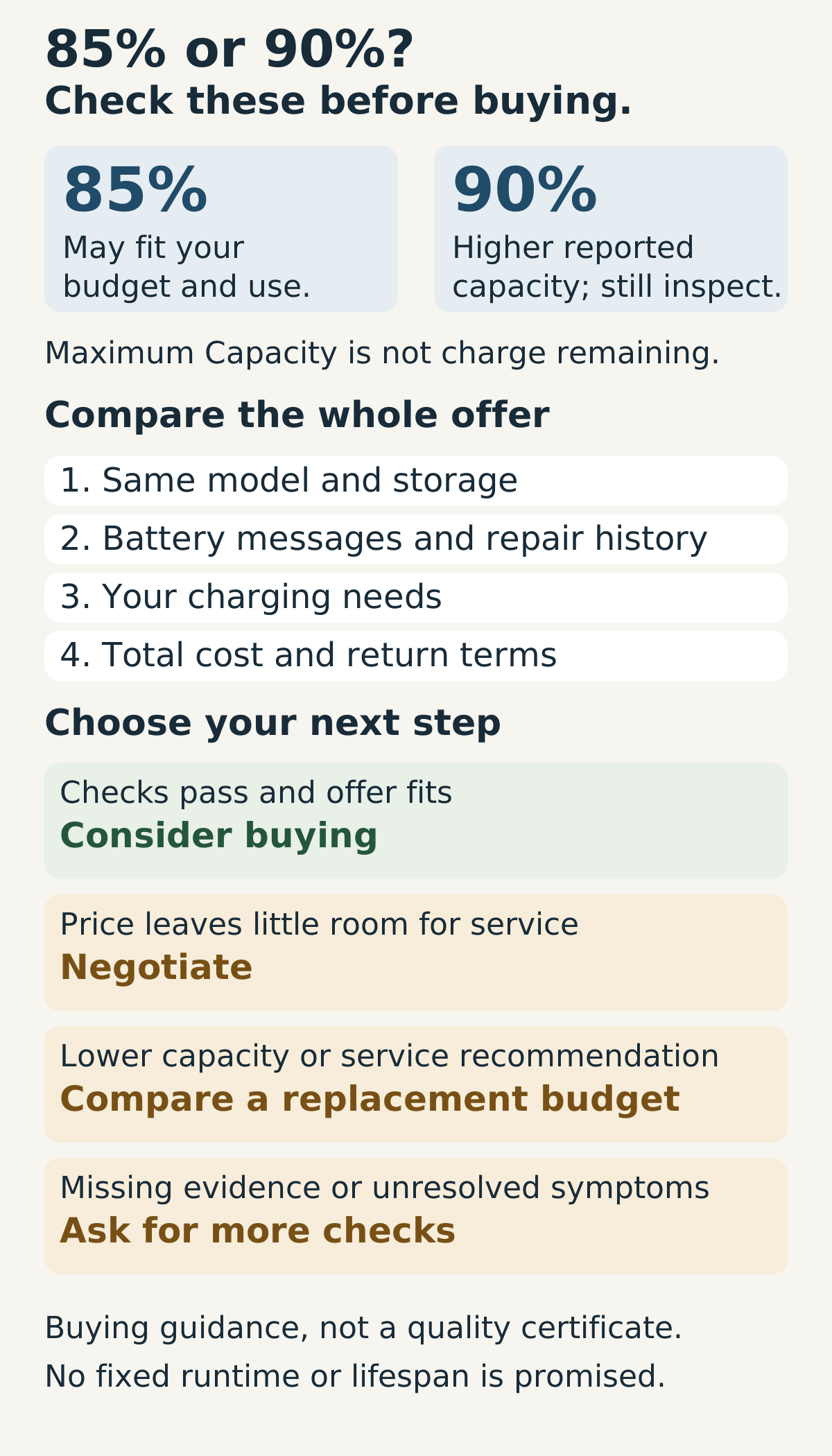
The bands are buying guidance, not quality grades. Do not reject an otherwise suitable phone solely because it reads 85%, or accept an uncertain one solely because it reads 90%.
Is 90% battery health worth paying more for?
Sometimes. If two phones have the same model, storage, condition, repair documentation and purchase protections, the higher reported capacity is a reason to consider paying more. The size of that premium still matters.
A small difference may be worthwhile if you value capacity and dislike arranging service. A larger premium needs a better explanation than “this one has 90%.” Compare the full checkout prices and ask whether the money would be more useful kept available for a replacement.
The recommendation also depends on the evidence. A well-documented 85% phone can be a more convincing offer than a 90% phone whose seller will not explain a repair or whose return terms are poor.
There is no universal price per battery-health point. The difference between 85% and 90% is five percentage points; it is not a promise of five percent more usable time in every task.
Avoid calling a 90% phone “almost new.” Battery condition, physical wear and repair history are separate parts of the assessment.
If you are comparing Amazon’s tiers rather than two inspected units, our Renewed versus Renewed Premium iPhone guide separates the program’s battery standards from the phone you receive.
If you are choosing a refurbishment program, Amazon Renewed vs Apple Certified Refurbished iPhone explains the difference between a capacity requirement and Apple’s new-battery commitment.
What does iPhone Battery Health actually tell you?
Apple’s Maximum Capacity figure compares the battery’s capacity with when it was new. It is different from the charge currently remaining and from a charging limit. A phone can show 85% Maximum Capacity while being fully charged. Our 80% charging-limit guide addresses that separate charging choice.
Capacity is also distinct from the battery’s ability to supply peak power. Read the relevant battery messages rather than treating a percentage as proof of reduced performance. Apple explains these distinctions in its battery and performance guidance.
For buying purposes, treat the displayed figure as information about one component. It does not reveal every repair, certify the phone’s other functions, or establish its endurance in your routine.
It cannot answer “How many months until replacement?” A single reading supplies no reliable schedule for future decline. Likewise, a cycle count does not tell you how many days remain before a battery becomes unsuitable for you.
This is why converting 85% into a fixed screen-on time is unhelpful. Without a relevant test of that device under defined conditions, an hours figure would suggest more certainty than the evidence provides.
85% vs 90%: compare the same iPhone model first
Start with comparable offers. An 85% Pro Max and a 90% base iPhone have differences beyond their battery readings; the percentage cannot settle that choice. Our used Pro Max versus new base iPhone comparison examines that wider feature-and-condition decision.
For a useful battery comparison, hold the model, storage and other condition as close as possible. Then examine what you are actually buying.
| Factor | What to compare | Why it matters |
|---|---|---|
| Model and storage | Exact model, storage, regional variant and carrier status | Avoid attributing unrelated differences to battery health |
| Price | Full checkout amount and mandatory charges | The higher reading must be considered alongside its premium |
| Your needs | Time away from power and acceptable charging frequency | Neither figure guarantees your preferred routine |
| Repair history | Supported parts labels and matching documentation | A high reading alone does not explain how the battery got there |
| Symptoms | Shutdowns, erratic readings and service messages | Unresolved behavior outweighs a reassuring percentage |
| Warranty | Provider, battery coverage, exclusions and process | General warranty wording may not cover ordinary battery wear |
| Returns | Window, fees, shipping and battery-related conditions | You need time and a workable remedy if the phone does not suit you |
| Service cost | Quote for that model, including applicable extras | A replacement scenario can change which offer is cheaper |
On a small screen, swipe sideways or focus the table and use the arrow keys.
Save the seller’s battery promise and purchase terms. A label such as “excellent condition” may describe appearance; read the separate battery commitment rather than assuming the two mean the same thing.
If your shortlist also includes another platform, compare the wider trade-offs in used iPhone versus new Android.
Our recommendation is to choose the complete offer. If the seller cannot substantiate the condition, a few extra percentage points should not resolve that uncertainty for you.
How to check the battery before buying
Inspect the actual device when possible. For an online purchase, ask for current evidence tied to that phone, then keep the return terms available for your checks after delivery.
Apple documents Battery Health & Charging for iPhone 11–14. On iPhone 15 and later with iOS 17.4 or later, Battery Health also includes cycle count and battery dates. See its model-specific guidance.
| Check | Where or how | If something is unclear |
|---|---|---|
| Maximum Capacity | Settings > Battery > Battery Health & Charging on iPhone 11–14; Battery Health on iPhone 15+ | Confirm you are looking at capacity, not charge remaining |
| Battery messages | Read the full health screen and any service recommendation | Ask for assessment rather than judging from the number |
| Parts & Service History | Settings > General > About on supported models with iOS 15.2+ | Request an explanation and documentation for the battery label |
| Cycle count and dates | Battery Health on iPhone 15+ with iOS 17.4+ | Use them as context; unsupported models may lack these details |
| Charging and operation | Try normal charging and relevant functions when practical | A short check can expose a problem, not certify endurance |
| Seller evidence | Inspect yourself or request a continuous device-specific video | A screenshot can be stale; video still has limits |
| Battery promise | Read and save the listing's exact commitment | Clarify the remedy if the delivered condition differs |
| Purchase protections | Check warranty, returns, exclusions and fees | Resolve important uncertainty before payment |
On a small screen, swipe sideways or focus the table and use the arrow keys.
The Parts & Service History documentation explains which models report battery repairs. The record is not a complete service chronology: where a part has been serviced repeatedly, only its latest service appears.
Investigate warnings at any percentage. An unresolved service message, verification issue or abnormal behavior matters more than a reassuring number.
Unknown does not automatically mean counterfeit. Apple lists several possible causes, including an unverified installation or a battery that is not working as expected. Its genuine battery guidance also warns that health information may be inaccurate when the battery cannot be verified.
Ask the seller to explain an unresolved label before using the percentage in your decision. A verbal assurance alone does not establish the condition.
For a battery, screen or camera warning, see whether to buy a used iPhone with an Unknown Part message before treating the lower price as a bargain.
If a phone meets the seller’s stated percentage but shuts down unexpectedly or behaves abnormally, assess that issue separately. Save evidence, contact the seller and review the applicable return or warranty terms. We would not treat compliance with a percentage promise as a reason to overlook the symptom.
Finally, check the rest of the phone. Apple explicitly advises against buying an Activation-Locked iPhone in its preowned buying guide. Good battery information cannot compensate for a device you cannot activate.
Before paying for the phone, work through the full used iPhone buying checklist for activation, management, network eligibility and essential functions.
Does 100% battery health mean the battery is new?
The reading alone does not prove that. A documented replacement may explain it, but you need the history to support that explanation.
Ask who replaced the battery, when, and whether a receipt matches the phone. Read the supported parts labels and any battery dates available. A genuine part may also have been used previously; Apple’s battery guidance describes a Used label on supported iPhone 15 and later devices running iOS 18.
A replacement is not automatically a reason to reject a used phone. What matters is whether the work is documented, the device behaves properly and the seller’s terms are satisfactory.
For a 100% phone with unclear history, our next step would be further checking. We would not add a premium merely because the number appears perfect. If the seller cannot provide reasonable evidence, choose an offer whose condition you can evaluate more confidently.
When does buying a cheaper iPhone and replacing the battery make sense?
It can make sense when the phone is otherwise suitable and the discount covers a realistic service plan. Get a quote for the exact model and consider the inconvenience of arranging the work. If you already own the phone, use replace the battery or buy a new phone for the repair-versus-upgrade decision.
Keep two totals separate:
- Purchase cost: phone price plus actual purchase charges.
- Replacement scenario: purchase cost plus the service quote and applicable extras.
You do not need to add an immediate replacement to every 85% purchase. That is a scenario to compare, not a forecast.
The following example uses four otherwise comparable iPhone 14 128GB offers, with equivalent assumed cosmetic condition, unlocked status, documented history and purchase protections.
Illustrative US-dollar example: all prices are assumptions, not live listings or an Apple service quote. Purchase tax, shipping and service extras are excluded. The assumed replacement amount is $100.
| Offer | Reported capacity | Purchase price | Cost if you add the assumed $100 replacement |
|---|---|---|---|
| A | 85% | $300 | $400 |
| B | 90% | $330 | $430 |
| C | 78% | $250 | $350 |
| D | 78% | $210 | $310 |
On a small screen, swipe sideways or focus the table and use the arrow keys.
Between A and B, the question is whether $30 is worth the higher reported capacity given your needs and the checked condition. Neither row establishes a particular runtime or a replacement-free period.
C looks cheaper at purchase, but adding the assumed service brings it to $350—$20 above B without service. D has a larger discount: its $310 replacement scenario is $20 below B’s purchase price.
These are different ownership strategies, with potentially different outcomes. The arithmetic does not establish that B and a repaired C or D would have equivalent battery condition or overall quality.
For an actual purchase, use Apple’s battery service estimator or a provider’s dated quote. Apple says inspection determines the final fee; tax or shipping may apply, and authorized providers can set their own fees.
We have not verified a current model-specific Apple fee for this example. The $100 assumption must not be read as its current iPhone 14 price.
If the seller mentions AppleCare, verify active coverage and eligibility. Apple’s US AppleCare page states that covered battery service carries no additional fee when capacity is below 80%. A reading of 85% or 90% does not meet that stated capacity condition by itself.
Verdict: which battery condition should you accept?
For a light user with easy charging access, 85% can be a reasonable purchase when inspection, price and terms fit. Negotiate if the discount offers little benefit over a comparable higher-health phone.
For someone who needs dependable use away from power, prefer evidence of suitable endurance and a workable return policy. Higher reported capacity is helpful context, but neither 85% nor 90% guarantees a full day.
For frequent gaming or video recording, assess representative use and keep a service budget available if needed. Do not use the health screenshot as a substitute for checking the device.
For a planned two- or three-year ownership period, compare the purchase with a possible replacement scenario. You can budget for that expense without pretending to know when it will occur.
For the wider ownership decision, assess how long a used iPhone could remain useful across software support, hardware condition and your needs.
For a 100% phone with unclear repair history, request more evidence before paying a premium. For any phone with unresolved shutdowns, service warnings or verification problems, investigate those first—even if it meets the seller’s advertised percentage.
Buy when the inspected offer fits your needs and price. Negotiate when the condition is acceptable but the saving is weak. Budget for service when you knowingly choose a lower-capacity phone. If important evidence remains unavailable, choose another offer.
