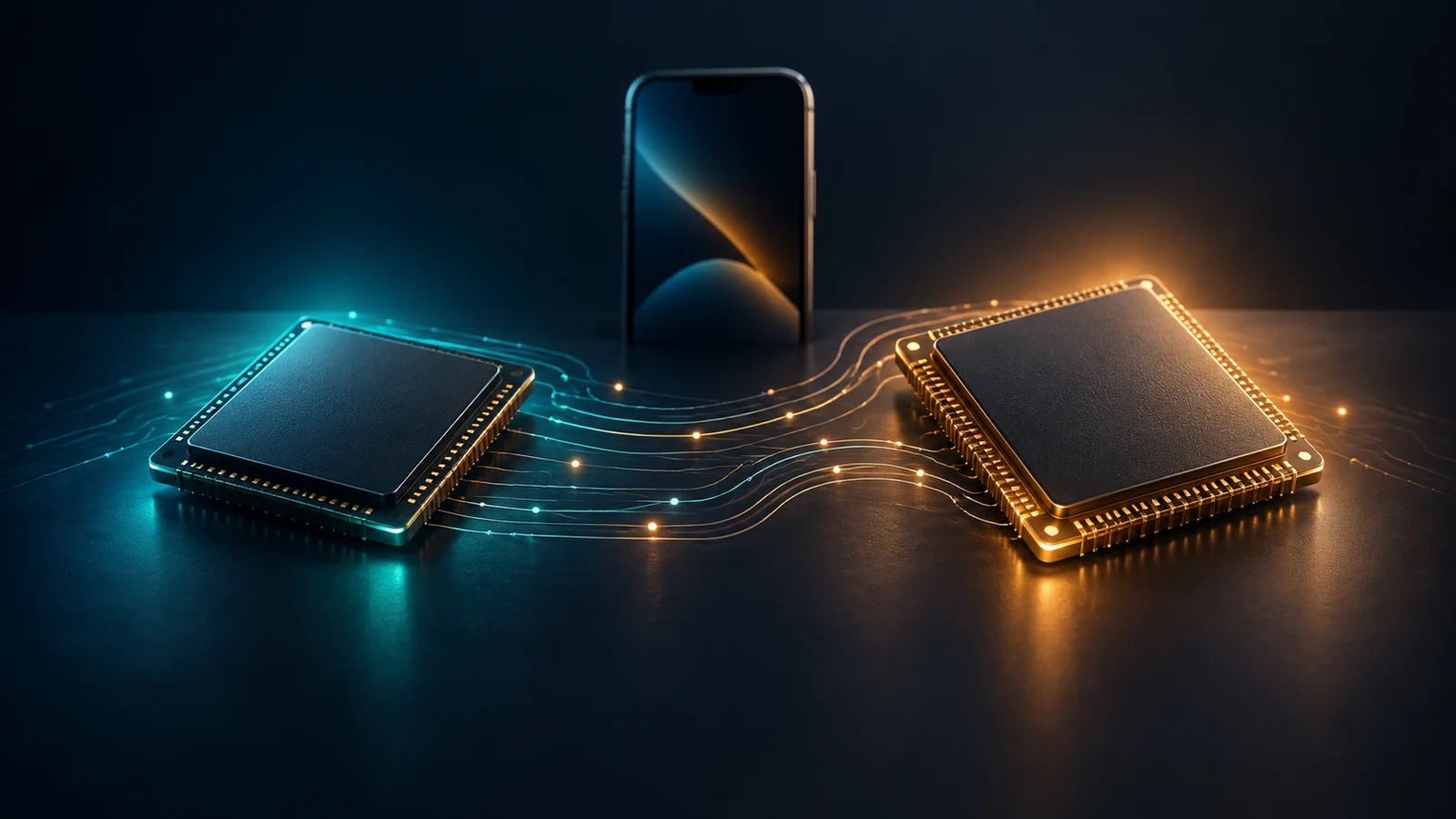
Conceptual illustration; not a chip floorplan or benchmark comparison.
The strongest reason to upgrade an older iPhone is a capability or demanding task your current phone cannot handle well. A20 Pro has higher CPU and GPU results than A19 Pro in the selected independent tests below, but those results do not establish one speed multiplier over A14 for everything you do.
Across these generations, the useful changes include different GPU configurations, hardware ray tracing, dedicated media processing, broader AI acceleration, and new approaches to cooling. Some open up a workflow; others improve performance within a particular benchmark. The distinction matters when deciding whether your current iPhone actually needs replacing.
For an A14, A15, or A16 owner, Apple Intelligence support can be a clearer dividing line than another CPU score. For someone already using an A17 Pro or newer Pro chip, a purchase needs a more specific justification: the game, export, AI task, or sustained workload that benefits. Apple’s current device requirements identify supported hardware, while individual features still have software and availability conditions.
Upgrade caution: A higher score is a reason to investigate your task, not a sufficient reason to replace a healthy phone.
Evidence checked September 30, 2026. This guide analyzes Apple documentation and measurements published by original testers. FlawCheck has not independently tested these phones.
Apple chip comparison: find your iPhone first
An iPhone generation and a chip generation are not interchangeable. Several chips appear across two phone generations, and some chip names cover different GPU configurations. The following table groups configurations rather than treating every phone as a separate chip.
A14–A16: shared chips and the A15 split
| Chip / GPU cores | iPhone models |
|---|---|
| A14 Bionic · 4 GPU cores | 12, 12 mini, 12 Pro, 12 Pro Max Apple specs: 12, mini, Pro/Max comparison |
| A15 Bionic · 4 GPU cores | 13, 13 mini, SE (3rd generation) Apple specs: 13, mini, SE |
| A15 Bionic · 5 GPU cores | 13 Pro, 13 Pro Max; 14, 14 Plus Apple specs: 13 Pro, Max, 14, Plus |
| A16 Bionic · 5 GPU cores | 14 Pro, 14 Pro Max; 15, 15 Plus Apple specs: 14 Pro, Max, 15, Plus |
A17–A18: Pro capabilities and regular variants
| Chip / GPU cores | iPhone models |
|---|---|
| A17 Pro · 6 GPU cores | 15 Pro, 15 Pro Max Apple specs: 15 Pro, Max |
| A18 · 5 GPU cores | 16, 16 Plus Apple specs: 16/Plus |
| A18 · 4 GPU cores | 16e Apple specs: 16e |
| A18 Pro · 6 GPU cores | 16 Pro, 16 Pro Max Apple specs: 16 Pro, Max |
A19–A20: keep phone designs separate
| Chip / GPU cores | iPhone models |
|---|---|
| A19 · 5 GPU cores | 17 Apple specs: 17 |
| A19 · 4 GPU cores | 17e Apple specs: 17e |
| A19 Pro · 6 GPU cores | 17 Pro, 17 Pro Max Apple specs: 17 Pro, Max |
| A19 Pro · 5 GPU cores | Air Apple specs: Air |
| A20 Pro · 7 GPU cores | 18 Pro, 18 Pro Max; Duo Apple specs: 18 Pro/Max, Duo |
The names remain A15 Bionic, A18, and A19 Pro across their respective variants; these configurations do not create unofficial chips such as “A15 Pro.” A GPU result from a Pro model should not automatically stand in for a regular model with fewer GPU cores.
CPU core count also changes little in this range: Apple’s specifications list six cores throughout, with two performance and four efficiency cores through A19. For A20 Pro, Apple calls the two larger cores “super cores.” That terminology describes the design, not a measured speed increase by itself. A14 specifications, A19 specifications, A20 Pro specifications.
RAM capacity, storage, display, battery, and cooling belong to the phone configuration. They should not be presented as fixed properties of every device using that chip. For the underlying terminology, see Smartphone Processor Specs Explained.
Selected capability milestones
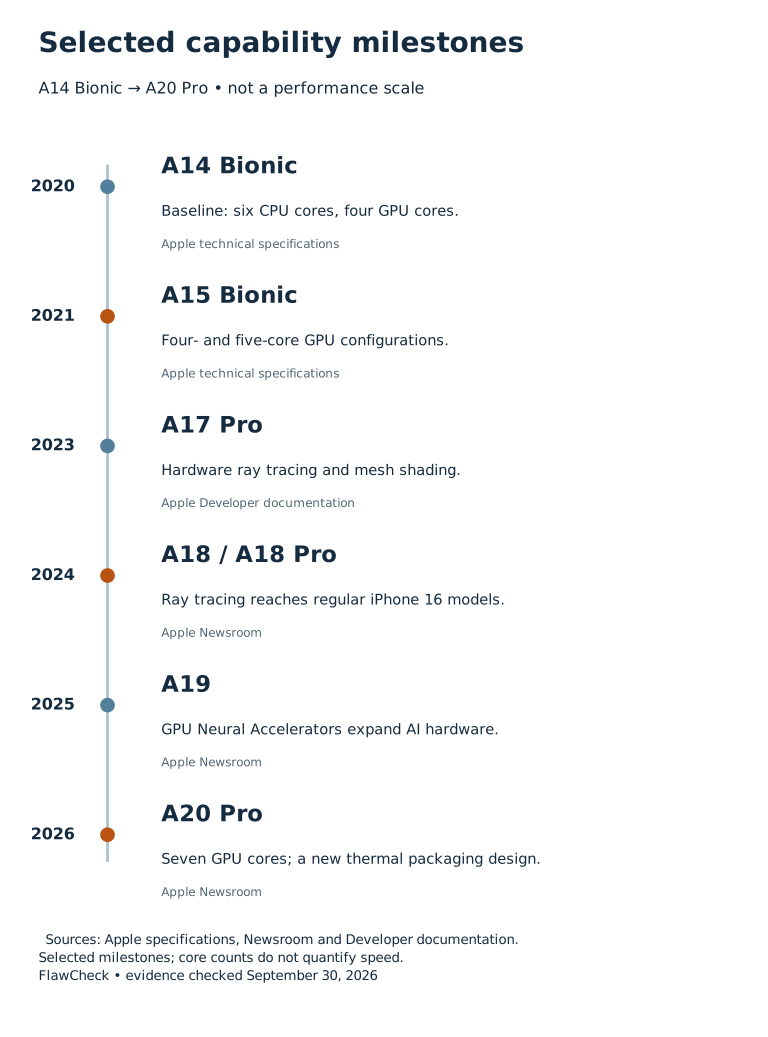
Selected capabilities, not a speed ranking. Sources: A14 specs, A15 regular-model specs, A15 Pro-model specs, A17 Pro GPU architecture, A18 announcement, A19 announcement, A20 Pro announcement.
CPU performance: improvement depends on the task
Six cores can do more work over time without becoming eight or ten cores. Apple describes microarchitectural changes for A17 Pro, for example. Core count alone cannot tell you how much work a core completes, how frequently it accesses memory, or how the operating system schedules a task. Apple’s A17 Pro announcement.
The measurable question is narrower: how does a particular phone perform in a particular workload? Here are two independent publications’ Geekbench 7 results for the same model pair.
| Original tester | iPhone 17 Pro, single / multi-core | iPhone 18 Pro, single / multi-core |
|---|---|---|
| Tom’s Guide | 3138 / 8692 | 4022 / 11543 |
| PhoneArena | 3225 / 8881 | 4030 / 11311 |
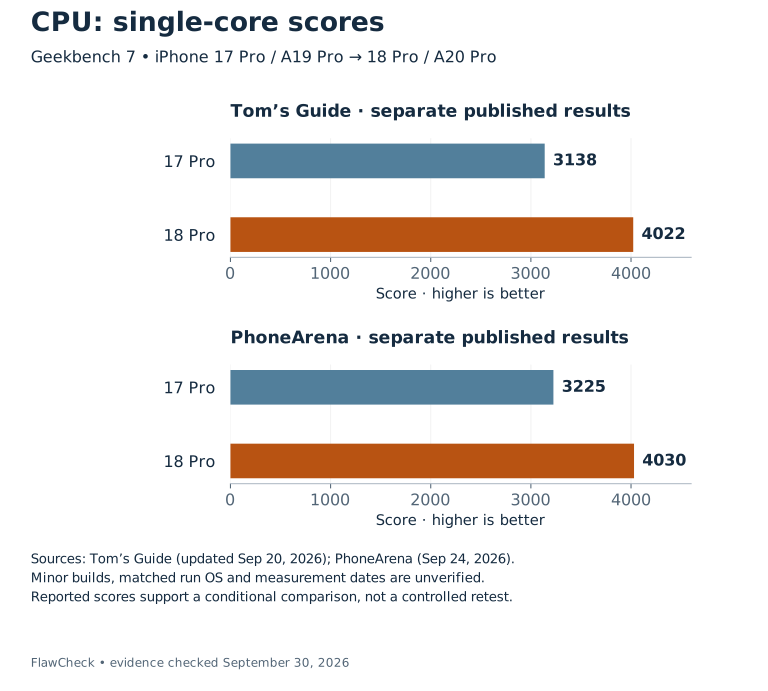
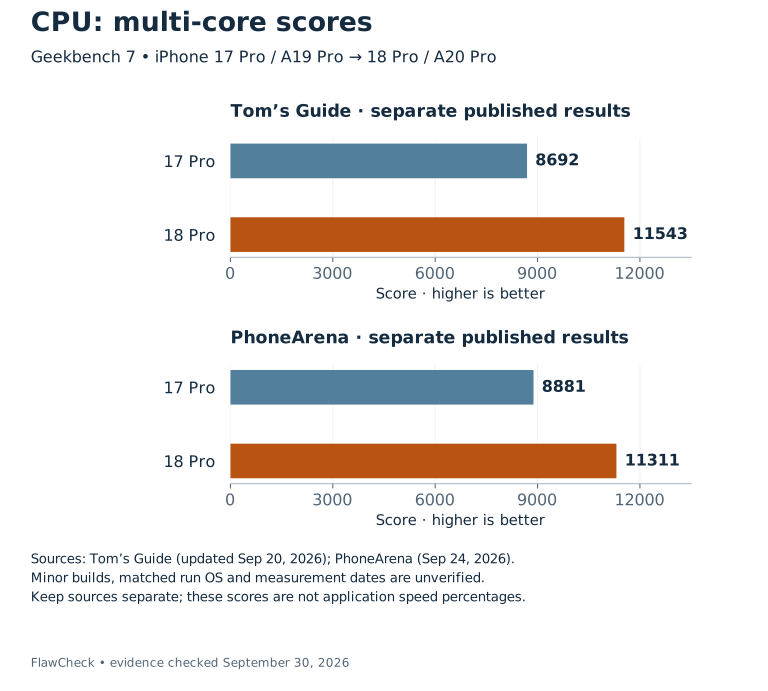
Geekbench 7 scores; higher is better. Sources kept separate: Tom’s Guide (review updated September 20, 2026) and PhoneArena (September 24, 2026). Minor builds, matched run OS and measurement dates remain unverified. These are conditional reported comparisons, not controlled retests.
Calculated within each publication, the single-core increases are 28.2% and 25.0%; the multi-core increases are 32.8% and 27.4%, respectively. These are changes in reported benchmark scores, not percentages for every application. The publications do not provide a complete matched record of minor benchmark builds, OS versions, and comparator retest dates.
The agreement in direction supports a limited conclusion: the selected CPU tests favor the newer phone. It does not identify how much of the difference comes from the CPU design alone, or predict how much faster your usual apps will feel.
For an upgrade, identify where you spend time waiting. A CPU-heavy calculation, a browser interaction, an application loading assets, and an online service waiting for a response are different tasks. The relevant evidence is a measurement of the task that bothers you, ideally on the exact phone you are considering. Our guide to what makes a phone fast covers the surrounding system factors.
Why there is no single A14-to-A20 score chart here
The research did not establish a verified common test series covering all these generations. Combining Geekbench 5, 6, and 7 would create a misleading trend. Even minor updates deserve attention: Primate Labs advises against comparing Geekbench 6.0 with 6.1. Geekbench 6.1 release notes.
Some historical review tables currently display a Geekbench 6.7 label even though the review predates that version’s April 2026 release. Whether the table was relabeled or the device was retested remains unresolved in our collection. An updated label does not establish the installed version at measurement. Geekbench 6.7 release notes; Notebookcheck’s iPhone 15 Pro review.
Marketing baselines also differ. Apple’s A15 CPU claim compared it with competing processors; its A19 claim compares against A15 in iPhone 13. Neither percentage is automatically a year-over-year gain. A15 announcement, A19 announcement.
GPU and gaming: capabilities changed as well as speed
The A15 split is an early warning against ranking phones by chip name alone. A regular iPhone 13 has four GPU cores, while a 13 Pro has five. That extra core is a hardware difference; it is not proof that every game runs 25% faster. iPhone 13 specifications, iPhone 13 Pro specifications.
A17 Pro is a more substantial capability milestone. Apple’s developer documentation describes its family 9 GPU features, including Dynamic Caching, hardware-accelerated ray tracing, and hardware-accelerated mesh shading. These concern how rendering work is executed and managed, extending the comparison beyond the number of GPU cores. Apple Developer’s GPU architecture overview.
A18 then brings hardware ray tracing to regular iPhone 16 and 16 Plus models. That capability is no longer exclusive to the previous year’s Pro phones, although the GPU configurations and device implementations still differ. Apple’s iPhone 16 announcement.
For players, hardware support is the first question. Whether a game uses it, which effects are enabled, and whether it delivers consistent frames are separate questions. A feature appearing in the chip specification does not prove that every game selects that rendering path.
Older GPU results provide historical context
Notebookcheck’s individual reviews report these Aztec Ruins High Tier results at 2560×1440 offscreen. Keeping the rendering target fixed makes the rows more informative than mixing different resolutions or on-screen results.
| Review device / chip | Reported FPS | Original review |
|---|---|---|
| iPhone 12 / A14 | 30.1 | Notebookcheck |
| iPhone 13 / A15, 4-core GPU | 37.2 | Notebookcheck |
| iPhone 13 Pro / A15, 5-core GPU | 39 | Notebookcheck |
| iPhone 14 Pro / A16 | 44 | Notebookcheck |
| iPhone 15 Pro / A17 Pro | 60 | Notebookcheck |
| iPhone 16 Pro / A18 Pro | 69.3 | Notebookcheck |
| iPhone 17 Pro Max / A19 Pro | 86 | Notebookcheck |
These are historical device observations. Application/workload builds, graphics API, OS, and measurement dates have not been established as a common protocol. We therefore do not calculate an all-generation improvement percentage from them or append an A20 score from a different test. They help locate older phones in the evidence while showing why a smooth-looking chart would imply more comparability than the collection establishes.
What the newer GPU measurements show
Tom’s Guide reports the following Solar Bay Unlimited frame rates. This is a specific synthetic graphics workload, not an average across games. Original performance table.
| Model pair | Older phone | Newer phone | Calculated change |
|---|---|---|---|
| 17 Pro → 18 Pro | 46.4 FPS | 61.93 FPS | +33.5% |
| 17 Pro Max → 18 Pro Max | 46.6 FPS | 67.9 FPS | +45.7% |
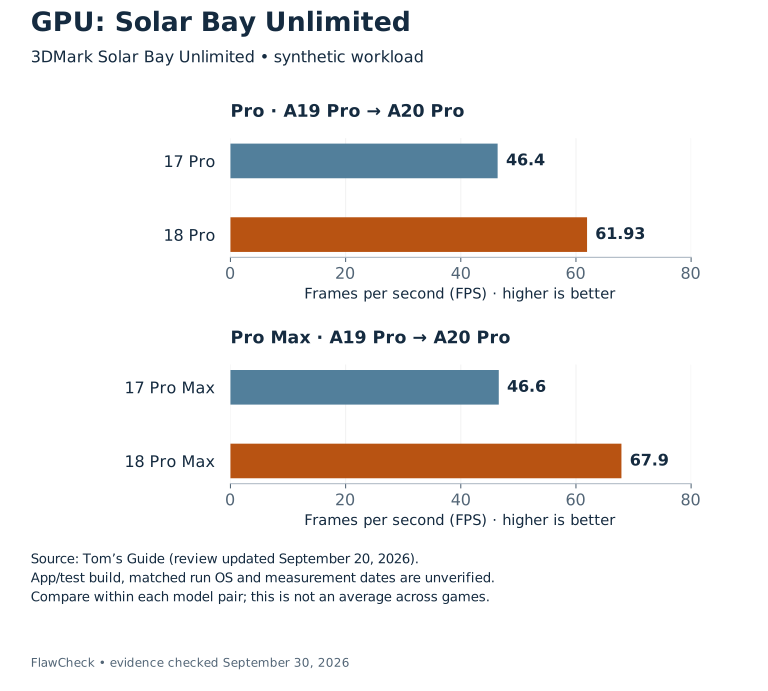
3DMark Solar Bay Unlimited, FPS; higher is better. Tom’s Guide, review updated September 20, 2026. App/test build, matched run OS and measurement dates remain unverified. Compare within each model pair; results do not represent average gaming performance.
PhoneArena separately reports higher Steel Nomad Light High and Low scores for 18 Pro than 17 Pro. Those results belong to their own workload and source; they should not be pooled with Solar Bay FPS. PhoneArena’s GPU results.
Apple claims A20 Pro’s GPU is up to 40% faster than A19 Pro. The independent tests provide evidence of improvement in selected workloads, but they neither validate that percentage for every game nor disprove it because one result falls below it. The manufacturer’s workload and these tests have not been established as equivalent. Apple’s A20 Pro announcement.
Game settings illustrate the remaining gap. Notebookcheck measured Genshin Impact 5.0.0 on iPhone 16 Pro at a 120 FPS setting: its reported average was 109.3 FPS at the lowest graphics preset and 65.2 FPS at the highest. A selectable frame-rate target is plainly different from a measured average. Notebookcheck’s gaming measurements.
That example is not a matched comparison with newer iPhones. It shows why a useful gaming review needs the game’s version, preset, rendering conditions, test route, duration, and frame delivery. A chip benchmark alone cannot supply them.
Sustained performance: cooling changes the comparison
A short burst and a long gaming session ask different questions of a phone. Apple explicitly connects A19 Pro’s sustained-performance claim to the vapor chamber in iPhone 17 Pro models. For A20 Pro, it describes packaging that places memory beside the die, allowing a different thermal path to the vapor chamber. These are system changes, not simply higher CPU scores. A19 Pro announcement, A20 Pro thermal design.
Stress-test stability describes how much of a test’s best result is retained at its lowest result. It does not tell you the absolute speed at that lowest point. Consider a purely illustrative example: retaining 70% of a best score of 8000 leaves 5600; retaining 90% of 4000 leaves 3600. The more stable device in that example is still slower at its lowest point. These are invented numbers to explain the metric, not measurements of an iPhone.
The actual A20 evidence also needs its context kept intact.
| Original tester | Device label | Wild Life Extreme stress stability |
|---|---|---|
| Tom’s Guide | iPhone 18 Pro | 62.8% |
| Tom’s Guide | iPhone 18 Pro Max | 79.4% |
| GadgetGuy | iPhone 18 Pro Max, as labeled in its table | 69.5% |
GadgetGuy reports a best loop of 7944 and a lowest loop of 5523, consistent with its rounded stability figure. Its surrounding prose sometimes calls the device Pro rather than Pro Max; we retain the table’s label and flag that inconsistency. GadgetGuy’s test table.
The different results should not be averaged or resolved by choosing the highest. The available protocols do not fully explain the difference. Nor should an 18 Pro Max result stand in for the smaller Pro or the foldable Duo.
For a long-session upgrade, look for absolute performance after heating, alongside frame-time behavior and the test conditions. Stability alone cannot verify Apple’s claimed sustained gain. For the whole-device choice, see our iPhone 18 Pro versus Pro Max comparison, which weighs the size and endurance trade-offs alongside model-specific performance. Phone Thermal Throttling Explained explains the broader mechanism.
AI capabilities: support, acceleration, and experience
Three comparisons often get mixed together: whether a phone supports a feature, which hardware executes the model, and how quickly that particular model finishes.
A14, A15, and A16 have Neural Engines. Yet Apple’s current Apple Intelligence requirements list iPhone 15 Pro/Pro Max and iPhone 16 or later models, including Air, in this range. Older chips having ML hardware does not put their phones on that support list. A14 chip documentation, A15 announcement, A16 announcement, Apple Intelligence requirements.
This creates a practical upgrade boundary. If a supported Apple Intelligence feature is the requirement, first check the device list and the feature’s OS, language, and regional conditions. A faster unsupported phone would not solve that eligibility problem; a supported phone does not automatically enable every feature everywhere.
AI increasingly spans several processing blocks
Apple describes CPU ML accelerators in A18 Pro and Neural Accelerators within GPU cores in A19 and A19 Pro. The Neural Engine is therefore only one part of the hardware available for ML workloads. A18 Pro architecture, A19 announcement, A19 Pro announcement.
For A20 Pro, Apple lists a Dual 16-core Neural Engine, totaling 32 cores, and claims double the AI processing power of A19 Pro. That is a hardware and manufacturer-performance statement, not a measured promise that every AI feature finishes in half the time. A20 Pro announcement.
Tom’s Guide’s Geekbench AI 1.7 quantized scores increase from 49050 on 17 Pro to 69245 on 18 Pro: a calculated 41.2% increase. The table identifies Core ML/Neural Engine for the newer phone, but does not fully document every comparator’s backend and run context. Tom’s Guide’s AI results.
That benchmark is not equivalent to Apple’s processing-power claim. It also does not measure a particular language model’s time to first token, token generation rate, or answer quality. Primate Labs describes framework changes affecting Android scores in the 1.7 release notes and warns against treating 1.7 and older scores as strictly comparable. That Android-specific context is not evidence of an iOS speed change; the exact framework and run version still need checking. Geekbench AI 1.7 release notes.
For an AI purchase, ask which feature or model you need, whether it runs locally, and what measurement reflects your wait. Apple Intelligence also uses Private Cloud Compute for some processing, so stronger local hardware does not remove every dependency on software or services. Apple’s processing description.
Camera and video: follow the complete workflow
Media changes can matter even when an ordinary CPU benchmark does not describe them. A17 Pro adds a dedicated AV1 decoder and a USB 3 controller. Decoding an AV1 stream, encoding a video, and transferring a finished file are distinct operations. Apple’s A17 Pro media description.
For a creator, the useful question is whether the phone and application support the specific path you need. A decoder does not establish an encoder’s capabilities. A controller’s supported interface does not guarantee that a cable, storage device, and real transfer all reach the advertised maximum.
ProRes makes the device distinction concrete. Apple’s iPhone 13 Pro Max specification permits ProRes up to 4K30, but limits the 128GB version to 1080p30. Both versions use A15 Bionic. Storage configuration changes the available workflow without creating a different chip name. iPhone 13 Pro Max specifications.
On later supported Pro phones, some ProRes recording modes require external storage, with specific storage-performance requirements. Check the exact model, frame rate, destination, and accessories rather than assuming a newer chip enables every configuration. Apple’s ProRes guidance.
Encoder throughput is not export time
Apple says A18 Pro’s ISP and video encoder process twice the amount of data. A complete editing export can involve decoding, effects, encoding, and storage, so that statement cannot be turned directly into “every export takes half as long.” A18 Pro announcement.
Tom’s Guide’s Premiere Rush table lists 25.5 seconds for 15 Pro and 21 seconds for 16 Pro in a 4K-to-1080p conversion. It does not establish a fully matched record of app builds, source-clip details, or hardware-acceleration paths. It illustrates a reported device task, not independent verification of the encoder claim. Original video-transcoding table.
Photography needs an equally specific comparison. Apple describes CPU, GPU, Neural Engine, and ISP working together in A16’s imaging pipeline. Their processing capability does not isolate the contribution of a sensor, lens, or image-processing choice. A16 announcement. Evaluate finished photos and video in a camera review; chip specifications supply only part of the explanation. Our iPhone 18 Pro review puts those processing changes alongside camera, modem and ownership evidence.
Energy efficiency: what the evidence can establish
Manufacturing technology changes across the range: Apple describes A14 as 5nm, A17 Pro as 3nm, and A20 Pro as 2nm. Those labels are not measurements of battery endurance or energy used per completed task. A14 announcement, A17 Pro announcement, A20 Pro announcement.
Apple also makes workload-specific power claims. For example, its A18 announcement says the CPU can run the same workload with 30% less power than A16. That remains a manufacturer claim here because the collected independent evidence does not include an equivalent controlled CPU power test. A18 announcement.
An efficiency comparison needs a defined task and output: energy to finish an export, for example, or power while delivering equivalent performance. A battery-runtime result asks a broader question about the complete phone. Display, radio use, battery configuration, software, and workload remain part of that result.
Power and energy also answer different questions. A higher-power device can potentially finish a job sooner; a lower-power device can spend longer doing it. Without completion time and the relevant energy measurement, neither observation establishes which chip uses less energy for that task. This is why the guide does not derive a savings percentage from the process node.
Temperature can change the experience as well. Apple documents reduced frame rates or longer processing times when a device becomes too warm. That is a reason to check test conditions, not automatic proof of a defective chip. Apple’s temperature guidance.
Upgrade context: match the change to your reason
The chip is a stronger reason to replace a phone when a documented limitation affects something you actually use. The following is a decision framework, not a claim that FlawCheck tested your phone or a prediction of guaranteed remaining years.
Capability and workflow needs
| Your situation | Chip-related question | Evidence to seek before buying |
|---|---|---|
| A14–A16 phone; want Apple Intelligence | Does the target model support the exact feature? | Current device, OS, language, and regional requirements |
| Older phone; want a demanding game | Is the game supported, and does the target deliver frames consistently? | Exact game build, preset, duration, and model measurements |
| Editing or recording video | Does the codec or recording workflow require different hardware or I/O? | App/codec tests; recording modes; storage and accessories |
Recent phones and sustained loads
| Your situation | Chip-related question | Evidence to seek before buying |
|---|---|---|
| A17 Pro or newer; chasing a benchmark increase | Does the improved result correspond to a task you perform? | Task timing or a measurable quality/setting improvement |
| Same-chip phones with different designs | Can the preferred phone sustain the required workload? | Model-specific results after heating, not another phone’s score |
Moving from A14, A15, or A16
Start with the task or capability you are missing. Apple Intelligence eligibility, hardware ray tracing in a supported game, or a Pro recording workflow offers a more concrete question than “how much newer is the chip?” The feature must be useful to you, and the exact phone must enable it.
If the concern is simply that your old phone feels slow, establish when it happens. A problem limited to one app, a device becoming warm, and a wait for an online response call for different evidence. A benchmark difference cannot diagnose all three. Check the condition of the existing phone before turning a chip comparison into a replacement verdict.
Also avoid assuming every newer iPhone is a full capability upgrade. The overview table shows chip reuse and GPU variants. Use it to locate the model, then inspect the recording features, display, storage, and device-specific performance you care about.
Moving from a recent Pro chip
With A17 Pro, A18 Pro, or A19 Pro, an already-supported workflow makes the question more demanding. Look for saved time, better frame delivery, an available quality setting, or support for a specific new task. A higher synthetic score is evidence about that test; the purchase case requires a benefit you value.
For sustained use, choose the form factor before borrowing a result. Pro Max, Pro, Air, and Duo should retain separate performance evidence. A larger benchmark result from a phone you do not want to carry is not automatically the right upgrade.
For the rest of the decision—battery condition, camera needs, cost, and the compromises of the whole device—use the iPhone upgrade guide. This A-series comparison supplies the processing context; it cannot settle the entire purchase.
How we selected and compared the evidence
Apple Newsroom, technical specifications, and Developer material establish published configurations and capabilities. Manufacturer speed or power claims remain attributed. Numerical results come from publications that directly tested devices; we did not substitute leaked scores, search snippets, or secondary copies of another lab’s measurements.
We kept benchmark families, GPU modes, phone variants, and source publications separate. Publication dates are not measurement dates. Missing OS builds, application versions, temperatures, and test repetitions remain unknown rather than being filled with launch specifications or today’s software versions.
The evidence supports selected device comparisons and capability milestones. It does not provide a controlled all-generation CPU series, matched gaming logs, a complete A20 media comparison, or independent energy-per-task measurements. No Duo benchmark was accepted in this dataset. See Are Phone Benchmarks Reliable? for the broader reading rules.