
Quick answer: If a used iPhone shows Remote Management from a company or school during setup, pause the purchase. Ask the seller to coordinate authorized removal of organizational management, including release from the organization’s enrollment program where applicable. Then check the phone again after the required erase/restore and online setup. If the seller cannot resolve it, choose another phone.
Our verdict: For personal use, an unresolved management warning is a reason to stop paying, even if the phone looks excellent or currently opens to the Home Screen. A discount does not compensate for an issue you cannot independently resolve.
What Does Remote Management Mean on an iPhone?
A Remote Management screen naming an organization during setup indicates an organizational enrollment process. Apple explains that assigning a device to a management service enables its enrollment pane in Setup Assistant. What happens next depends on the organization’s configuration; some setups request organizational credentials. 1
For a buyer, the important question is whether the phone is ready to become a personal device without that organization’s management.
Three terms to recognize
- MDM: Mobile Device Management, the system an organization uses to apply supported settings and controls.
- Supervision: A device state that enables additional organizational controls.
- Automated Device Enrollment, or ADE: An enrollment method that connects organizational device assignment with setup.
These terms overlap, but they are not interchangeable. Some iPhone enrollment methods do not enable supervision. Supervision can also be configured manually, so a supervision notice alone does not identify every part of the enrollment history. 23
Management can affect restrictions, apps, and device configuration. It does not mean administrators automatically gain access to every personal message. Apple’s enrollment documentation describes different permissions for different methods. Apple also says administrator location access through Managed Lost Mode locks the device and displays a notice. Separate apps and services require their own assessment. 24
A company or school may legitimately sell an old phone. A management warning alone does not prove theft. Our concern is whether the seller has completed the handover and can demonstrate that the remaining management has been resolved.
Remote Management vs Activation Lock and Carrier Lock
The word “unlocked” in a listing is too vague to answer every ownership and usability question.
Know what each result means
Four checks. Four different questions.
Swipe sideways on small screens · focus table + arrow keys| Check | What it concerns | Limit | Next action |
|---|---|---|---|
| Remote Management | Organizational enrollment and controls | Not battery, hardware or carrier clearance | Resolve with seller / organization |
| Activation Lock | Use tied to an Apple Account | Separate from organizational release | Seller resolves before purchase |
| Carrier Lock | Restriction to a carrier | No SIM restrictions is not MDM clearance | Check intended carrier and variant |
| Blacklist | Identifier flagged in the queried records | A current clean result is not release or payoff proof | Use the relevant checker; inspect the phone |
Each result has a scope. Continue checking before deciding to buy.
Apple identifies No SIM restrictions under Settings → General → About → Carrier Lock as the carrier-unlocked status. That field does not serve as an organizational-release certificate. 5
Likewise, do not treat a generic clean IMEI or compatibility result as proof that the phone has been released from a company or school. Our recommendation follows the scope of those checks: a result about one restriction should not be stretched into an assurance about another.
GSMA’s Device Check FAQ describes a clean result as not currently flagged on its Block List. For the scope and timing limits, see our used iPhone IMEI check guide.
For carrier-specific questions, use our carrier-locked used iPhone guide.
Check Activation Lock separately. Apple advises against buying a preowned iPhone while it remains enabled. 6
How to Check a Used iPhone for Remote Management
For the complete hardware and ownership inspection, start with our used iPhone buying checklist.
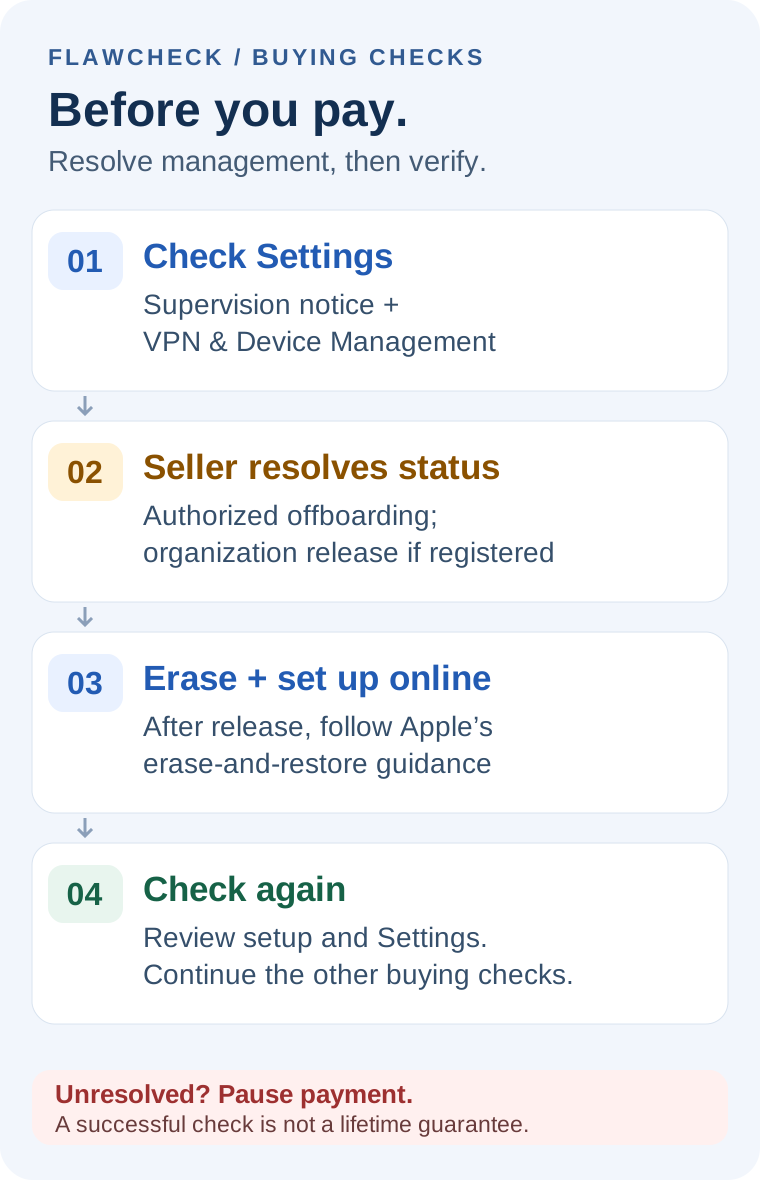
Use the following sequence for an in-person purchase. For an online purchase, perform the checks promptly after delivery, within the applicable return period.
1. Check Settings before the seller erases the phone
With the seller’s permission, open the main Settings page and look near the top for a supervision message. Then open Settings → General → VPN & Device Management. If a management profile appears, inspect its details and ask the seller to explain it. 4
Do not label every item in that area as MDM. Configuration profiles can be installed through different methods. An Enterprise App developer-trust entry can also relate to a manually installed app; its presence alone does not establish MDM enrollment. 78
If nothing appears, keep the conclusion narrow. Apple says that no profiles shown means no device-management profiles are installed. 9
Our inference from Apple’s installed-profile and enrollment documentation is that this does not independently establish release from an organization’s records. Continue with setup checks, especially when the seller identifies the phone as a former company or school device. 910
2. Have the seller prepare it for inspection
Match the phone to the listing and note its model and iOS version. Discuss the erase before anyone starts it.
The seller should back up their information and follow Apple’s sale-preparation instructions for their account, Find My, and SIM or eSIM. They should enter their own credentials. Do not casually delete their photos or other synced information to “clean” the device. 11
If organizational management is already evident, ask the seller to resolve that first. Erasing repeatedly is not a substitute for authorized offboarding.
3. Continue setup over a working internet connection
An erased phone displaying Hello has not yet completed the check. Apple says it needs to be set up and activated before testing. 6
Connect it to working internet and continue setup. Where offered, skip optional personal-account and backup transfers until the management question is settled.
Stop if an organization-named Remote Management screen or unresolved Activation Lock appears. Do not enter someone else’s work credentials or accept a promise that you can sort it out after payment.
A generic activation or server error does not, by itself, diagnose MDM. Record the exact message and check the connection before drawing that conclusion.
4. Recheck after reaching the Home Screen
Look again for unexplained supervision or management profiles. If the seller arranged organizational release, make sure the confirmation concerns the same device; a screenshot supplied remotely should not be your only evidence.
A successful setup and clear current Settings are useful observations. They do not guarantee every future event or prove the phone’s entire history.
Continue the remaining buying checks: battery, repairs, cameras, display, connectivity, carrier suitability, and condition. Use our used iPhone Battery Health guide for that separate condition check. Passing the management checks is only one part of the purchase decision.
Why Remote Management Can Appear After a Reset
Erasing a phone’s local information and changing its organizational enrollment records are different operations.
Apple documents that during ADE configuration, the device checks Apple’s servers for an assigned management service and contacts that service to enroll. If the relevant assignment remains, organizational setup can appear again. 10
That explains why “I factory-reset it” is not sufficient proof of organizational release.
Apple’s device-management documentation says removing an enrollment profile removes the configurations, settings and managed apps based on that enrollment. That is different from releasing a device from an organization. An outstanding Automated Device Enrollment assignment can apply management again during setup; do not use a reset or a missing profile as proof of release. 710
For example, a seller may show you a phone that opens normally today. If its organizational assignment remains unresolved, that demonstration does not establish what you will encounter during a fresh setup.
Avoid blanket claims that every reset or software update will bring management back. The outcome depends on the device’s enrollment and assignment. For a buyer, the practical response is to verify the handover before paying rather than predict when a warning might return.
Can the Seller Remove Remote Management?
Sometimes the seller can arrange it. That does not mean every seller can personally remove every type of management.
Removal is not one universal operation
Ask what actually changed.
Swipe sideways on small screens · focus table + arrow keys| Seller says | Meaning | Limit | Buyer’s next step |
|---|---|---|---|
| Profile removed | Installed profile / enrollment changed | Does not establish organization release | Clarify remaining enrollment records |
| Device unassigned | Management-service assignment changed | Do not assume active management ended immediately | Ask about complete offboarding |
| Released from organization | Removed from organizational program | Still needs erase/restore and setup checks | Verify matching device and test again |
Each result has a scope. Continue checking before deciding to buy.
Some enrollment profiles are configured so the user cannot remove them. Removal rights depend on how management was installed and configured. 712
Apple Business distinguishes service unassignment from Release from Organization. For release, an authorized party completes the action and verifies the device’s Released status. Apple then requires the device to be erased and restored. Apple School Manager documents a corresponding release process. 11314
Ask the seller to coordinate the relevant organizational offboarding. The buyer should not need access to a company’s administrative console. There is no universal three-click sequence that applies to every MDM provider or enrollment method.
Activation Lock also needs separate attention: Apple warns that managing it through Apple Business is unavailable after release. The authorized party should handle that dependency before completing the handover. 13
A bypass promise is insufficient evidence. We would not accept “the screen is bypassed” as proof that organizational records were released. Ask for authorized resolution and verify the phone afterward.
Should You Buy an iPhone With Remote Management?
If you are still choosing a buying route, compare new, used and renewed iPhones.
For a personal phone, our recommendation is to avoid unresolved organizational management. Reconsider only after the seller resolves it and allows the necessary checks.
FlawCheck guidance for personal use
Keep checking, wait, or walk away?
Swipe sideways on small screens · focus table + arrow keys| Observed sign | Meaning | Limit | Next action |
|---|---|---|---|
| Remote Management during setup | Organizational enrollment appears | Does not prove theft | WAIT — seller resolves; do not pay yet |
| No profile currently visible | No installed profile shown | Not proof of organization release | CHECK — complete online setup |
| Release + clear setup | Stronger evidence of resolved handover | No lifetime guarantee or hardware certification | CONTINUE — finish other buying checks |
| Bypassed / never reset | Seller relies on an unverified workaround | Does not establish release | AVOID — choose another personal phone |
| Generic setup error | Cause remains undetermined | Not enough to diagnose MDM | WAIT — document error; check network |
Each result has a scope. Continue checking before deciding to buy.
Who should avoid it? Anyone who needs a personal phone ready for immediate use, cannot verify the seller’s organizational handover, or would have to depend on a bypass service.
A lower price does not give you the permissions needed to change organizational records. If your purchase depends on an unknown administrator helping later, the unresolved issue belongs in the seller’s hands before the transaction proceeds.
What to Do If You Already Bought One
Act promptly and keep the transaction process moving while the seller investigates.
- Preserve the listing and order details. Keep the seller’s condition and management-related promises.
- Record the actual issue. Note the delivery date, model, iOS version where accessible, and exact warning. Retain relevant images privately, without publishing full identifiers or someone else’s data.
- Contact the seller through the transaction channel. Explain the observed management issue and request authorized resolution or a return.
- Check your actual deadlines and conditions. A promise to contact IT does not establish an extension to a return or claim deadline.
- Verify any resolution. Where organizational release applies, confirm it concerns your device, then complete the required erase/restore and online setup.
- If unresolved, pursue the applicable return or dispute process. Do not pay for a bypass merely to keep using the phone while the transaction deadline passes.
Apple recommends understanding the return policy and inspecting a preowned iPhone after delivery. Specific fees, deadlines, and refund eligibility depend on your purchase. 6
Before returning it, follow the return instructions and remove your own account, data, and cellular profile if you added them. Apple’s computer-restore instructions note that restoring an iPhone does not delete its eSIM, so do not assume that step handles everything. 15
Questions to Ask the Seller Before You Pay
Ask specific questions rather than accepting “fully unlocked”:
- Was this phone previously issued by a company or school?
- If it was managed, who authorized its sale and coordinated offboarding?
- Where applicable, was it released from Apple Business or Apple School Manager?
- Can I inspect Settings and complete online setup before paying?
- Has any bypass been used, or are there restrictions on resetting it?
- For delivery, what process applies if organizational enrollment appears?
A seller may need to ask their IT contact for clarification. That is a reason to wait for a complete answer, not a reason to accuse them. If the answer remains unverifiable, choose a different phone.
Sources and evidence scope
Research-based guide for US personal-use buyers. Selected Apple enrollment, supervision and release guidance reviewed October 16, 2026; this date does not certify every linked source. No device or bypass-tool testing. Recommendations are editorial judgments.
- Apple Business assignment
- Enrollment methods and privacy
- Device supervision
- Supervised devices
- Carrier unlocking
- Preowned iPhone
- Profile lifecycle
- Enterprise apps
- Review configuration profiles
- ADE security
- Prepare for sale
- ADE management
- Apple Business release
- School Manager release
- Computer factory restore
- GSMA Device Check FAQ — scope of Block List results (checked October 15, 2026).
