DSDOWNSIDE
TechBrand: Seagate

Seagate Expansion 8TB Desktop Hard Drive Review: The Hidden Downside

"A high-capacity 8TB backup solution hampered by SMR technology write slowdowns during large transfers, reliance on an AC wall adapter, and an outdated Micro-B USB cable."
Overall Rating
7.4/ 10

Good

Downside Score
7.6/ 10

Significant Trade-offs

Retail Price
$159

MSRP / Street Price

By alex-chen
Updated August 25, 2026
Check Current Price($159)Transparent Affiliate Link — Helps fund our lab tests.
Seagate Expansion 8TB Desktop External Hard Drive (USB 3.0 HDD, STKP8000400)
Downside 7.6/10
Executive Summary

The Bottom Line

Overall
7.4 / 10
Downside
7.6 / 10

"A high-capacity 8TB backup solution hampered by SMR technology write slowdowns during large transfers, reliance on an AC wall adapter, and an outdated Micro-B USB cable."

What We Like

  • Low cost per terabyte for 8TB bulk capacity
  • Instant drag-and-drop Windows and Mac plug-and-play
  • Includes 1-Year Rescue Data Recovery Services
  • Textured diamond plastic casing hides fingerprints

What We Don't Like (Downsides)

  • ×SMR (Shingled Magnetic Recording) causes write speeds to drop to 15-30MB/s on large files
  • ×Requires a bulky external AC wall power adapter to operate
  • ×Uses an outdated USB 3.0 Micro-B connector
  • ×Lacks a physical power switch and activity LED indicator
  • ×Produces low-frequency acoustic hum and desk vibration
Best For:

Cold storage, media archiving, and automated system backups, Users seeking maximum gigabytes per dollar under $160

Avoid If:

Direct 4K/8K video editing or active scratch disk use, Users moving large 100GB+ file batches frequently, Mobile travelers needing USB bus-powered portable storage, Users wanting a quiet, silent desk environment

Downside Compromise Score

Measures how many negative trade-offs this product demands.

7.6 / 10
Significant Compromise
0-2 (Minor)3-4 (Low)5-6 (Moderate)7-8 (Significant)9-10 (Severe)

Don't Buy Seagate Expansion 8TB Desktop External Hard Drive (USB 3.0 HDD, STKP8000400) If...

If any of these conditions apply to your use case, save your money or look at alternatives.

  • Direct 4K/8K video editing or active scratch disk use
  • Users moving large 100GB+ file batches frequently
  • Mobile travelers needing USB bus-powered portable storage
  • Users wanting a quiet, silent desk environment

What the Marketing Doesn't Tell You

Comparing bold manufacturer advertisement claims with independent lab and field testing.

Marketing Claim

"Fast Drag-and-Drop File Transfers"

Real-World Reality

Burst speeds hit 160MB/s initially, but large sustained writes exhaust the cache, causing SMR rewrite slowdowns to 20MB/s.

Marketing Claim

"Easy Desktop Backup Solution"

Real-World Reality

Requires a wall outlet for power. Cannot run off laptop USB ports when working away from a desk.

Marketing Claim

"Quiet, Reliable Desktop Storage"

Real-World Reality

The 3.5-inch 7200/5400 RPM drive mechanism creates audible clicking sounds during active indexing and hums on wooden desks.

Buyer Warning: SMR Write Speed Collapse & AC Wall Adapter Required

The drive uses SMR (Shingled Magnetic Recording) tech, causing write speeds to drop to 15–30 MB/s on large file transfers. Furthermore, it requires a bulky 12V AC wall power brick to operate.
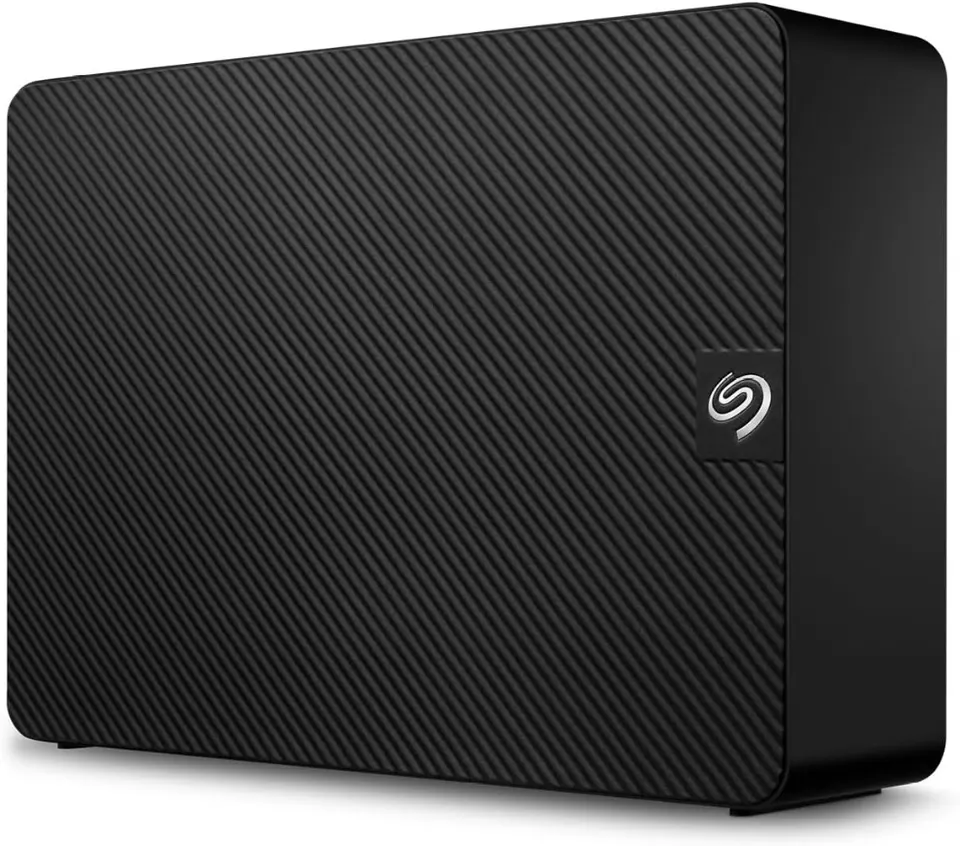
Seagate Expansion 8TB Desktop External Hard Drive Teardown

The Seagate Expansion 8TB Desktop External Hard Drive (USB 3.0 HDD, STKP8000400) is one of the most popular high-capacity external storage solutions for PC and Mac users. Offering an expansive 8TB of storage space for under $160, drag-and-drop USB 3.0 setup, and 1 year of Rescue Data Recovery Services, it appeals to users seeking maximum gigabytes per dollar for media archives and automated backups.

However, the downside first: SMR write speed slowdowns during large file transfers, mandatory AC wall power brick reliance, an outdated Micro-B cable, and low-frequency desk vibrations reveal significant usability trade-offs.


1. SMR (Shingled Magnetic Recording) Speed Collapse

The drive’s primary performance bottleneck stems from its internal recording architecture:

SMR Shingled Track Rewrite Bottleneck

  1. Fast Initial Burst Speeds: When transferring small batches of files, the drive utilizes a fast write cache, reaching speeds up to 160 MB/s.
  2. Sustained Speed Drop: When transferring large 100GB+ game folders or 4K video archives, the cache runs out. The drive must rewrite overlapping “shingled” tracks, causing write speeds to collapse to 15 MB/s – 30 MB/s, turning a 15-minute transfer into a multi-hour wait.

2. Mandatory AC Wall Power Brick

Unlike 2.5-inch portable hard drives or external SSDs that run off your laptop’s USB port:

  • Desktop 3.5-inch Requirement: The Seagate Expansion 8TB houses a full-size 3.5-inch desktop hard drive inside.
  • Wall Adapter Needed: It requires a bulky 12V AC power wall adapter plugged into an electrical outlet to function. You cannot use it on a plane, train, or outdoor coffee shop without AC power.

3. Outdated Micro-B USB 3.0 Connector

Instead of adopting the universal USB-C standard found on modern devices:

  • The drive uses an older USB 3.0 Micro-B port on the back of the enclosure.
  • Connecting to modern MacBooks, iPads, or thin Ultrabooks requires purchasing a separate USB Micro-B to USB-C cable or USB Type-A dongle adapter.

4. Constant Spindle Hum & Vibration

Because the drive lacks a physical ON/OFF power switch:

  • Continuous Idle Spinning: The internal hard drive platter spins continuously as long as the AC power adapter is plugged in.
  • Desk Vibration: On lightweight wooden desks, the 3.5-inch drive produces a noticeable low-frequency acoustic hum and vibration during active file indexing.

5. Summary: Excellent Mass Storage, Poor Active Scratch Disk

If you need a cost-effective 8TB drive to sit on your desk for automated nightly backups, movie archives, or cold storage, the Seagate Expansion 8TB delivers incredible dollar-per-terabyte value.

However, if you need a fast drive for 4K video editing, moving massive game libraries regularly, or portable travel use, skip this SMR drive and choose a Conventional Magnetic Recording (CMR) drive like the Western Digital 8TB Elements or an external portable SSD.

True Cost of Ownership

Estimated total expenditure over 2 years including hidden secondary costs.

Total Est. Cost
$174
Base Product Price$159
Required / Recommended Accessories$15
Replacement Parts (Filters, Pads, Tips)$0
Consumables & Supplies$0
Software / Cloud Subscriptions$0
Estimated Maintenance$0
Calculated based on average usage patterns and manufacturer part pricing.

Score Breakdown

Detailed multi-vector rating metrics across key evaluation pillars.

Performance6.5 / 10
Build Quality7.0 / 10
Ease of Use8.0 / 10
Durability6.8 / 10
Value for Money8.0 / 10
Downside Severity7.6 / 10

Head-to-Head Comparison

How this product stacks up against key market competitors.

ProductPriceOverall RatingDownside ScoreBest ForKey Trade-off / Verdict
Seagate Expansion 8TB Desktop External Hard Drive (USB 3.0 HDD, STKP8000400)
Reviewed Item
$1597.4 / 107.6 / 10Cold storage, media archiving, and automated system backups, Users seeking maximum gigabytes per dollar under $160"A high-capacity 8TB backup solution hampered by SMR technology write slowdowns during large transfers, reliance on an AC wall adapter, and an outdated Micro-B USB cable."
WD Elements 8TB Desktop
$1697.8 / 106.2 / 10Cleaner sustained write performance"Slightly more expensive but offers better sustained write consistency"
Toshiba Canvio Flex 4TB Portable
$1098.0 / 105.0 / 10Bus-powered USB-C portability"Smaller capacity but operates without an AC wall power brick"

Better Alternatives

Consider these options if the downsides of Seagate Expansion 8TB Desktop External Hard Drive (USB 3.0 HDD, STKP8000400) are dealbreakers for you.

If you hate:

"CMR technology with consistent fast write speeds & 3-year warranty"

Buy this instead:
Western Digital 8TB Elements Desktop Hard Drive
See Review
If you hate:

"Ultra-fast 1050MB/s SSD speeds & USB bus powered"

Buy this instead:
SanDisk 2TB Extreme Portable SSD
See Review

Technical Specifications

Verified manufacturer specifications.

Capacity
8TB (8,000 GB)
Drive Form Factor
3.5-inch Desktop Internal HDD
Recording Tech
SMR (Shingled Magnetic Recording)
Interface
USB 3.0 (Micro-B to Type-A)
Power Source
18W External AC Power Adapter (12V)
Dimensions
7.04 x 4.92 x 1.65 inches (2.06 lbs)

Frequently Asked Questions

Direct answers to common buyer concerns and uncertainties.

Why does the write speed drop so low on the Seagate Expansion 8TB?

The drive uses SMR (Shingled Magnetic Recording) technology. Once its fast write cache is full, the drive must rewrite overlapping tracks, causing write speeds to drop from 160MB/s down to 15-30MB/s on large files.

Does the Seagate Expansion 8TB require a wall outlet power adapter?

Yes. As a 3.5-inch desktop hard drive, it requires the included 12V AC power wall adapter. USB bus power alone is not sufficient.

alex-chen

Written by alex-chen

Verified Reviewer

Product reviewer and independent testing engineer.

Related Product Teardowns

View All Reviews →
Apple AirPods Pro 3
Audio
Downside 6.5/10
Apple
8.8

Apple AirPods Pro 3

"Exceptional ANC and seamless Apple integration, but the walled garden, non-replaceable batteries, and planned obsolescence make the true cost much higher than the sticker price."

Primary Downside:

"Non-replaceable batteries limit lifespan"

$279Read Teardown