Should You Charge Your Phone to 80%? The Battery-Life Trade-Off Most Guides Ignore
Charging to 80% may reduce battery wear, but it also cuts daily headroom. See when 80%, 90% or optimized charging makes more sense.
Decision in 30 seconds
What matters most
- ✓ An 80% limit reduces time at a high state of charge, but it removes 20 percentage points of displayed capacity from the start of the day.
- ✓ Losing 20 percentage points does not guarantee exactly 20% less runtime; workload, signal, temperature and the user's normal stopping point matter.
- ✓ A sustainable 90% limit can be more useful than an 80% rule that forces daily top-ups or is constantly disabled.
- ✓ Optimized charging still reaches 100% but reduces how long the battery remains full; it is a practical choice for people who need maximum range.
- ✓ Heat and high state of charge interact, so avoiding sustained heat is more robust than obsessing over the difference between 80% and 85%.
How we selected
- Whether the selected limit comfortably lasts through a normal day
- Planned ownership period and access to affordable battery service
- Time spent connected to power or sitting near a full charge
- Heat during charging, gaming, navigation, camera use and wireless charging
- Ability to override the limit before travel, outages or demanding workloads
Bottom line
Use the lowest charge limit that comfortably survives your normal day. An 80% cap makes sense for light users, frequently plugged-in phones and long ownership plans; 90% is often the better compromise, while 100% with optimized charging is reasonable when daily range matters more.
Short answer
Charging to 80% can reduce long-term battery wear, especially if you often leave the phone plugged in or keep it for years. But it is not automatically the best setting for everyone.
The downside is immediate: you start with 20 percentage points less displayed charge. That does not mean exactly 20% less runtime, but it reduces your margin for navigation, video, gaming, hotspot use, poor coverage or a long day.
An 80% limit makes sense when it comfortably lasts a normal day. If it forces a recharge, power bank or constant monitoring, 90% or optimized charging may be the better compromise.
Use the lowest charge limit that meets your normal day without creating a second charging problem.
Charge to 100% when you genuinely need the range. Occasional full charges are not a failure, and modern phones already manage charging to prevent literal overcharging.
What the 80% limit actually changes
Lithium-ion batteries age through a combination of time, temperature, charging patterns, energy throughput, and chemical conditions inside the cell. There is no single habit that controls all of this.
A high state of charge generally means higher cell voltage. Spending a long time at that higher voltage can accelerate some of the chemical reactions that gradually reduce capacity and increase internal resistance. Heat can accelerate those reactions further. This is why manufacturers focus not only on whether a phone reaches 100%, but also on how long it remains there.
Apple says Optimized Battery Charging reduces the time an iPhone spends fully charged. Its fixed Charge Limit stops compatible iPhones near a selected level between 80% and 100%. Google describes its Pixel options similarly: Adaptive Charging still reaches 100% near the time you unplug, while Limit to 80% prioritizes long-term battery health.
An 80% limit therefore changes two things:
- It lowers the maximum state of charge reached during routine charging.
- It reduces or eliminates the time the battery would otherwise spend near full.
It does not freeze battery aging. Calendar-aging tests on commercial NMC cells and a four-year study of silicon-containing pouch cells support the general link between state of charge, temperature and degradation. They do not predict your phone’s exact Battery Health—or prove that an 80% cap doubles its lifespan.
The trade-off most guides ignore
If you cap a new phone at 80%, you voluntarily give up 20 percentage points of displayed charge today to preserve an uncertain amount of capacity for later. That can be a sensible exchange—but only if the missing headroom has little value to you.
If you normally finish the day at 40%, starting at 80% may still leave a comfortable margin. If you normally finish at 15%, the cap could force a top-up, power bank or earlier Low Power Mode. The battery may age more gently, but the phone becomes less useful from day one.
Losing 20 percentage points of displayed charge also does not guarantee exactly 20% less screen time. Runtime depends on signal strength, temperature, workload, your usual shutdown point and the accuracy of the battery estimate. “20% less daily battery life” is catchy but too precise.
- Benefit: potentially slower long-term degradation.
- Cost: less daily reserve and possibly more charging friction.
- Uncertainty: no one can predict the exact benefit for every model and usage pattern.
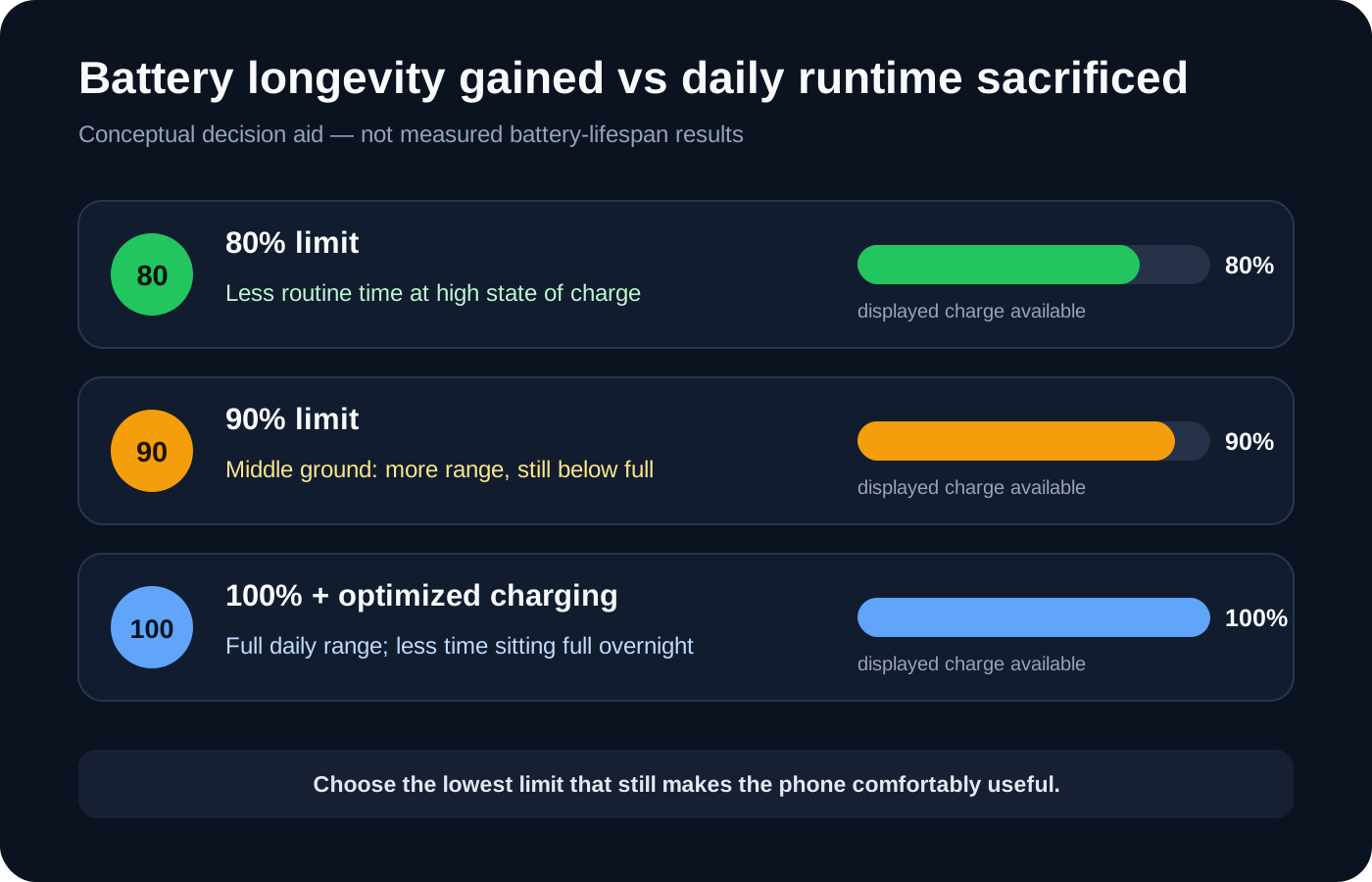
Conceptual decision aid—not measured battery-lifespan results or a FlawCheck longevity test. Actual degradation varies by cell chemistry, temperature, charging behavior and device design.
80% vs 90% vs 100% charging
The best choice is not necessarily an extreme. A 90% or 95% limit can preserve more useful range while reducing time spent fully charged.
| Charge setting | Main advantage | Main downside | Best suited to |
|---|---|---|---|
| 80% limit | Minimizes routine time at a very high state of charge | Least daily headroom; may require a top-up | Light users, desk charging, long ownership plans |
| 90% limit | Better balance between longevity and range | Less protection than a lower cap; still not full capacity | Users who find 80% slightly restrictive |
| 95% limit | Small sacrifice in range and less time pinned at full | Likely a smaller longevity benefit | Users who need nearly all-day capacity |
| 100% with optimized charging | Maximum available range while reducing time spent full overnight | Still reaches a high state of charge every cycle | Heavy users and people with predictable overnight charging |
| 100% without optimization | Maximum availability and simplest routine | More time may be spent near full, especially when left plugged in | Travel days, emergencies, irregular schedules |
Samsung’s guidance says 80%, 85%, and 90% limits can all reduce wear, while the everyday difference may be small; avoiding extended time at 100% matters more than obsessing over the lowest possible number. That supports a graduated decision rather than a rigid rule.
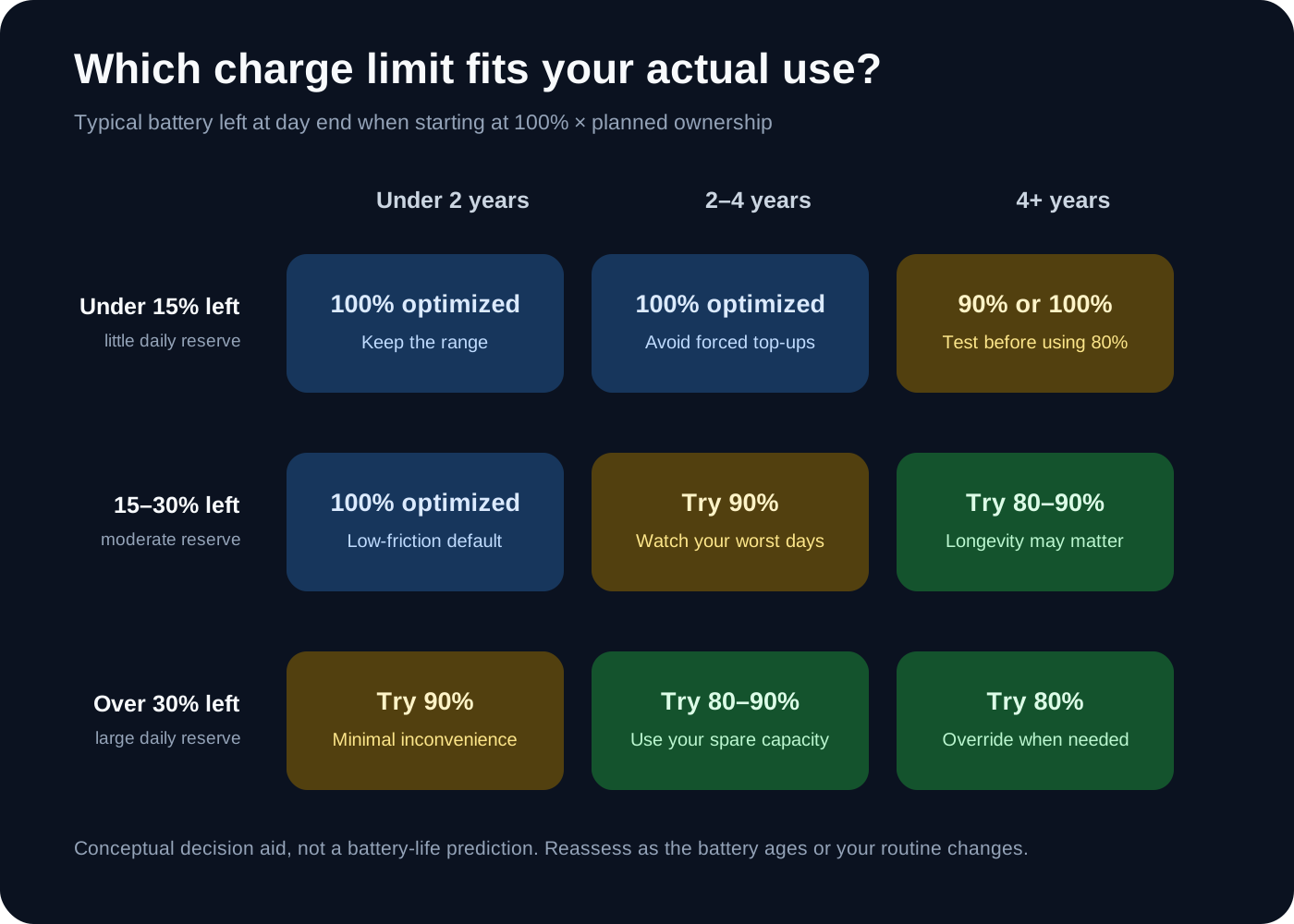
Use your typical end-of-day reserve when starting at 100%. This matrix is a conceptual decision aid, not a battery-life prediction.
When the 80% limit makes sense
You finish with plenty of charge or stay plugged in
If your phone regularly ends the day above 30% or 40%, the top 20 percentage points may be unused insurance. A lower limit also makes sense for desk workers, drivers and docked-phone users who keep the device connected for hours. The issue is not simply touching 100%; it is remaining near full.
You plan to keep the phone for four to six years
The longer the ownership period, the more time a modest reduction in wear has to matter—especially when battery service is expensive, inconvenient or potentially affects the water-resistance seal. Our long-term phone ownership guide explains why update support, parts access and repair cost still matter after charging habits are optimized.
You can override the limit easily
A charging policy works best when it can adapt. If your phone lets you temporarily charge to 100% before travel or a demanding day, using 80% normally carries less risk.
When charging to 100% is the better decision
Travel and long days away from outlets
Navigation, roaming, weak coverage, photography and background location services can consume much more energy than a normal day. The extra reserve is useful; one full charge will not define the battery’s lifespan.
Recording photos or video
Camera use keeps several power-hungry components active. Starting at 100% reduces the chance that battery anxiety ends a recording session early.
Gaming, hotspot use and demanding workloads
These workloads combine high power draw with heat. An 80% start may move charging into the workload, when the phone is already warm. Charging fully beforehand and unplugging may be more practical.
Severe weather, outages and emergencies
When power is uncertain, maximum usable capacity matters more than marginal long-term optimization. Treat the battery as a tool, not a museum piece.
An older battery no longer lasts the day
Limiting a degraded battery to 80% can worsen an existing runtime problem. Once capacity loss affects use, compare battery-service cost and downtime with replacing the phone. Our battery replacement versus phone upgrade guide provides that decision test. Preserving an inconvenient battery is not the same as preserving a useful device.
Battery longevity is only one part of a long ownership plan. If the phone may stay with you for four or five years, our 128GB versus 256GB storage guide checks whether fixed capacity—not battery wear—could force the earlier upgrade.
Heat may matter more than the exact percentage
Choosing 80% while routinely overheating the phone is false precision.
Heat, time at high charge, and charging habits—not one magic number. A lower limit addresses only one part of battery aging; it cannot cancel sustained heat or an impractical charging routine.
Apple advises avoiding use or charging in ambient temperatures above 35°C because high heat can permanently reduce battery lifespan. The iPhone may even limit charging above 80% when temperatures exceed the recommended range.
Common high-heat situations include:
- Gaming or recording video while fast charging.
- Leaving the phone on a car dashboard in direct sunlight.
- Wireless charging with poor coil alignment or a thick insulating case.
- Running navigation and charging in a hot vehicle.
- Charging under bedding or in another location that traps heat.
Wireless and fast charging are not automatically harmful. What matters is the temperature the phone reaches and how long it remains hot, especially at a high state of charge. Avoiding sustained heat is more robust than obsessing over 80% versus 90%.
Does topping up more often cancel the benefit?
Plugging in twice does not automatically count as two battery cycles.
Apple defines one charge cycle as using an amount equal to 100% of the battery’s capacity, even if that usage happens across several partial charges. Using 60% one day and 40% the next adds up to one equivalent cycle; the number of cable connections is not the cycle count.
Partial charging can therefore be reasonable. Charging from 45% to 75% is not inherently worse merely because it is another session. But an 80% limit does not make energy throughput irrelevant: total energy use still contributes to cycle aging, and charging may generate heat.
The useful questions are:
- How much battery capacity do you consume in total?
- How hot does the phone get while charging and using it?
- How long does it sit at a high state of charge?
Counting plugs is not useful.
How Apple, Pixel and Samsung handle charge limits
Charging controls vary by model, software and region. Check your device instead of assuming every phone from a brand behaves identically.
| Platform | Fixed limit | Adaptive option | Important caveat |
|---|---|---|---|
| Apple iPhone | iPhone 15 and later can select 80% to 100% in 5% steps | Optimized Battery Charging delays charging past 80% when the limit is 100% | iPhone may occasionally charge to 100% to maintain accurate estimates |
| Google Pixel | Supported models offer Limit to 80% | Adaptive Charging finishes near the expected unplug time | Google says the phone may fully charge every tenth cycle for calibration |
| Samsung Galaxy | Supported devices/software may offer 80%, 85%, 90% or other levels | Some versions include adaptive or sleep-based protection | Menus and available levels vary by model, software and market |
Occasional calibration charges above the selected limit are normal and do not erase the feature’s previous benefit.
A practical charging policy
You do not need to micromanage every charge. Use a policy that survives normal life:
- Begin with 90% if your phone supports it. Use it for a week and note the lowest level you normally reach before charging.
- Try 80% only if 90% leaves substantial unused capacity. There is no prize for choosing the smallest number.
- Use optimized charging at 100% if your schedule is predictable but you need full range. It reduces time spent full without removing the top of the battery from daily use.
- Charge to 100% before demanding days. Travel, photography, hotspot use and outages are valid reasons.
- Prioritize temperature. Move the phone out of direct sun, remove an insulating case if charging becomes unusually hot, and avoid heavy workloads while charging when practical.
- Avoid repeatedly running the phone to shutdown. A strict upper limit should not push you toward very low states of charge every day.
- Reassess as the battery ages. A limit that worked with a new battery may become impractical later.
The setting should support your behavior, not force you to organize your day around battery chemistry. If a future battery replacement is part of the plan, remember that opening a sealed phone can affect its original protection; our IP68 versus water-damage warranty guide separates the laboratory rating from actual repair and warranty coverage.
Who should care—and who should ignore this advice?
Charge limits matter most if you keep phones for years, often leave the device connected or finish most days with a large reserve. Then an 80–90% cap is a low-cost way to reduce one source of stress.
You can mostly ignore the rule if you replace phones every two or three years, need nearly all the battery or work away from outlets. Keep optimized charging enabled, avoid sustained heat and use the capacity you paid for.
Neither choice guarantees a particular Battery Health percentage. The sensible goal is not the healthiest possible battery at any cost. It is the best balance between useful runtime today, repairability later, and how long you realistically plan to own the phone.
FAQ
Is the 80% charge limit worth using?
It is worth using when 80% comfortably lasts through your normal day and you plan to keep the phone long enough to value reduced battery wear. If it forces routine top-ups or battery anxiety, try 90% or optimized charging instead.
What are the disadvantages of charging a phone only to 80%?
You begin with 20 percentage points less displayed charge, have less reserve for unexpected workloads, and may need to recharge sooner. The exact loss in runtime is not necessarily 20% because usage and discharge patterns vary.
Is an 80% limit better than Optimized Battery Charging?
It offers stronger control over maximum state of charge, but it also removes daily capacity. Optimized charging still reaches 100% while reducing the time spent there. The better option depends on whether you need full range.
Should I charge to 100% before traveling?
Yes, if the additional range may be useful. Navigation, roaming, photography and weak signal can increase consumption. Charging fully for a trip does not undo months of more moderate charging.
Does charging twice a day count as two cycles?
No. Equivalent cycles are based on cumulative capacity used, not the number of times you plug in. Several partial discharges can add up to one full equivalent cycle.
Is 80% or 90% the better charge limit?
Choose 80% if it leaves a comfortable reserve. Choose 90% if 80% regularly pushes the battery too low or requires another charge. A sustainable 90% policy is better than an 80% policy you constantly disable.
Should I use an 80% limit if I replace my phone every two years?
Probably not if it reduces usefulness. You may see some battery-health benefit, but the shorter ownership period gives you less time to benefit from it. Optimized charging and heat avoidance are less restrictive alternatives.
Is heat worse than charging to 100%?
Both temperature and high state of charge affect battery aging, and their combination can be especially unfavorable. There is no universal ratio that applies to every phone, but avoiding sustained heat is more valuable than obsessing over the difference between 80% and 85%.
Bottom line
Charging to 80% is a useful tool, not a universal commandment. It can reduce long-term wear by keeping the battery away from a high state of charge, but the cost is less daily headroom.
For many people, 90% is the overlooked middle ground. For heavy users, 100% with optimized charging is a reasonable choice. Use 100% whenever the extra range serves a real purpose, keep the phone cool, and stop treating occasional full charges as damage events.
The best limit is the one that protects the battery without making the phone worse to own.
Frequently Asked Questions
Direct answers to common buyer concerns and uncertainties.
Is the 80% charge limit worth using?
It is worth using when 80% comfortably lasts through your normal day and you plan to keep the phone long enough to value reduced battery wear. If it forces routine top-ups or battery anxiety, try 90% or optimized charging instead.
What are the disadvantages of charging a phone only to 80%?
You begin with 20 percentage points less displayed charge, have less reserve for unexpected workloads and may need to recharge sooner. The exact loss in runtime is not necessarily 20% because usage and discharge patterns vary.
Is an 80% limit better than Optimized Battery Charging?
It offers stronger control over maximum state of charge, but it also removes daily capacity. Optimized charging still reaches 100% while reducing the time spent there. The better option depends on whether you need full range.
Should I charge to 100% before traveling?
Yes, if the additional range may be useful. Navigation, roaming, photography and weak signal can increase consumption. Charging fully for a trip does not undo months of more moderate charging.
Does charging twice a day count as two cycles?
No. Equivalent cycles are based on cumulative capacity used, not the number of times you plug in. Several partial discharges can add up to one full equivalent cycle.
Is 80% or 90% the better charge limit?
Choose 80% if it leaves a comfortable reserve. Choose 90% if 80% regularly pushes the battery too low or requires another charge. A sustainable 90% policy is better than an 80% policy you constantly disable.
Should I use an 80% limit if I replace my phone every two years?
Probably not if it reduces usefulness. You may see some battery-health benefit, but the shorter ownership period gives you less time to benefit from it. Optimized charging and heat avoidance are less restrictive alternatives.
Is heat worse than charging to 100%?
Both temperature and high state of charge affect battery aging, and their combination can be especially unfavorable. There is no universal ratio that applies to every phone, but avoiding sustained heat is more valuable than obsessing over the difference between 80% and 85%.

Written by FlawCheck Editorial Desk
Editorial ResearchFlawCheck's editorial desk is responsible for source review, claim labeling, buyer-risk analysis, publication updates, and corrections. Current articles are research-based unless a documented hands-on method is explicitly provided.
Reviews behind this guide
View All Reviews →
Apple iPhone 18 Pro
"The iPhone 18 Pro is now a confirmed $1,199 flagship with meaningful hardware changes, but launch specifications do not prove that those changes improve ownership enough to justify upgrading. Wait for independent battery, thermal, camera and C2 modem testing if your current phone still works well."
"Starts at $1,199 in the US"

ASUS Vivobook Go 15 OLED Slim Laptop
"A budget-friendly 15.6-inch laptop crippled by non-expandable 8GB soldered memory, an outdated Zen 2 CPU architecture, dim 250-nit screen, and plastic chassis flex."
"8GB LPDDR5 RAM is permanently soldered to the motherboard (Zero upgrade slots)"
Boltt Ace 5G
"The Ace 5G offers a large battery, NFC and a clear update promise for its price, but the coarse display, 18W charging, heavy chassis and Boltt's unproven delivery record make waiting for independent tests the safer choice."
"6.79-inch display is only HD+"