Replace the Battery or Buy a New Phone? The Costs People Usually Miss
Battery replacement looks cheap until you count aging parts, lost water resistance, support life and resale value. Use this downside-first test before paying.
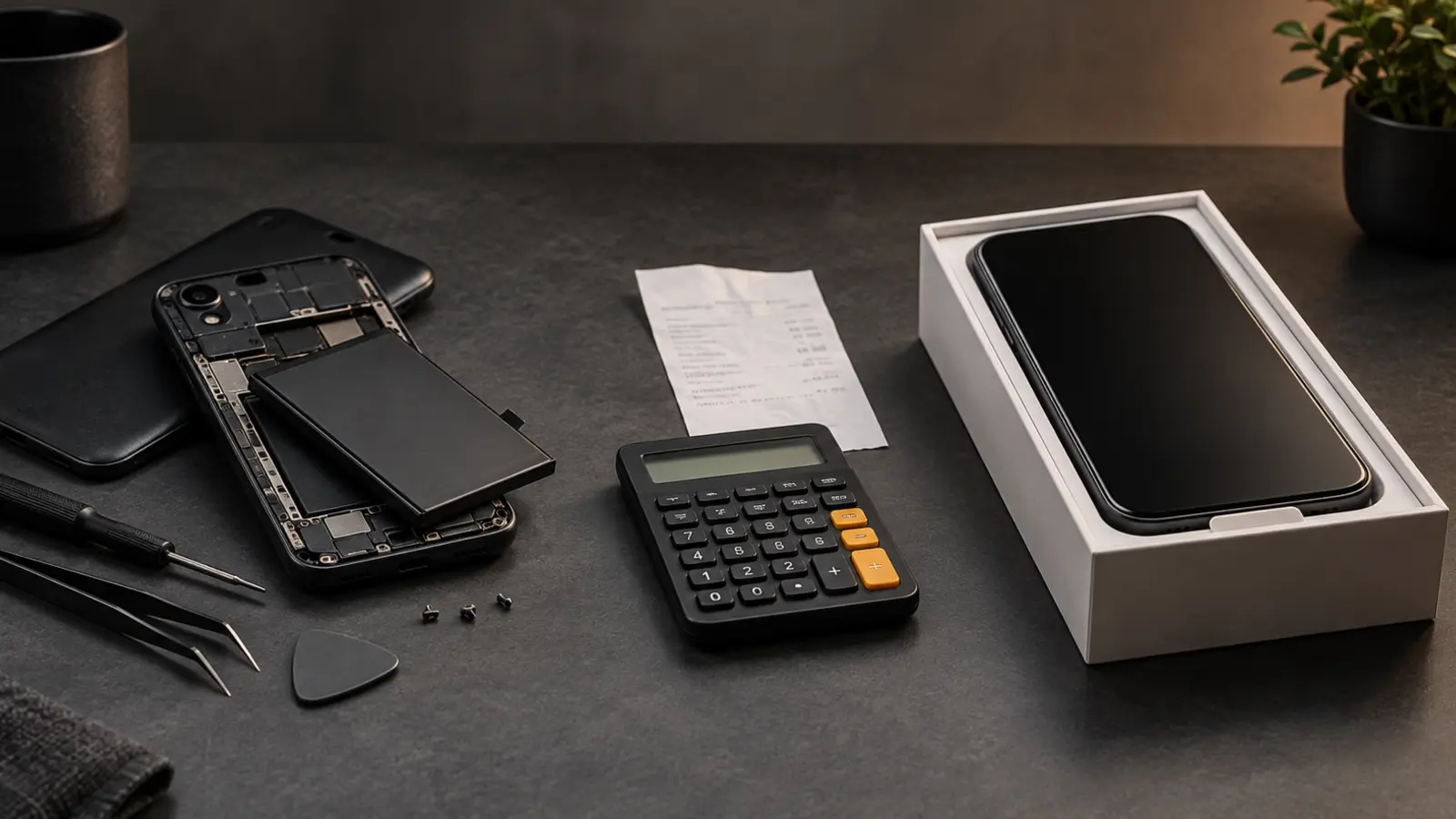
Decision in 30 seconds
What matters most
- ✓ Battery wear is a repairable fault, not proof that the entire phone is obsolete.
- ✓ An estimated capacity below 80% is a useful inspection point, but real runtime and unexpected shutdowns matter more than one percentage.
- ✓ Battery replacement makes the strongest financial case when it costs less than roughly 20–25% of a suitable replacement phone and can extend useful life by at least two years.
- ✓ Ending security support, cracked glass, failing ports, insufficient storage and poor performance can turn a cheap battery repair into false economy.
- ✓ Swelling, heat or physical deformation is a safety issue: stop using the phone and seek professional service rather than applying a cost formula.
How we selected
- Battery health, real screen-on runtime, shutdowns and charging behavior
- Remaining operating-system and security-update support
- Total repair quote including other damage and warranty terms
- Performance, storage, camera, connectivity and accessibility needs
- Expected additional years of use after repair
Bottom line
Replace the battery when the phone still meets your needs, remains secure and has no other expensive faults. Buy a new phone when battery wear is only one item in a growing repair bill, software support is ending, or the device no longer handles your essential tasks.
A phone that once lasted all day now reaches the afternoon at 25%. The tempting conclusion is that the whole device is finished. Usually, only one consumable component has aged.
Battery replacement can be one of the highest-value phone repairs. It can also be wasted money when the phone has stopped receiving security updates, its screen is cracked, storage is full and performance no longer meets the owner’s needs. Buying new has its own concealed bill: sales tax, accessories, financing, migration time and brutal first-year depreciation. The right question is not simply whether the battery is bad. It is which choice buys the most reliable, supported use for the least net cost.
This guide provides a repeatable decision instead of a universal rule.
The short answer
Replace the battery when all four statements are true:
- the phone still performs every essential task;
- it has meaningful security-support life remaining;
- it has no other costly or safety-related fault;
- and the complete repair cost is small compared with a suitable replacement phone.
Buy a new phone when battery wear is only one of several limitations, the device is leaving security support, or a repair would buy only a short and frustrating extension.
Do not base the choice solely on age. A three-year-old flagship with long update support and adequate storage can be a strong battery-replacement candidate. A cheaper two-year-old phone with a damaged display, poor parts availability and no useful support runway may not be.
| Choose battery replacement when… | Choose another phone when… |
|---|---|
| The battery is the dominant fault | Battery wear is one item on a growing fault list |
| At least two useful support years remain | Security support ends soon or has already ended |
| The complete quote is below roughly 20–25% of a suitable replacement | Repair plus near-term faults approach replacement cost |
| Performance, storage and connectivity still fit your needs | A healthy battery would not solve your daily complaints |
| The repair includes a traceable part and meaningful warranty | Parts, resealing or repair accountability are unclear |
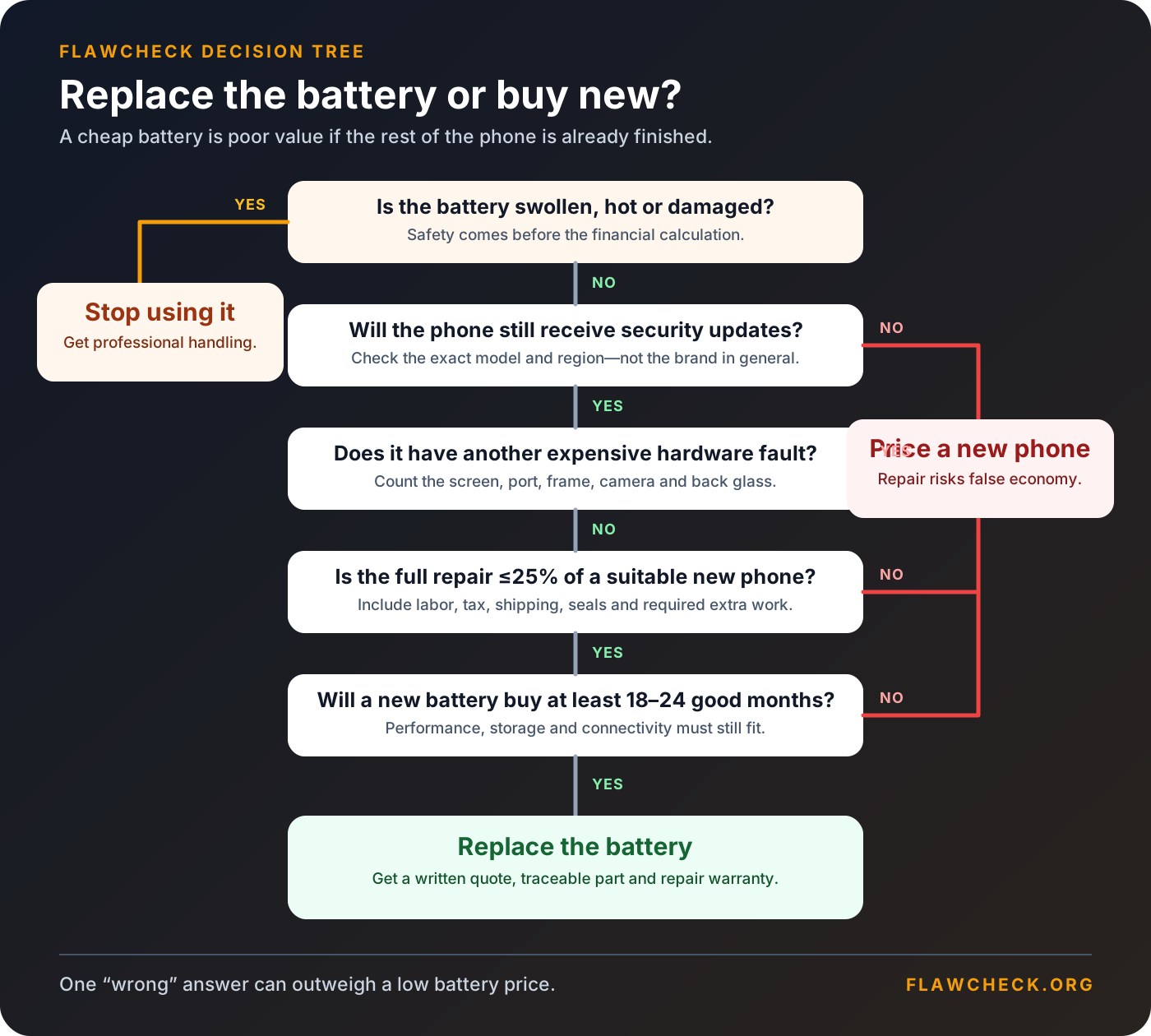
The FlawCheck test starts with support life and other faults—not with an arbitrary battery-health number.
First determine whether the battery is actually the problem
Fast drain does not always prove physical battery degradation. A new app, weak cellular signal, background synchronization, navigation, high display brightness, gaming, camera use or a recent system update can increase power consumption.
Before requesting a repair, review battery use across several normal days, restart the phone, install stable updates and check whether one app or weak cellular signal explains the drain. Then run the manufacturer’s diagnostic: Apple exposes battery health in Settings, Google provides Pixel battery diagnostics, and Samsung includes Phone diagnostics in Samsung Members. These readings are estimates; the decisive symptom is whether the phone fails before your next normal charging opportunity.
Is Replacing a Phone Battery Worth It?
Usually—when the battery is the dominant fault, the phone remains supported and the complete repair buys at least 18–24 useful months. It is poor value when a healthy battery would merely expose the next limitation: expired security support, inadequate storage, a damaged display or another likely repair.
What the 80% battery-health threshold really means
The number 80% appears often because manufacturers use it as a service or design benchmark. Apple says covered iPhones qualify for battery service at no additional charge when capacity falls below 80%. Google labels supported Pixels as “Reduced” below 80% and recommends considering replacement.
That does not make 80% a cliff. It is also a different measurement from an 80% charging cap: battery health estimates remaining capacity, while a charge limit controls how full the battery gets today. Our guide to whether an 80% charge limit is worth using explains the runtime-versus-wear trade-off.
A desk worker may remain comfortable at 78%, while a driver using navigation and high brightness may find 84% unusable. Treat 80% as a prompt to inspect real runtime, abrupt percentage drops, unexpected shutdowns, unreliable charging and power-related performance limits—not as an automatic verdict.
Safety overrides the financial decision
Do not continue ordinary use while calculating value if the battery appears swollen, the display or back is lifting, the phone becomes abnormally hot without a heavy workload, or there is an unusual smell or visible damage.
Stop charging and using the device. Do not press the enclosure closed, puncture the battery or place it under household waste. Ask the manufacturer, an authorized service center or an appropriate local battery-recycling service for safe handling instructions.
A suspected safety failure is not a reason to buy a phone immediately, but it is a reason to stop experimenting with the old one.
The costs people usually miss
The sticker-price comparison is almost designed to mislead. A $99 battery repair looks tiny beside a $799 phone, while a trade-in offer can make an upgrade look almost free. Neither number captures what you will actually spend—or what risks you retain.
Hidden costs of replacing the battery
- Inspection can uncover mandatory work. Some providers will not open a phone with cracked glass, a bent frame or previous liquid damage without addressing it. The battery quote can become a screen-and-battery quote after inspection.
- Shipping and downtime have value. Mail-in service can leave you without your authentication device, camera, navigation and work apps. A temporary phone, missed work or repeated setup belongs in the calculation.
- Opening the enclosure disturbs its seal. Proper adhesive replacement and testing reduce risk, but “resealed” is not automatically a lifetime guarantee against liquid damage.
- The rest of the phone keeps aging. Charging ports, displays, buttons, cameras and storage do not reset when the battery does. One likely second repair can reverse an otherwise attractive decision.
- A new battery cannot extend software support. Paying for fresh hardware months before security updates end may buy less useful life than the battery itself can deliver.
- The repair may not return its cost at resale. Buyers value a healthy battery, but a $100 service rarely raises an old phone’s selling price by the full $100. Repair for your own continued use, not on the assumption of guaranteed profit.
Hidden costs of buying a new phone
- The phone is not the whole checkout. Sales tax, a case, screen protector, charger, insurance or a higher storage tier can materially increase the first-year cost.
- Trade-in value is conditional. Quotes can fall after inspection, and trading in removes the option to keep the old phone as a backup or sell it privately.
- Financing hides the total. A small monthly number is still a purchase price, and carrier credits may require a long service commitment.
- Migration is work. Banking access, authenticators, eSIMs, wearables and app logins can take hours to restore. Some data or settings do not transfer cleanly.
- Depreciation is front-loaded. A new phone typically loses value faster in its first ownership period than an older phone loses over the same time.
- An unnecessary upgrade can repeat the same flaw. Buying another phone with insufficient storage, weak repairability or short support merely moves the regret forward.
| Cost or risk | Replace battery | Buy another phone |
|---|---|---|
| Up-front payment | Battery, labor, tax, possible shipping | Device, tax, accessories, possible activation |
| Time cost | Diagnostics, backup, repair downtime | Research, purchase, migration and reauthentication |
| Retained risk | Other old components and remaining support window | Early depreciation and undiscovered model-specific flaws |
| Water-resistance question | Seal is opened; ask about resealing and testing | New device begins with its stated factory resistance |
| Resale effect | Healthy battery may help, but rarely repays full service cost | Trade-in lowers net cost but surrenders the old device |
| Best financial case | One repair buys at least two good years | Upgrade resolves several real limitations at once |
The downside-first rule is simple: include the cost that is likely, not only the cost shown on the first screen.
Current official-service pricing is not one universal number
Manufacturer repair pages are useful, but they do not support a single timeless claim such as “an official battery replacement costs $99.” The final amount varies by model, country, tax, shipping, physical condition and service provider.
- Apple: its U.S. estimator showed model-dependent out-of-warranty battery service around $99–$129 when checked in September 2026. Apple states that inspection determines the final fee, shipping may be added, and authorized providers can set their own fees. Eligible AppleCare coverage includes battery service at no extra charge when capacity falls below 80%.
- Samsung: owners must select the exact Galaxy model and service route. Walk-in, mail-in and authorized-partner pricing can differ, so a generic web range is not a written Samsung quote. If you are replacing the whole device, our downside-first Samsung Galaxy buying guide compares support, storage and likely repair exposure before you move into another sealed phone.
- Google Pixel: Google offers mail-in and walk-in service in supported markets and uses authorized partners such as Asurion/uBreakiFix in the United States. Out-of-warranty price depends on the phone and inspection. Genuine DIY kits sold through iFixit are parts-only prices, not a fair comparison with installed service.
For planning, an authorized conventional-phone battery job commonly lands in roughly the $60–$130 band in the United States, but treat that only as a screening range. Foldables, additional damage, regional pricing and shipping can move the total. Get a written quote for the exact device before using any percentage rule.
Compare the next 12 months, not just today
Use the same time window for both choices:
12-month repair ownership cost = current phone value + complete battery service + likely additional repairs + downtime − phone value after 12 months
12-month replacement ownership cost = purchase price + tax + accessories + financing + migration − old-phone trade-in or sale value today − replacement-phone value after 12 months
“Trade-in today” and “resale after 12 months” are different offsets. Keeping the old phone means giving up what you could sell it for now, so its current market value belongs in the repair calculation. If you only want to compare cash leaving your account today, remove both end-of-period resale values rather than subtracting one side selectively.
Here is an illustrative example—not a price promise:
| Example cost over the next 12 months | Keep and repair | Buy a suitable phone |
|---|---|---|
| Current phone value / new-phone price | $200 | $650 |
| Battery service | $110 | — |
| Tax, shipping and accessories | $15 | $75 |
| Expected additional repair allowance | $60 | $0 |
| Downtime or migration allowance | $25 | $40 |
| Less old-phone sale/trade-in today | — | −$200 |
| Less phone value after 12 months | −$90 | −$400 |
| Illustrative 12-month ownership cost | $320 | $165 |
This example favors replacement because the assumed new phone retains substantial value after one year. Change the ownership horizon to three or four years, keep the new phone longer, or lower its future resale value and repair may regain the advantage. The table is valuable because it exposes those assumptions instead of declaring every $110 repair cheaper than every $650 purchase.
When Is a Phone Too Old to Repair?
Battery replacement has its strongest financial case when it costs no more than roughly 20–25% of a suitable replacement phone and should buy at least two supported, satisfying years. The denominator matters: compare against the least expensive phone that genuinely meets your needs, not automatically the newest flagship.
Then imagine your current phone with perfect battery life. If you would still complain about storage, lag, a damaged display, an unreliable port or missing connectivity, the battery is not the dominant problem. A fresh cell cannot add storage or RAM, so check whether the capacity you have now will last through the proposed extension.
Before treating storage pressure as a reason to replace the phone, check how much free storage the phone actually needs. A temporary low-space condition is different from a capacity mismatch that returns after every cleanup.
If storage is the deciding weakness, use our 128GB versus 256GB ownership-cost guide to estimate retained data growth, temporary workloads and cloud cost before replacing otherwise serviceable hardware. On Android phones, also check whether missing microSD is truly a dealbreaker before upgrading: expandable storage may postpone replacement for photo and offline-media users, but it usually cannot absorb every app or system workload.
The rule has exceptions. Repair can remain sensible above 25% when migration or accessibility setup is unusually costly. It can be poor value below 20% when support ends soon or a second major repair is likely. Use the threshold to begin scrutiny, not end it.
Three common decisions
| Situation | Likely decision | Downside-first reason |
|---|---|---|
| Three-year-old iPhone, otherwise healthy, with several supported years left | Replace the battery | One repair addresses the dominant fault |
| Four-year-old Android nearing support end with an unreliable port | Price another phone | A battery does not solve security and hardware risks |
| Older flagship with a cracked display and weak battery | Compare the complete repair bundle | A battery-only quote hides the real bill |
A refurbished phone is the third option
A reputable refurbished phone can bridge the gap when the current device has several faults but a new flagship would create excessive depreciation. Check its battery condition, warranty, repair history and remaining software support; a large refurbished discount does not erase a tired battery or a short support runway.
Will a new battery make the phone faster?
Sometimes, but only for a specific reason.
An aged battery may be unable to supply peak power reliably. Some phones manage performance to reduce shutdown risk. Replacing that battery can restore sustained behavior that was being limited by power delivery.
It cannot upgrade the processor, increase RAM, empty storage, repair thermal damage or reverse heavier software. If the phone remains slow while cool, adequately charged and with comfortable free storage, expect limited performance improvement from battery service alone.
Run the same real tasks before and after repair—camera launch, navigation, application switching and exporting a typical file—instead of relying on a single benchmark.
Water resistance after repair
Modern phones often use adhesive seals. Opening the enclosure disturbs them.
A professional repair may install new adhesive and perform pressure or leak testing, but service terms differ. Ask exactly what is tested and warranted. Do not assume an IP rating means water damage is covered; our IP68 versus water-damage warranty guide examines that mismatch in detail.
After any repair, continue treating water resistance as risk reduction rather than permission to submerge the phone.
Official service, independent repair or DIY?
| Route | Main advantage | Downside to verify |
|---|---|---|
| Official or authorized | Lowest uncertainty around part recognition, calibration and responsibility | Higher price or mandatory repair of other damage |
| Reputable independent | Often better value for an older phone | Part provenance, seal replacement, testing and written warranty |
| DIY | Lowest visible parts cost | Display damage, battery puncture, calibration and sealing risk |
A swollen or damaged lithium-ion battery is not a beginner project. For a more modular alternative, our Fairphone Gen 6+ review shows what replaceable battery, display and USB-C modules improve—and which camera, performance and water-resistance compromises remain.
A ten-minute decision worksheet
Write down these answers:
| Question | Repair signal | Upgrade signal |
|---|---|---|
| Does the phone meet every essential need with a charger nearby? | Yes | No |
| Is the battery the only major fault? | Yes | No |
| Are at least two useful years of security support expected? | Yes | No/unclear |
| Is storage sufficient for those years? | Yes | No |
| Is the complete repair under about 20–25% of a suitable replacement? | Yes | No |
| Does the repair include a traceable part and warranty? | Yes | No |
| Is the enclosure free of swelling or major structural damage? | Yes | No |
Five or more repair signals make battery replacement the likely value choice. Several upgrade signals mean you should total all limitations before spending. Any safety signal requires professional handling regardless of the score.
Questions to ask the repairer
- What is the complete price after inspection?
- Is this battery new, compatible and traceable?
- What capacity and service warranty are promised?
- Will health reporting, charging optimization and parts history work?
- Are adhesive seals replaced?
- Is any water-resistance test performed, and what does it guarantee?
- Is my data expected to remain intact, and should I erase the phone?
- What happens if the display breaks during opening?
- How long will the repair take?
Back up the phone before service. Remove payment cards or follow the manufacturer’s repair-preparation procedure, disable tracking only when officially required, and never give a technician an account password casually.
Recycle the removed battery through an appropriate collection channel; never place a lithium-ion battery in general household waste.
Final verdict
A degraded battery is usually a reason to repair a good phone, not replace it. Repair when the full quote is below roughly one quarter of a suitable replacement and buys at least 18–24 supported months. Replace the phone when a fresh battery would merely expose expired support, inadequate storage, damaged hardware or poor performance.
Ask one question: If this phone had a healthy battery tomorrow, would I happily keep it for two more years? If yes, get a complete repair quote. If no, make sure the next phone fixes the reasons.
For broader ownership planning, see our long-term phone buying guide and research methodology.
Sources
- Apple: iPhone battery service and repair
- Apple: iPhone battery and performance
- Apple: Understand iPhone battery usage and health
- Apple: About genuine iPhone batteries
- Google: Understand your Pixel battery
- Google: Fix issues with your Pixel phone battery
- Google: Find an authorized Pixel repair partner
- Samsung: Check, repair or replace a Galaxy battery
- Samsung: About Galaxy battery deterioration
- Which?: When to replace a phone battery
- iFixit: Smartphone battery health
- iFixit: Smartphone repairability scores
Editorial disclosure: FlawCheck did not inspect or repair every phone model. Battery-health readings, capacity, parts behavior, prices, safety procedures and support periods vary. Confirm current terms for the exact model and region before authorizing service.
Frequently Asked Questions
Direct answers to common buyer concerns and uncertainties.
Is 80% battery health the automatic replacement point?
No. It is a useful diagnostic threshold used by major manufacturers, but an estimate is not the whole decision. Replace the battery when reduced runtime, shutdowns or performance limitations materially affect use.
Will replacing the battery make an old phone faster?
It can restore performance when the phone limits peak power because an aged battery cannot deliver it reliably. It will not fix a slow processor, insufficient RAM, full storage, overheating, network limitations or poorly optimized software.
How long should a replacement battery extend a phone's life?
There is no guaranteed period. A two-year extension is a useful planning target, but the result depends on battery quality, usage, heat, repair quality and remaining software support.
Does battery replacement preserve water resistance?
Opening a sealed phone disturbs its adhesive seal. A qualified repairer may replace the seal and test the device, but you should ask what water-resistance testing and warranty are included rather than assuming the original rating is guaranteed.
Should I replace a swollen phone battery myself?
No. Stop charging and using the device, avoid pressing or puncturing it, and obtain professional handling advice. Swelling changes the task from routine maintenance to a safety issue.
Is an official battery always required?
Use a reputable service provider and a traceable, compatible part. Official service can provide calibration, parts history and warranty advantages on some phones; third-party quality and device behavior vary. Compare the complete service terms, not only the battery price.

Written by FlawCheck Editorial Desk
Editorial ResearchFlawCheck's editorial desk is responsible for source review, claim labeling, buyer-risk analysis, publication updates, and corrections. Current articles are research-based unless a documented hands-on method is explicitly provided.
Reviews behind this guide
View All Reviews →
Apple iPhone 18 Pro
"The iPhone 18 Pro is now a confirmed $1,199 flagship with meaningful hardware changes, but launch specifications do not prove that those changes improve ownership enough to justify upgrading. Wait for independent battery, thermal, camera and C2 modem testing if your current phone still works well."
"Starts at $1,199 in the US"

ASUS Vivobook Go 15 OLED Slim Laptop
"A budget-friendly 15.6-inch laptop crippled by non-expandable 8GB soldered memory, an outdated Zen 2 CPU architecture, dim 250-nit screen, and plastic chassis flex."
"8GB LPDDR5 RAM is permanently soldered to the motherboard (Zero upgrade slots)"

Boltt Ace 5G
"The Ace 5G offers a large battery, NFC and a clear update promise for its price, but the coarse display, 18W charging, heavy chassis and Boltt's unproven delivery record make waiting for independent tests the safer choice."
"6.79-inch display is only HD+"