
Quick answer: You can look for warning signs and check whether a used iPhone works today, but a meeting with the seller cannot establish its complete liquid history. Ask about exposure and repairs, inspect the exterior, check the liquid contact indicator if accessible, and try everyday functions. If a warning sign remains unexplained, get a diagnosis before paying.
Our verdict: For a main phone, pass on unresolved suspected liquid damage. A low price is not a substitute for an inspection, a repair quote, and clear return terms. A phone without obvious warning signs can remain a candidate; it has not earned a guarantee against hidden problems.
This is a buying checklist based on published guidance, not a hands-on test or a diagnosis of a particular device.
Start with the full used iPhone buying checklist for activation, management, carrier eligibility and the rest of the transaction.
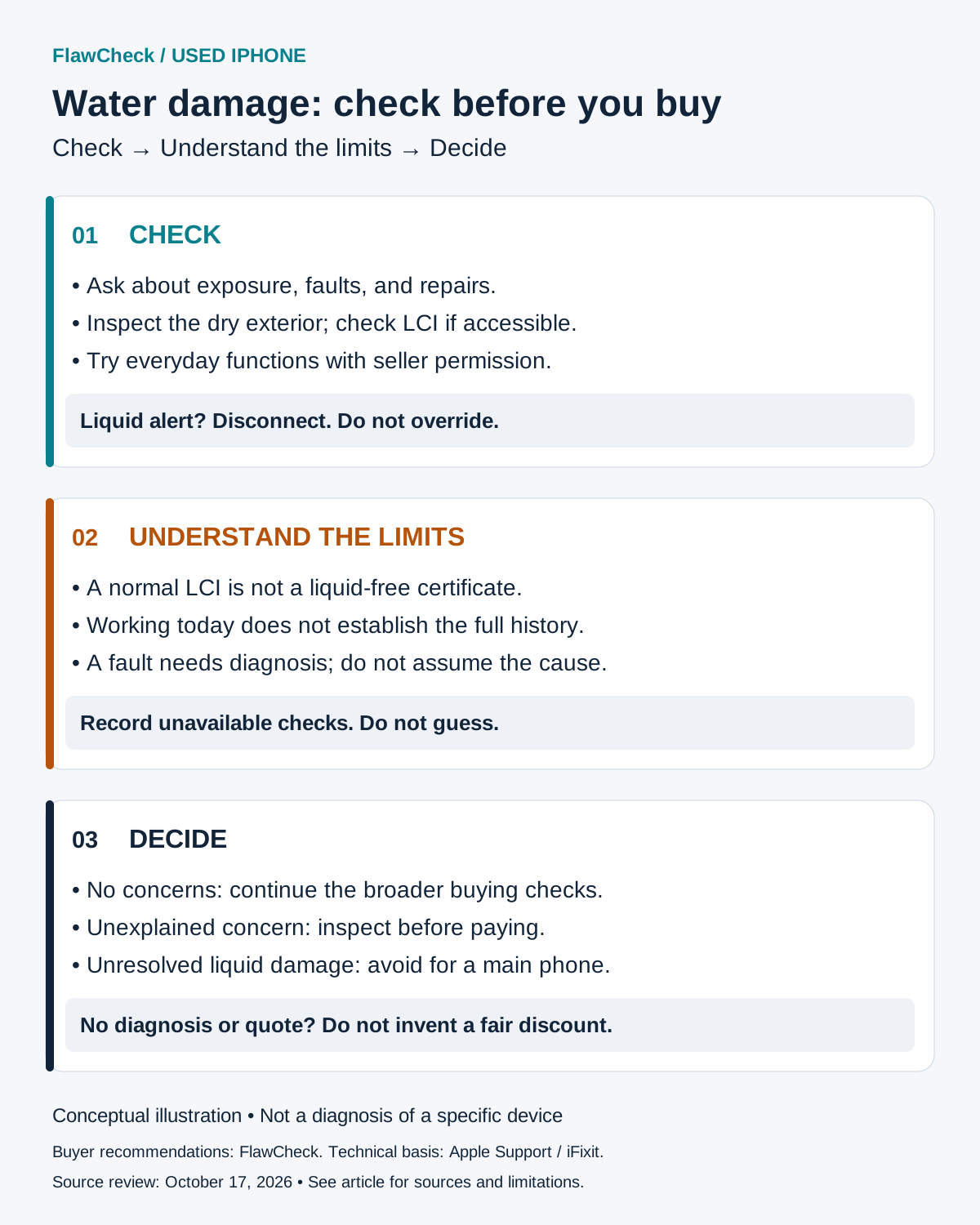
Check → Understand the limits → Decide
Check
- Ask about exposure, faults and repairs.
- Inspect the dry exterior; check LCI if accessible.
- Try everyday functions with permission.
Liquid alert? Disconnect. Do not override.
Understand the limits
- A normal LCI is not a liquid-free certificate.
- Working today does not establish the full history.
- A fault needs diagnosis; do not assume the cause.
Record unavailable checks. Do not guess.
Decide
- No concerns: continue broader buying checks.
- Unexplained concern: inspect before paying.
- Unresolved liquid damage: avoid for a main phone.
No diagnosis or quote? Do not invent a fair discount.
1. Ask the seller before you inspect
Start with questions that require a specific answer:
- Has the phone been submerged, splashed, or shown a liquid warning?
- Has it been opened, cleaned internally, or repaired after liquid exposure?
- Which parts were repaired, by whom, and when? Are invoices available?
- Are any functions unreliable, even occasionally?
- How long has the seller owned it, and why are they selling?
- Can you return it if an undisclosed fault is found? What exclusions apply?
Keep the listing and written answers. “It works” does not answer “Was it repaired after getting wet?” Equally, a seller saying they do not know the history is uncertainty, not proof of dishonesty.
For an online purchase, request photos of the actual phone and relevant service paperwork. Agree on the inspection and return arrangements before ordering. If returns exclude liquid-related findings, ask how that affects a fault discovered after delivery. Do not assume the word “refurbished” answers these questions.
2. Inspect the dry phone without opening it
Ask permission to remove its case and inspect it under good light. Look at the connector opening, camera glass, screen edges, and SIM tray area if present.
Record what you see: unusual deposits, damaged contacts, gaps, or a haze that appears to be behind the glass. A photograph may help a technician assess the concern, but do not label a deposit as corrosion simply because it is white or green.
iFixit treats corrosion or liquid residue on components as reasons for concern. That supports seeking an inspection; it does not let a buyer diagnose a board through a charging-port photo. [4]
If a camera looks hazy, ask the seller to wipe the exterior lens glass and check again. If the haze still appears internal, postpone the purchase for an explanation. Do not heat the camera or try to clear it yourself.
Do not remove screws, insert tools into the connector, or ask the seller to dunk the phone. Apple advises against intentional submersion and says to make sure the phone is dry before opening its SIM tray. [3]
Swipe horizontally for all columns. Keyboard: focus the table area and use arrow keys.
| Finding | What it may tell you | What it does not prove | Next step |
|---|---|---|---|
| Red LCI | Liquid contact at that indicator. | Which parts are damaged or the full repair scope. | Get a device-specific inspection before paying. |
| Liquid-detection alert | An issue involving liquid in the connector, cable, or accessory. | That the whole phone was submerged. | Disconnect; stop the cable test. Seller resolves it before purchase. |
| Unusual deposits or internal-looking haze | A visible concern needing an explanation. | Corrosion or internal damage confirmed from appearance alone. | Request assessment; do not scrape, heat, or open the phone. |
| Face ID, audio, display, or charging fault | A function is not working as expected. | Liquid as the cause. | Ask for diagnosis and repair scope; pause payment. |
| Checks work normally | Those functions worked during the inspection. | A liquid-free history or future reliability. | Continue the broader buying checklist and review sale terms. |
3. Check the liquid contact indicator for the exact variant
A liquid contact indicator, or LCI, is a physical indicator. Apple describes its normal color as white or silver; contact with water or a liquid containing water turns it red. [1]
Use Apple’s model-specific diagrams to locate it. Match the model and market rather than assuming every phone has the same opening. Some eSIM-only variants have neither a SIM tray nor an externally visible LCI. [1]
With the seller’s permission, inspect only the accessible location shown for that phone, using light and magnification if needed. If you cannot confidently see the indicator, mark it “not checked.”
Swipe horizontally for all columns. Keyboard: focus the table area and use arrow keys.
| LCI observation | What it tells you | Important limit | Buyer action |
|---|---|---|---|
| Red | The indicator has reacted to liquid contact. | Not a complete damage diagnosis. | Inspect first; do not infer a repair price. |
| White or silver | No visible activation at that location. | Does not rule out liquid damage elsewhere. | Continue the other checks; do not label the phone safe. |
| Not visible / unclear | No usable result from this check. | Some market variants have no externally visible LCI. | Check Apple’s exact model/market diagram; record as not checked. |
An unchanged LCI cannot rule out liquid damage elsewhere: iFixit notes that liquid can reach components without reaching an indicator. [4] Do not turn a white sticker into a “never water damaged” claim.
If exposure may be causing a fault, Apple recommends inspection by Apple or an Apple Authorized Service Provider, even when the LCI is red. [1]
4. Test everyday functions
These are suggested buyer checks of current operation. A failed check needs an explanation; it does not identify liquid as the cause. Have the seller operate the phone where access or personal information is involved.
| Function | Suggested check | Reason to pause |
|---|---|---|
| Display and touch | View a light and dark screen; draw across the display in a notes app | Discoloration, flickering, missed areas, or unwanted input |
| Cameras | Take photos and short videos with front and rear cameras; try available camera views and focus | Persistent haze, errors, or inconsistent operation |
| Face ID, if fitted | Ask the seller to demonstrate normal authentication; arrange an enrollment check during the agreed handover process | Repeated failure that remains unexplained |
| Speakers and microphones | Play familiar audio at a moderate level; record and replay a voice memo and video | Distortion, weak sound, or missing audio |
| Connections | Try Wi-Fi, Bluetooth, and a call where practical | Repeated connection failures |
| Charging | Only on a dry phone with a dry, suitable cable and charger, check ordinary charging | An alert or unreliable connection |
Do not ask for the seller’s passcode or account credentials. If a check cannot be completed before payment, write that down rather than counting it as passed.
Muffled sound can occur while liquid in a speaker or microphone area evaporates, according to Apple. [3] That is one possible explanation, not a diagnosis of every muffled speaker. Likewise, a Face ID fault, display fault, or unreliable connector should not automatically be called water damage.
For a separate biometric problem, use the used iPhone Face ID guide. For disclosed display work, use the replaced-screen checks. Neither a biometric fault nor a repair label diagnoses liquid damage.
Read the used iPhone battery-health guide separately; a battery percentage does not settle the condition of the rest of the phone.
Stop if a liquid alert appears
On supported iPhones, an on-screen alert can concern liquid in the connector, cable, or accessory. It is separate from the physical LCI and does not establish that the whole phone was submerged. [2]
Disconnect the cable. Apple says not to reconnect until the phone and cable are completely dry; charging a wet connector can corrode its contacts and cause permanent damage. [2]
Stop the purchase test: Do not override a liquid warning to finish the demonstration. Have the seller resolve the issue before payment.
For a purchase, stop the test and let the seller resolve the problem. Do not use the emergency override to finish the demonstration. If the warning recurs, seek an explanation before proceeding. Apple notes that a particular accessory may be faulty and that persistent alerts with Apple cables or accessories may require service. [2]
5. Understand what passing the checks cannot prove
Keep three kinds of evidence separate:
- Exposure evidence: an activated indicator or a seller’s account of an incident.
- An observed problem: a warning, visible abnormality, or a function that fails.
- A diagnosis: an inspection that identifies damage and explains the work needed.
A seller’s account should be labeled as their account. A repair invoice should be read for what was actually repaired. Neither should be stretched into a complete history of the phone.
Your practical conclusion after successful checks is limited: the functions you tried worked during that inspection. You have not examined every internal component or established future reliability. This is a limitation of the checklist, not a claim that every used phone needs to be opened.
An original IP rating also does not settle the question. Apple says water resistance is not permanent and may decrease with normal wear. [3] For a buyer, the implication is to avoid treating the model’s laboratory rating as a measurement of the used unit in front of you.
For the wider ownership decision, our used iPhone lifespan guide explains how condition, support and repair options affect suitability without assigning a remaining-life guarantee.
6. Buy, inspect first, or walk away?
The decisions below are FlawCheck’s buying recommendations, not Apple service classifications.
Swipe horizontally for all columns. Keyboard: focus the table area and use arrow keys.
| Phone condition | Seller records | Terms to review | Decision |
|---|---|---|---|
| No obvious concerns; functions work | Answers are consistent; any available repair records reviewed. | Clear sale terms; assess inspection/return options. | Continue normal checks; no guarantee implied. |
| Red LCI; functions appear normal | No useful inspection yet. | Arrange inspection before committing. | Inspect first. |
| Alert, unexplained haze/deposits, or intermittent fault | Cause and repair scope unresolved. | Resolve before payment; do not rely on a promised fix. | Pause purchase. |
| Disclosed liquid damage, repaired | Device-specific findings and repair invoice available. | Read coverage and return exclusions in writing. | Consider cautiously; avoid if condition remains unclear. |
| Known damage; no diagnosis or quote | Missing or vague evidence. | As-is sale / no useful return route. | Avoid for a main phone. |
| Seller refuses checks or pushes alert override | Answers do not resolve concerns. | Pressure to pay before assessment. | Walk away. |
What should an inspection tell you?
Ask for the device identity, inspection date, scope of checks, findings, repairs proposed or completed, and any areas not assessed. If work is needed, request a written quote. A report should explain what was checked rather than merely say “passed.”
For a repaired phone, ask whether the paperwork addresses the original fault and whether any concerns remain. A receipt for one replacement part should not be read as proof that everything else was assessed.
Compare the purchase price plus the quoted work with a suitable alternative without the unresolved concern. If the repair scope is unknown, there is no evidence-based discount that makes the risk disappear.
Apple’s One-Year Limited Warranty excludes service for liquid damage, subject to applicable consumer rights. [1] Check any separate seller coverage directly; do not assume a general warranty promise covers this purchase.
For the distinction between a rating and coverage, read IP68 vs water-damage warranty.
7. Who should avoid it?
Avoid a phone with unresolved suspected liquid damage if you:
- Need dependable access for work, travel, or family contact.
- Cannot absorb an unexpected repair or replacement.
- Cannot obtain a useful inspection before committing.
- Have no clear route to return a phone with an undisclosed problem.
- Are buying mainly because the discount makes the uncertainty seem affordable.
A repair specialist buying a project can make a different decision from someone buying their only phone. Be clear about which purchase you are making.
Best fit: when to keep considering the phone
Keep it on your shortlist when there are no unresolved warning signs, the functions you need work, the seller’s account is consistent with available evidence, and the terms suit you. This is a conditional buying judgment, not a diagnosis or a guarantee.
8. Save this checklist for the viewing
- Record the model and market variant.
- Ask about exposure, faults, and repairs; retain written answers.
- Review invoices and the actual listing photos.
- Inspect the dry exterior under good light.
- Check the correct LCI if accessible; record an unclear result honestly.
- Try display, touch, cameras, authentication, audio, and connections.
- Test ordinary charging only when the phone and accessories are dry.
- Stop if a liquid alert appears; do not override it.
- Resolve unexplained findings before payment.
- Read return terms and relevant exclusions.
- Complete the broader used-iPhone checks before buying.
Sources
Technical sources checked October 17, 2026. Buyer procedures and verdicts are FlawCheck editorial recommendations.
