Upgrade when a newer phone fixes a limitation you actually encounter. Moving from a Snapdragon 865-era device can bring more processing headroom and newer camera, AI and connectivity capabilities. The useful gain depends on the replacement phone, however: a higher peak score does not tell you how long it holds your game’s target frame rate, which video modes its camera app offers, or how much battery your workload consumes.
For an owner of an 8 Gen 2, 8 Gen 3 or 8 Elite phone, the case needs to be more specific. Identify the game, export task or feature your current phone cannot deliver, then look for measurements of that task on the candidate device.
Gen 6 evidence is still uneven. This guide separates Snapdragon 8 Elite Gen 6 from Snapdragon 8 Elite Extreme Gen 6, and separates commercial-phone measurements from Qualcomm reference devices. It does not assign every generation a universal speed or battery-life ranking.
The generations at a glance
This is a capability map, not a performance league table. Phone names identify examples in the research; they do not guarantee every regional model has the same configuration. Links beside each platform point to Qualcomm specifications, while the later sections cite independent measurements.
| Platform | Main change to track | Phone example in the research | What to verify |
|---|---|---|---|
| Snapdragon 865 | Kryo 585, Adreno 650, X55 and Wi-Fi 6. Q865 | OnePlus 8 Pro | Current software, battery condition and demanding-game performance |
| Snapdragon 865+ | Higher CPU ceiling; FastConnect 6900 adds Wi-Fi 6E capability. Q865P | ROG Phone 3 | Exact edition, performance mode and cooler use |
| Snapdragon 870 | Same Kryo 585/Adreno 650 family; FastConnect 6800. Q870 | POCO F3 | Features implemented by the phone, not assumptions from “870” |
| Snapdragon 888 | Cortex-X1-era CPU, Adreno 660, triple 14-bit ISP and X60. Q888 | Xiaomi Mi 11 | Sustained load and camera implementation |
| Snapdragon 888+ | Higher CPU ceiling within the Kryo 680/Adreno 660 family. Q888P | ROG Phone 5s | Model and operating mode |
| Snapdragon 8 Gen 1 | Cortex-X2-era CPU, triple 18-bit ISP and X65. QG1 | OnePlus 10 Pro | Heat, sustained throughput and power mode |
| Snapdragon 8+ Gen 1 | Revised performance/power claims; clock variants exist. QGP1 | OnePlus 10T | Firmware and successful versus aborted stress runs |
| Snapdragon 8 Gen 2 | Hardware ray tracing, INT4 support and FastConnect 7800/Wi-Fi 7. QG2 | Xiaomi 13 | Game support, driver and exact CPU variant |
| Snapdragon 8 Gen 3 | Revised CPU mix, Frame Motion Engine 2 and AV1 decoding. QG3 | Xiaomi 14 | Native rendering versus generated frames; retail thermal behavior |
| Snapdragon 8 Elite | Custom Oryon CPU; X80 and FastConnect 7900. QE | OnePlus 13 | Core/clock variant and long-session results |
| Snapdragon 8 Elite Gen 5 | Third-generation Oryon, APV support and triple 20-bit ISP. QG5 | OnePlus 15 | App support, codec implementation and cooling |
| Snapdragon 8 Elite Gen 6 | Standard branch, X105/FastConnect 8800 and GPU matrix cores. QG6 | Xiaomi 18 Pro | Retail firmware, enabled features and test version |
| Snapdragon 8 Elite Extreme Gen 6 | Separate branch with Neural Fusion and higher listed video-capture ceilings. QX6 | Qualcomm reference device in the measured evidence | Commercial-phone results before a buying verdict |
Names and variants can change the comparison
Snapdragon 8 Elite is the official name; “8 Gen 4” is not the label used here. Snapdragon 8 Gen 5 and 8 Elite Gen 5 are separate products. The 8s family also sits outside this guide’s flagship sequence. A shared number does not establish equivalent hardware. QE QG5V QNON
Clock variants matter too. Qualcomm’s 8 Gen 2 brief distinguishes 3.19 GHz and 3.36 GHz versions. Its Elite documentation also identifies alternatives, including a seven-core version. Match the exact phone configuration rather than borrowing the fastest specification available under the family name. QG2 QE
For the underlying CPU, GPU, NPU and ISP terminology, see Smartphone Processor Specs Explained.
What changed across the main groups?
865, 865+ and 870: refinements within a family
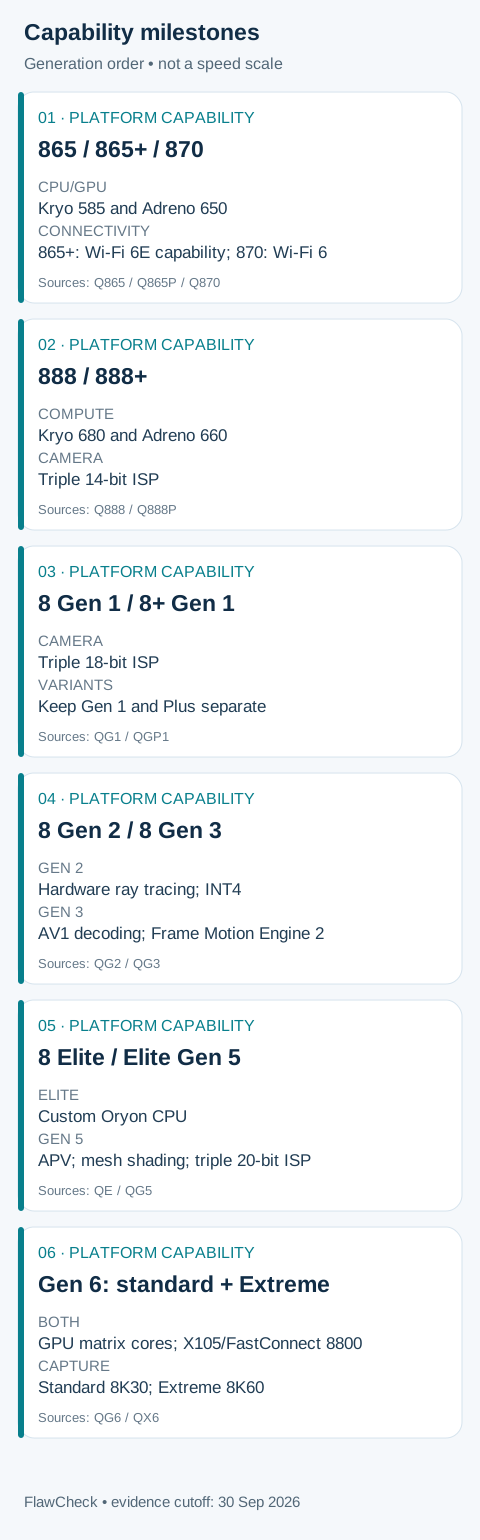
These three share the Kryo 585 and Adreno 650 names, with different CPU ceilings. They also show why the number alone is misleading: 865+ lists FastConnect 6900, while 870 lists FastConnect 6800. You cannot assume the latter inherits every connectivity feature of the former. Q865 Q865P Q870
For someone still using one of these phones, the important comparison is with the complete replacement. Establish whether the problem is sustained gaming, an unsupported camera mode, insufficient app memory, storage pressure or a deteriorated battery. A new SoC can address some limitations; the phone’s memory, software and condition determine others.
888, 888+ and the first Gen 1 platforms: more capability, thermal questions
The 888 introduced a different CPU/GPU generation and a triple-ISP design; 8 Gen 1 moved to an 18-bit triple ISP. Those are substantive platform changes, but their specifications do not settle sustained performance. Q888 QG1
Notebookcheck’s Mi 11 sample stopped a GFXBench battery test because of overheating. That is evidence about this device and test, not proof that every Snapdragon 888 phone behaves identically. N4
Treat 8+ Gen 1 as a separate comparison rather than folding it into 8 Gen 1. Qualcomm advertises efficiency improvements, but device measurements still need their operating conditions. A successful run on a cooled sample cannot establish the behavior of every phone using that platform. QGP1
Gen 2 and Gen 3: new rendering and AI paths
Gen 2’s hardware ray tracing and INT4 support widen the tasks developers can target. Gen 3’s feature set extends the graphics and media path. These changes are potentially useful when the app uses them; they are not automatic upgrades to every existing game or AI feature. QG2 QG3
This is where specifications need a second question: which application implements the feature on this phone? A capability can exist without appearing in your preferred game’s settings or producing a measured improvement in your workload.
Elite and Gen 5: Oryon and a broader media toolkit
The Oryon CPU is a major architectural marker in this sequence. Elite Gen 5 also adds capabilities such as APV and mesh shading. These are meaningful changes to the platform’s toolkit, while their practical value remains tied to software and phone implementation. QE QG5
For a buyer, the strongest evidence is a result that matches the intended use: an export completed faster, a game maintaining its target, or a recording format available in the shipping camera app. A feature list alone does not establish those outcomes.
CPU: what the measured scores can tell you
Notebookcheck’s older review tables provide Geekbench 5 results for commercial phone models, but their currently displayed patch labels are dynamic. The precise app builds at the original measurement dates are not established in our evidence. The following examples show reported CPU throughput; they do not isolate the chip from the phone.
| Phone / platform | Test family | Single-core / multi-core points |
|---|---|---|
| OnePlus 8 Pro / 865 | Geekbench 5 | 909 / 3318. N1 |
| POCO F3 / 870 | Geekbench 5 | 998 / 3368. N3 |
| OnePlus 10 Pro / 8 Gen 1 | Geekbench 5 | 1211 / 3521. N6 |
| Xiaomi 13 / 8 Gen 2 | Geekbench 5 | 1478 / 5090. N8 |
| Xiaomi 14 / 8 Gen 3 | Geekbench 5 | 1684 / 6307. N9 |
| OnePlus 13 / 8 Elite | Geekbench 6 | 3087 / 9369. N10 |
| OnePlus 15 / Elite Gen 5 | Geekbench 6 | 3498 / 10645. N11 |
Read each test family separately. Geekbench 6 changed datasets, workloads and multi-core testing relative to Geekbench 5. A ratio across those versions is not an upgrade percentage. Even within a family, these phones differ in memory, firmware and operating conditions. M3
The OnePlus 10 Pro benchmark package used high-performance mode. The OnePlus 13 and 15 samples used Chinese ColorOS firmware; their results should not silently acquire the settings or software of another regional model. N6 N10 N11
For everyday responsiveness, the relevant question is whether CPU work is the limiting factor. Use What Makes a Phone Fast? to distinguish processing headroom from memory, storage, software and display constraints.
For heavier tasks, favor an actual completion time. Tom’s Guide reported 37 seconds for a Premiere Rush transcode on a Gen 2 reference device and 47 seconds on an Elite Gen 5 reference device, noting that the latter was not optimized for the task. Missing clip, codec and app-build details prevent a clean comparison. Those results do not establish that Gen 5’s CPU is slower than Gen 2’s. R3 R6
Gaming: separate peak GPU speed from the session you play
A short GPU test tells you about a specific rendering workload. It does not measure an hour of your game, its frame cap, or its firmware whitelist.
For example, Notebookcheck reports 6,754 points in Wild Life Extreme for the OnePlus 13, alongside 55.7% stability in the separate Wild Life stress test. Both are useful, but they describe different tests. Do not multiply them to invent a sustained Extreme score or translate stability into game FPS. N10
Similar FPS can hide different workloads
| Phone | Game and settings | Reported average FPS |
|---|---|---|
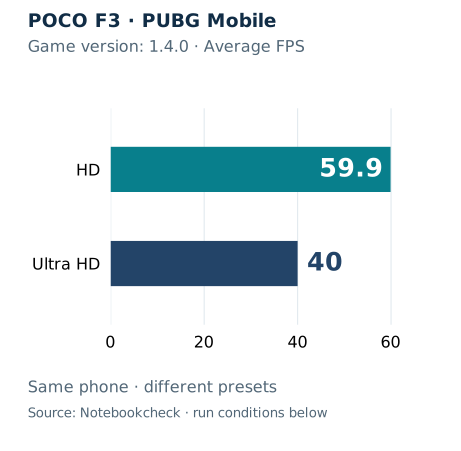
| POCO F3 / 870 | Genshin 1.5; highest details described in source prose | 59.4. N3 |
| Xiaomi 13 / 8 Gen 2 | Genshin 3.4; highest settings | 59.8. N8 |
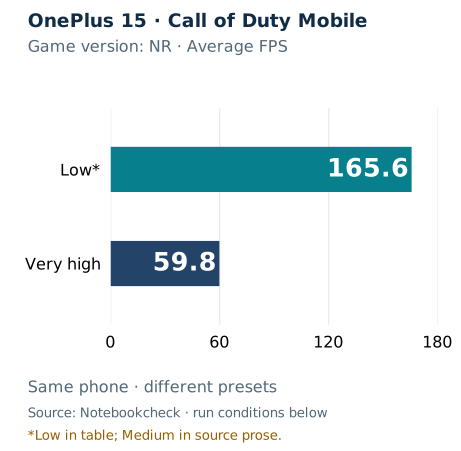
| OnePlus 15 / Elite Gen 5 | COD Mobile; low / very high in the source table | 165.6 / 59.8. N11 |
The two Genshin results are not a controlled comparison: versions differ, and the presets are described in review prose without a matched per-run settings record. They cannot establish that 870 equals Gen 2. A frame cap can also conceal extra headroom.
The COD result illustrates the setting dependency. Its source table says “low,” although the accompanying prose mentions medium. We retain the table label and flag the discrepancy; we do not generalize it into a promise of 165 fps across games. N11
For your own comparison, seek the same game build, scene, preset and rendering resolution, with a frame-time trace over the session length you care about. A min–max FPS range is not a 1% low measurement. Check whether the frame counter includes interpolation before calling the result native FPS.
A high stability percentage needs its full history
Notebookcheck’s OnePlus 10T sample eventually completed Wild Life stress at 92.7% stability, after roughly ten attempts and repeated interruptions. The successful run followed cooling and little preceding use. Benchmarks used high-performance mode on prelaunch firmware. N7
That result is informative precisely because the failed attempts remain part of it. Extracting only 92.7% would suggest a consistency the test history does not support.
Likewise, Xiaomi 14’s review describes interrupted combined loads and a later CPU-only thermal run. The latter cannot stand in for the original CPU-plus-GPU workload. N9
Use Phone Thermal Throttling Explained for the mechanism. Here, the upgrade question is practical: does the replacement maintain your target at acceptable heat and settings after it has warmed up?
Ray tracing, mesh shading and Gen 6 AI-assisted rendering require separate implementation checks. Both Gen 6 briefs list matrix cores; they are not exclusive to Extreme. Generated-frame output also needs latency and image-quality evidence alongside the underlying render rate. QG6 QX6
Efficiency: what improves, and what remains unmeasured
Qualcomm’s 8+ Gen 1 brief advertises 30% improved CPU power efficiency and 30% GPU power reduction relative to Snapdragon 8 Gen 1. These are manufacturer claims with different wording, not a measured promise that every phone lasts 30% longer. QGP1
Elite Gen 5’s brief reports up to 35% CPU power-efficiency improvement and 16% overall SoC power savings relative to 8 Elite. The baseline and subsystem matter. Do not add those percentages together or carry them backward to estimate a gain over 865. QG5
A useful independent comparison needs performance and power together. For gaming, compare the energy used while holding the same frame rate and image quality. For an export, compare energy to finish the same job as well as completion time. Lower instantaneous watts alone do not settle the question if the task takes longer.
The measurement boundary matters too: power at the SoC, power drawn by the whole phone and power measured at a charger are different quantities. Surface temperature and battery-percentage loss are not substitutes for those measurements.
Our researched sources do not provide a consistent energy dataset across all thirteen branches. Consequently, this guide cannot identify the most efficient Snapdragon generation or forecast whole-phone battery life from process-node labels. Use comparable battery tests of the actual phones for that buying decision.
AI: newer hardware needs the right model and software
Gen 2 lists INT4 support and Hexagon Direct Link; Elite Gen 5 extends the listed precision options to include INT2 and FP8. These are hardware capabilities, not a guarantee that an arbitrary model will run well or produce better answers. QG2 QG5
Qualcomm’s AI Hub documentation explains that HTP context binaries target a specific SoC. A binary built for an older target may run on newer hardware with compromised performance. The runtime, compilation target and model therefore matter alongside the NPU. D1
Before treating an AI result as an upgrade benefit, identify the application, model, precision and execution backend. For a language model, request time to first token, generation rate and context length. For image processing, request latency and output-quality checks. RAM use and energy are relevant to both.
The available AI scores lack enough backend and model detail to build a dependable NPU ranking. We therefore keep them out of the performance tables. A test that fails to run is also not evidence of zero AI capability.
Gen 6’s advertised agentic functions should be checked against shipping software, regional availability and supported languages. Platform support does not prove that your chosen feature works fully offline, supports Vietnamese, or avoids a subscription. Those are app and OEM questions that need their own verification. QG6 QX6
Camera and media: a higher ceiling is not an image-quality verdict
The ISP sequence includes dual 14-bit processing in 865, triple 14-bit in 888, triple 18-bit in Gen 1, and triple 20-bit in Elite Gen 5. That describes processing capability, not the bit depth of every exported file or a measured improvement in photographs. Q865 Q888 QG1 QG5
Gen 2’s Cognitive ISP adds scene segmentation to the platform’s toolkit. Whether skin, skies or moving subjects look better still requires samples from the phone’s finished camera pipeline. QG2
Video specifications need particularly careful reading. The 865 brief lists 8K30 support, while Xiaomi’s POCO F3 specifications list 4K30 for that 870 phone. A family-level capability does not establish an available camera mode on every device. Q865 Q870 OF3
Also distinguish recording from playback. Elite Gen 5’s brief lists 8K HDR playback at 60 fps; that line does not establish 8K60 recording. AV1 decoding in Gen 3 and H.266 decoding in Extreme Gen 6 likewise should not be relabeled encoding support. QG5 QG3 QX6
For creators, confirm the camera app’s codec, lens support, stabilization, HDR options and continuous recording limits. APV compatibility needs an actual implementation and a usable editing workflow. If the problem is overprocessing or motion blur, compare relevant camera samples rather than expecting the ISP specification to resolve it.
Connectivity: check the network around the phone
The sequence moves through newer modem and FastConnect systems, but peak platform rates are not measurements of your Internet connection.
Gen 2 lists Wi-Fi 7 through FastConnect 7800. Gen 6 moves to X105 and FastConnect 8800, with Wi-Fi 8 availability qualified by selected Android versions. Qualcomm’s range comparison specifies a 4×4, 320 MHz system and other RF conditions, compared with earlier 2×2, 160 MHz products. It is not a universal range result for shipping phones. QG2 QG6
Verify the phone’s enabled features, regional bands, router and carrier configuration. A newer modem cannot, by its name alone, establish better reception at your location or lower latency to a game’s server.
This guide’s measured evidence does not include a controlled network comparison across generations. Treat connectivity as a compatibility and implementation check until a test supplies the relevant conditions.
Gen 6: what the early evidence establishes
Frandroid bought a Chinese-market Xiaomi 18 Pro using standard Elite Gen 6 and reported Geekbench 7 results of 2,920 single-core and 8,248 multi-core. Its firmware and test context should remain attached to those results. N13
The same review recorded front and rear surface temperatures of 51.8°C and 50.6°C during AnTuTu 10, and repeated drops in its CPU Throttling test. These are observations of that Chinese-market phone and those workloads. They do not establish gaming FPS, explain the cause, or predict the final software in another region. The early thermal evidence is a reason to seek sustained retail tests before buying for performance alone. N13
Separately, Tom’s Guide measured an Extreme Gen 6 reference device with 24 GB RAM, reporting Geekbench 7 scores of 4,161 and 12,464. This is a Qualcomm reference platform, not a measured commercial Extreme phone in our dataset. R7
The shared benchmark family does not make those two devices a controlled comparison. Neither score should be placed on a continuous chart with Geekbench 6. Android Authority’s separate Extreme reference coverage uses Geekbench 6, adding another reason to retain each dataset’s identity. R8
The official capture ceilings also differ: standard lists 8K30 and 4K slow-motion120; Extreme lists 8K60 and 4K slow-motion240. These are platform limits awaiting verification on the particular phone and camera mode a buyer intends to use. QG6 QX6
Should you upgrade from your current generation?
Use this table as a decision framework. It does not prescribe a replacement solely from the age of the chip.
| Current platform | Question to answer first | Evidence that supports a change |
|---|---|---|
| 865 / 865+ / 870 | Is the limitation processing, battery condition, software or missing features? | A candidate phone completes your task or holds your game target; its support and condition suit your ownership plans |
| 888 / 888+ / 8 Gen 1 | Does performance fall below your needs during sustained use? | A warmed-up test of the replacement under comparable load, with mode and cooling documented |
| 8+ Gen 1 / 8 Gen 2 | Which specific workload or capability remains inadequate? | A measured task improvement or a verified feature you will use; no need to infer value from generation number |
| 8 Gen 3 / 8 Elite / Elite Gen 5 | Is an incremental improvement worth replacing a working phone? | Relevant completion times, long-session results, or a required implemented camera/AI feature |
| Considering either Gen 6 branch | Is the result from the exact commercial model and firmware? | Retail sustained, energy and feature tests; reference benchmarks establish a starting point, not a whole-phone verdict |
A practical comparison starts with one sentence: “I need this game to maintain my chosen settings through a full session,” or “I need this export to finish sooner.” Record what your current device does, then find the same task in a review of the candidate. If the review changes the preset, adds a cooler or uses another app version, treat it as a different scenario. Include the trade-offs you would live with: fan noise, heat in the hand, battery consumption and feature availability. This turns a generation comparison into a testable requirement rather than a purchase triggered by a launch headline.
Bottom line
Keep the phone when it meets your target and the proposed benefit is only a larger score. Investigate an upgrade when a recurring limitation has a measured solution in the replacement. Investigate the existing phone first when the symptom could be battery condition, storage or software rather than insufficient processing.
For used-device condition, support and ownership costs, continue with Old Flagship vs New Mid-Range Phone. This generation guide cannot certify a particular second-hand unit.
For a brand-level comparison, use Snapdragon vs MediaTek; this guide owns the flagship Snapdragon generation and variant map.
Our Sony Xperia 10 VIII review and Fairphone Gen 6+ review cover different priorities in the mid-range. Their Snapdragon 6 Gen 3 and 7s Gen 4 platforms sit outside this flagship sequence. Use those reviews for the complete phone verdict; none of the flagship measurements here transfers to either model.
How this guide uses evidence
FlawCheck has not directly benchmarked these phones. Specifications come from Qualcomm and OEM documentation; measured examples come from the named reviewers. The evidence cutoff is September 30, 2026.
We preserve test family, phone and sample type. Missing driver, original test-build, starting-state or cooling details remain missing. Aborted runs are recorded as failures to complete, not zero scores. Different graphics workloads, AI backends and benchmark generations are not normalized into one index.
For a broader reading checklist, see Are Phone Benchmarks Reliable?.