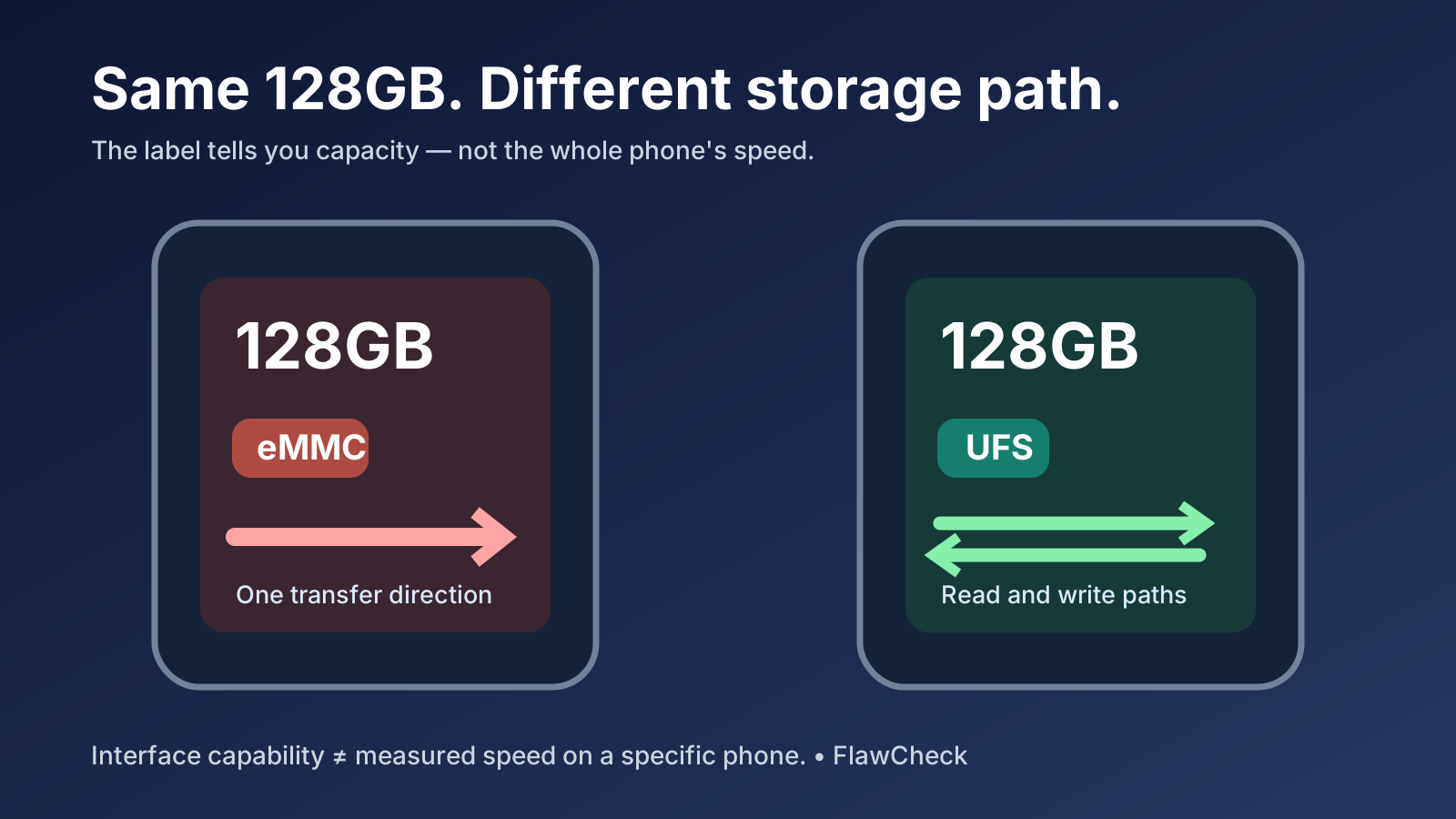
Two phones can both advertise 128GB of storage and still feel different when you open an app, install an update, or use the camera while other work runs in the background. The capacity tells you how much data fits. It does not tell you how quickly the phone can move that data.
One specification to check is the type of built-in storage: eMMC or UFS. UFS has a more capable interface, and particular UFS chips can outperform particular eMMC chips. But a phone that feels slower after a year has not necessarily developed an eMMC problem. Full storage, limited RAM, heat, a slow processor, and an app update can produce similar symptoms. The useful question is whether storage is the bottleneck in the tasks you care about. Our phone performance guide shows how that storage question fits alongside chip, memory, cooling and software when choosing a phone.
Evidence note: This is a research-based buying and troubleshooting guide. FlawCheck has not performed a controlled, long-term eMMC-versus-UFS phone comparison. Chipmaker performance figures below describe the specific products and conditions in their source materials; they are not measured app-loading gains for every phone.
Which buyer should prioritize UFS?
| Your situation | What to prioritize |
|---|---|
| You are choosing between otherwise comparable phones at a similar price | Prefer a clearly specified UFS model, particularly if you install many apps, move large files, or intend to keep the phone for years. Check actual device tests before paying a substantial premium. |
| You mostly call, message, browse, and stream on a strict budget | eMMC is not an automatic dealbreaker. Adequate capacity, RAM, reliable software, and a sensible price may matter more. |
| Your current phone has become slower | Check free space, RAM-related app reloads, heat, and troublesome apps before blaming its storage type. |
| The listing says only “128GB storage” | Ask for the storage standard of the exact capacity variant and market model. If it remains undisclosed, treat performance as unknown. |
⚠ Hidden downside A seller can display “128GB” prominently while leaving storage speed out of the listing. That omission makes it harder to compare the daily experience of two similarly priced phones.
What eMMC and UFS actually change
Both are forms of built-in flash storage: they keep your apps, photos, downloads, and system files when the phone is off. Neither is your phone’s RAM. Storage capacity is expressed in GB; the storage interface and implementation help determine how quickly data can be read and written.
Samsung Semiconductor explains that UFS has separate paths for reading and writing, allowing the interface to handle both directions at once. The conventional eMMC interface transfers in one direction at a time. UFS also supports queuing work for the storage device. This matters when the phone must juggle more than one storage request. Source: Samsung Semiconductor.
Important version detail: Do not simplify this to “eMMC can never queue commands.” Samsung’s older comparison uses eMMC 5.0, while Micron has published research on eMMC with command queuing. The architecture explains potential advantages; it does not assign one fixed speed to every chip or phone.
Samsung published results comparing its UFS 2.0 solution with eMMC 5.0, and Micron describes performance gains for its UFS 3.1 product against eMMC. These are useful demonstrations of what particular products can achieve, not a universal multiplier for real-world phone speed. Sources: Samsung Semiconductor; Micron UFS 3.1.
eMMC vs UFS at a glance
| Question | eMMC | UFS | What a buyer should conclude |
|---|---|---|---|
| Can the interface read and write at the same time? | Its conventional interface transfers in one direction at a time. | Separate read and write paths allow simultaneous transfers. | UFS has more room to handle mixed storage work; this does not predict app-launch seconds. |
| Can storage requests be queued? | Version-dependent: do not assume every eMMC device lacks command queuing. | Command queuing is part of the UFS design described by Samsung. | Confirm the versions and products being compared rather than repeating an old eMMC 5.0 comparison. |
| Where could a difference show up? | Heavy installs, file work, or concurrent I/O may expose a bottleneck. | A capable UFS implementation may complete those jobs faster. | Look for tests of the exact phones under the same workload. |
| What does the label leave out? | NAND, controller, capacity, firmware, software, and the rest of the phone. | The same missing variables also matter for UFS. | A storage label is one input, not a whole-phone performance score. |
Table evidence: Samsung’s interface and product comparison and Micron’s eMMC command-queuing research. The workload outcomes are conditional, not measurements by FlawCheck.
Where storage fits when an app opens
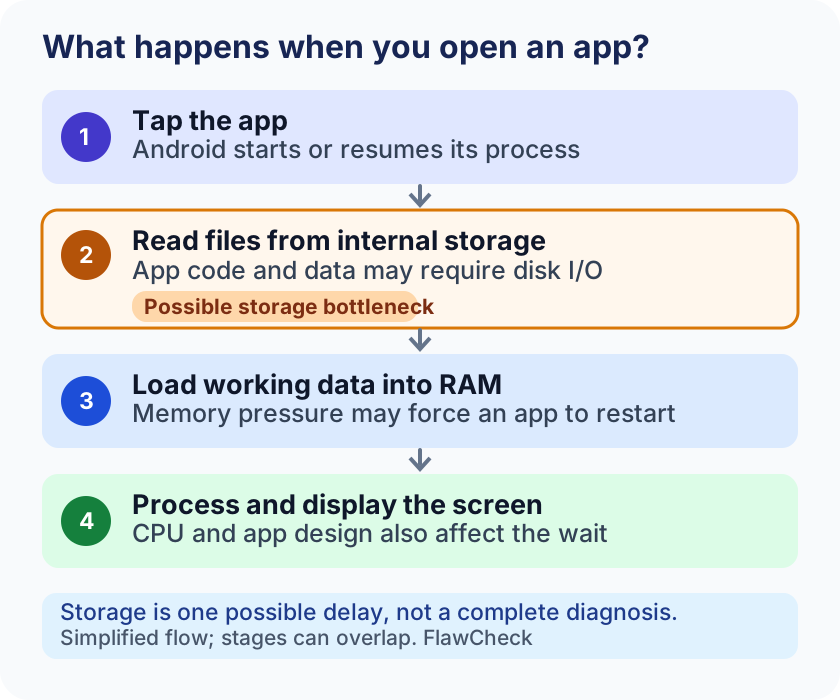
Simplified flow. The stages can overlap and vary by app; the highlighted storage step is one possible delay, not the only one.
Where might you notice the difference?
| Task | Why storage could matter | What else affects the result |
|---|---|---|
| Opening an app that is not already active | The phone may need to load code and data. Android’s developer documentation identifies disk I/O as one possible obstacle during startup. | App design, CPU, RAM pressure, system work, and network requests. |
| Installing or updating several apps | Reading existing files and writing new data can happen alongside other activity. | Processor, network, available space, package size, and software behavior. |
| Moving or saving large local files | The storage device must read or write substantial data. | Source and destination, file size, controller, and sustained performance. |
| Using the phone while another storage-heavy task runs | Multiple requests can compete for storage resources. | RAM, CPU scheduling, background services, and thermal limits. |
| Playing a game | Storage can affect loading and asset access. | Sustained FPS depends heavily on CPU, GPU, cooling, and game settings; a UFS label does not promise higher FPS. |
Android Developers notes that concurrent disk I/O can obstruct app initialization, but also identifies work inside the app and garbage collection as possible delays. A faster interface is therefore a reason to investigate a phone, not a guarantee that a particular app opens a set number of seconds faster. Source: Android Developers.
ⓘ What this spec cannot tell you The eMMC or UFS label cannot tell you how many seconds a specific app takes to open, whether Android keeps an app in RAM, how long gaming FPS stays stable, or whether the phone will feel fast in four years. Those answers require whole-device evidence.
Why does a cheap phone feel slower over time?
The storage chip does not automatically become slower just because a calendar year has passed. The workload around it may change: more apps and data, less free space, more background activity, or newer app versions. An initially modest storage system can become more noticeable under heavier work, but that is an inference about a possible bottleneck, not proof that eMMC physically degraded.
Start with free space. Google says an Android phone can start having issues when less than 10% of storage is free. This is Google’s troubleshooting warning, not a claim that an eMMC phone slows at precisely 10% or that a UFS phone is immune. See our separate guide to how much free storage to keep on your phone. Source: Android Help.
Next, distinguish storage from memory. Under RAM pressure, Android may stop less essential processes. Returning to an app can then require it to start again. Storage performance may influence how long that restart takes, but the storage label alone does not explain why the app was removed from memory. Our Virtual RAM guide addresses this trade-off. Source: Android Open Source Project.
Heat is another separate explanation. If frame rates fall only after sustained gaming and the phone gets hot, follow the phone thermal throttling guide instead of treating the UFS/eMMC specification as the diagnosis.
Is slow storage actually your problem?
| Symptom | First check | How to read the result |
|---|---|---|
| Many apps launch slowly, especially while updates install | Check available space; compare the same apps when background updates finish and the phone is cool. | Storage contention is plausible, but CPU, RAM, and app behavior still need consideration. |
| Downloads or app updates fail and the phone is nearly full | Check Settings → Storage and create room for the task. | Lack of headroom is actionable; it does not identify eMMC as the cause. |
| Apps reopen from the beginning when you switch back | Observe whether the app was dropped from memory; check RAM and background-management behavior. | Likely a memory-management question. Slower storage may only extend the reload. |
| Gaming starts smoothly, then FPS falls as the device heats up | Repeat at the same settings without charging; watch when the drop begins. | Thermal limits deserve investigation before storage speed. |
| One app became slow after an update | Update or troubleshoot that app; compare other offline apps. | An app-specific problem is more likely than a phone-wide storage conclusion. |
| Web pages are slow but offline apps remain responsive | Check connection and service conditions. | No clear evidence of a storage bottleneck. |
Google’s general slow-phone guidance recommends checking storage, software and app updates, and whether an app is causing the issue. None of these quick checks proves that a storage chip is defective; they help narrow the next question. Source: Android Help.
Read this as a triage table, not a diagnosis. A slow phone can have several causes at once.
Before you buy: five checks that matter more than a label alone
- Identify the exact phone variant. Confirm the model number, market, RAM and capacity configuration. Do not assume that a listing for one variant proves the storage standard of every variant.
- Find the storage type in a reliable specification. Prefer the maker’s documentation for that exact variant. If the maker does not disclose it, look for a trustworthy review that identifies its tested unit and method. Mark unconfirmed specifications as unknown.
- Compare the whole phone. A UFS model with a much weaker processor, too little RAM, poor software, or too little capacity is not automatically the better purchase.
- Look for task-based evidence. A cold app launch, an installation while other work runs, and repeated use after the phone warms up answer different questions. A peak sequential read number alone does not settle them.
- Price the difference against your ownership plan. If everything else is close, UFS is a sensible preference for heavier or longer use. If the UFS phone costs substantially more, decide which shortcomings you actually encounter; there is no evidence-based universal surcharge worth paying.
✓ Before you buy Confirm the exact model and capacity variant → verify its storage standard → check RAM, processor and software support → read task-based tests → judge the price difference for your use. If the standard is undisclosed, mark it unknown.
If you are deciding between 128GB and 256GB, read Is 128GB Enough for a Phone?. More capacity can ease space pressure, but the number of gigabytes alone does not identify the storage interface. If expandable storage is part of your plan, check when a missing microSD slot is a dealbreaker: a card cannot always replace internal space for apps and system updates. For the larger ownership decision, see Best Phones for Long-Term Ownership.
What if you already own an eMMC phone?
Check storage headroom and any unusually large downloads or app data. Update the affected app and system when an appropriate fix is available; if only one app is slow, focus there first. Repeat the task when the phone is cool and no large installation is running. These steps may remove competing causes, but they cannot change the built-in storage interface.
Do not buy a new phone on the basis of the eMMC label alone. If the device meets your daily needs, there is no deadline after which eMMC stops being usable. If several important tasks remain slow with adequate free space and without heat or app-specific problems, compare a replacement using measured device behavior and the five checks above.
The buying verdict
The hidden risk is comparing cheap phones by “128GB” alone. Check which storage technology the exact model uses and give UFS an advantage when other important factors are close. If your current phone feels slower, diagnose space, RAM, software, network, and heat before assigning blame to eMMC. A storage standard is a useful buying clue; the final decision needs evidence about the whole phone.